Workato Connector Guide
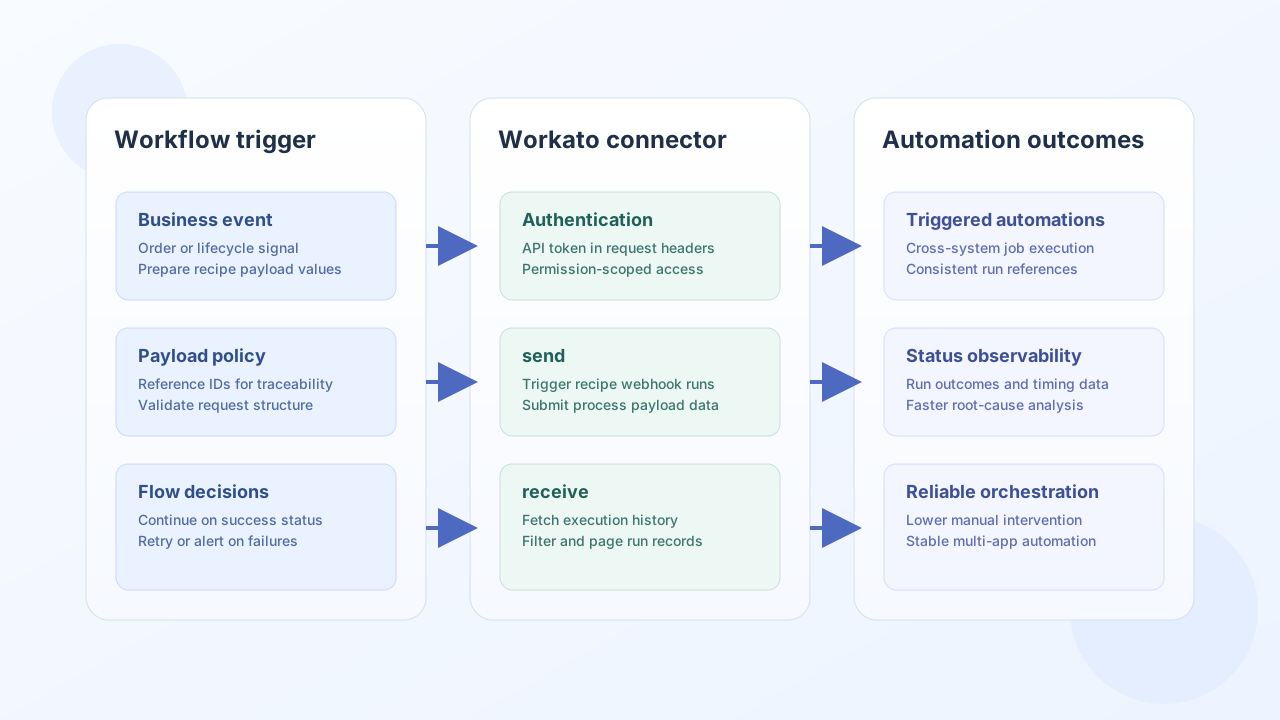
The Workato connector lets Tealfabric workflows trigger automations, submit payloads, and retrieve execution outcomes from Workato recipes. It is most useful when your process requires coordinated actions across SaaS systems and needs reliable status visibility for each run.
Document information
| Field | Value |
|---|---|
| Canonical URL | /docs/04_connecting-systems/connectors/w/workato |
| Version (published date) | 2026-05-08 |
| Tags | connectors, reference, workato |
| Connector ID | workato-1.0.0 |
Configuration and authentication
Configure the connector with your Workato environment URL and API token so workflow calls authenticate consistently. In production, use a dedicated token with only the permissions required for the recipes and resources your workflows manage.
base_url(required): Workato API base URL, such ashttps://app.workato.com.api_token(required): Workato API token (sent asAuthorization: Beareron each request).timeout_seconds(optional): request timeout for API operations (default30).
Run test after setup to validate connectivity and credentials via GET api/recipes before enabling live jobs.
Trigger and update automations with send
Use send to call a Workato REST path with a JSON body (default HTTP method POST). Include stable reference IDs in payloads so each run can be tracked across systems.
const baseUrl = "https://api.example.com/api/v1";
const tenantId = "<TENANT_ID>";
const apiKey = "<API_KEY>";

async function startRecipe(integrationId: string) {
  const response = await fetch(`${baseUrl}/integrations/${encodeURIComponent(integrationId)}/execute`, {
    method: "POST",
    headers: {
      "X-API-Key": apiKey,
      "X-Tenant-ID": tenantId,
      "Content-Type": "application/json",
    },
    body: JSON.stringify({
      operation: "send",
      endpoint: "api/recipes/12345/start",
      method: "POST",
      data: {
        order_id: "ORD-9001",
        customer_id: "CUST-1002",
        amount: 420.0,
      },
    }),
  });
  if (!response.ok) throw new Error(`Request failed: ${response.status}`);
  return response.json();
}
curl -X POST "https://api.example.com/api/v1/integrations/<ENTITY_ID>/execute" \
-H "X-API-Key: <API_KEY>" \
-H "X-Tenant-ID: <TENANT_ID>" \
-H "Content-Type: application/json" \
-d '{
"operation": "send",
"endpoint": "api/recipes/12345/start",
"method": "POST",
"data": {
"order_id": "ORD-9001",
"customer_id": "CUST-1002",
"amount": 420.0
}
}'
{
  "success": true,
  "data": {
    "message": "Workato operation completed successfully",
    "result": {
      "status": "queued",
      "reference": "ORD-9001"
    }
  },
  "metadata": {
    "processing_time_ms": 42
  }
}
Retrieve execution data with receive
Use receive to GET a Workato REST path and unwrap list payloads from the top-level result field when present. Pass query parameters via query for filtering or pagination supported by the Workato API.
const baseUrl = "https://api.example.com/api/v1";
const tenantId = "<TENANT_ID>";
const apiKey = "<API_KEY>";

async function listRecipes(integrationId: string) {
  const response = await fetch(`${baseUrl}/integrations/${encodeURIComponent(integrationId)}/execute`, {
    method: "POST",
    headers: {
      "X-API-Key": apiKey,
      "X-Tenant-ID": tenantId,
      "Content-Type": "application/json",
    },
    body: JSON.stringify({
      operation: "receive",
      endpoint: "api/recipes",
      query: {
        page: 1,
        per_page: 20,
      },
    }),
  });
  if (!response.ok) throw new Error(`Request failed: ${response.status}`);
  return response.json();
}
curl -X POST "https://api.example.com/api/v1/integrations/<ENTITY_ID>/execute" \
-H "X-API-Key: <API_KEY>" \
-H "X-Tenant-ID: <TENANT_ID>" \
-H "Content-Type: application/json" \
-d '{
"operation": "receive",
"endpoint": "api/recipes",
"query": {
"page": 1,
"per_page": 20
}
}'
{
  "success": true,
  "data": {
    "message": "Workato data retrieved successfully",
    "recipe_count": 2,
    "items": [
      {
        "id": 12345,
        "name": "Order fulfillment",
        "status": "running"
      },
      {
        "id": 12346,
        "name": "Customer sync",
        "status": "stopped"
      }
    ]
  },
  "metadata": {
    "processing_time_ms": 38
  }
}
When Workato returns a top-level result array, items is that array and recipe_count is its length. When result is a single object, items is that object (legacy PHP parity) and recipe_count reflects count() semantics on the object keys.
Generic API calls with execute
Use execute when you need a configurable HTTP method (default GET) against any Workato REST path. Request bodies are read from body or data; when both are omitted the connector uses an empty array and omits the JSON body for POST/PUT/PATCH (legacy !empty($body) parity).
Reliability guidance
Most production issues come from revoked tokens, over-scoped queries, or unhandled rate limits. Keep API tokens rotated and permission-scoped, limit response fields for monitoring operations, and add exponential backoff on transient HTTP 429 and timeout failures.
These controls help keep cross-system automations stable as recipe volume grows.