Cisco Webex API Connector Guide
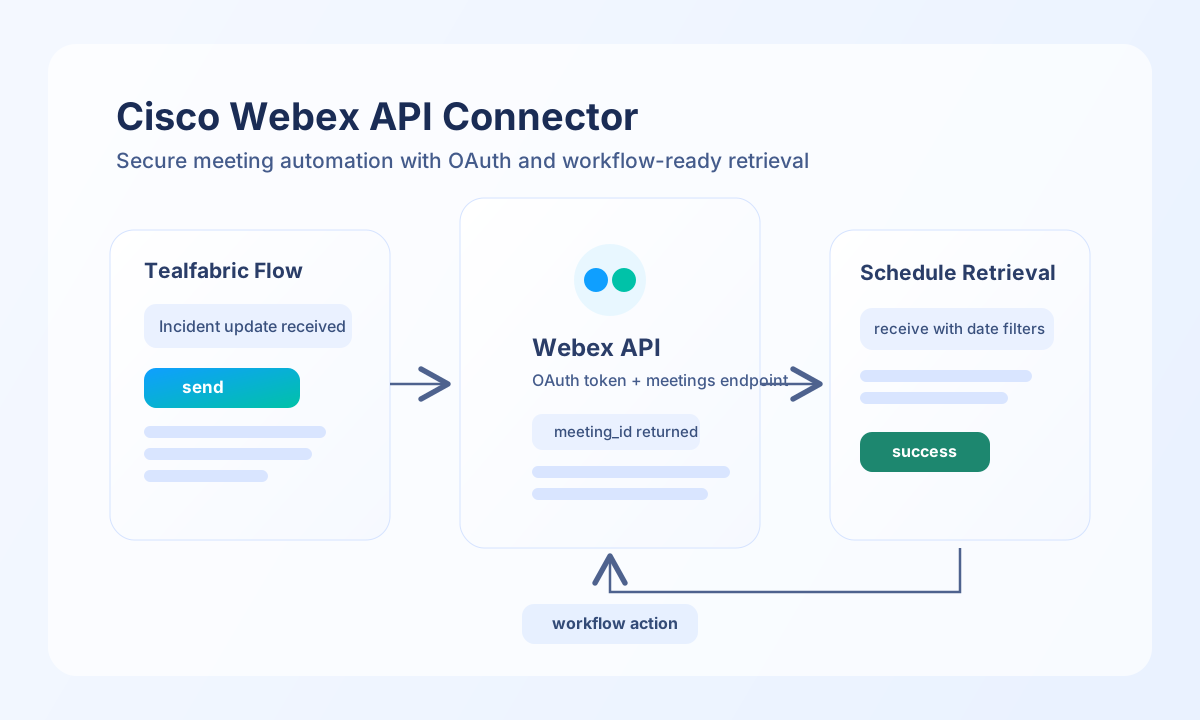
The Cisco Webex API connector helps you automate meeting and messaging workflows from Tealfabric using secure OAuth 2.0 authentication. You can use it to create meetings, retrieve scheduled sessions, and branch workflow logic based on Webex response data.
Document information
| Field | Value |
|---|---|
| Canonical URL | /docs/04_connecting-systems/connectors/w/webex |
| Version (published date) | 2026-05-08 |
| Tags | connectors, reference, webex |
| Connector ID | webex-1.0.0 |
Configure OAuth access
Configure client_id, client_secret, and redirect_uri from your Webex app in the Webex Developer Portal. These values let Tealfabric authorize against Webex on behalf of your integration and should be treated as sensitive credentials.
After authorization, store access_token and refresh_token in the integration settings so the connector can call Webex APIs and renew sessions when needed. Keep scope limited to the permissions your workflow actually requires, then validate setup with test before moving to production.
Create meetings with send
Use send for outbound Webex actions such as creating meetings or posting room messages. The following example creates a scheduled meeting, which is a common pattern for onboarding, incident response, and customer call workflows.
const baseUrl = "https://api.example.com/api/v1";
const tenantId = "<TENANT_ID>";
const apiKey = "<API_KEY>";

async function createWebexMeeting(integrationId: string) {
  const response = await fetch(`${baseUrl}/integrations/${encodeURIComponent(integrationId)}/execute`, {
    method: "POST",
    headers: {
      "X-API-Key": apiKey,
      "X-Tenant-ID": tenantId,
      "Content-Type": "application/json",
    },
    body: JSON.stringify({
      operation: "send",
      endpoint: "meetings",
      method: "POST",
      data: {
        title: "Weekly Operations Review",
        start: "2026-05-12T14:00:00Z",
        end: "2026-05-12T14:45:00Z",
        timezone: "UTC",
        agenda: "Review service health and open actions"
      }
    }),
  });
  if (!response.ok) throw new Error(`Request failed: ${response.status}`);
  return response.json();
}
curl -X POST "https://api.example.com/api/v1/integrations/<ENTITY_ID>/execute" \
-H "X-API-Key: <API_KEY>" \
-H "X-Tenant-ID: <TENANT_ID>" \
-H "Content-Type: application/json" \
-d '{
"operation": "send",
"endpoint": "meetings",
"method": "POST",
"data": {
"title": "Weekly Operations Review",
"start": "2026-05-12T14:00:00Z",
"end": "2026-05-12T14:45:00Z",
"timezone": "UTC",
"agenda": "Review service health and open actions"
}
}'
{
  "success": true,
  "data": {
    "id": "<ENTITY_ID>",
    "title": "Weekly Operations Review",
    "webLink": "https://webex.com/meet/<ENTITY_ID>",
    "state": "scheduled"
  }
}
Retrieve meetings with receive
Use receive to read upcoming meetings and feed that data into reminders, notifications, or escalation paths. Date filters help limit API volume and keep workflow processing fast.
const baseUrl = "https://api.example.com/api/v1";
const tenantId = "<TENANT_ID>";
const apiKey = "<API_KEY>";

async function listUpcomingMeetings(integrationId: string) {
  const response = await fetch(`${baseUrl}/integrations/${encodeURIComponent(integrationId)}/execute`, {
    method: "POST",
    headers: {
      "X-API-Key": apiKey,
      "X-Tenant-ID": tenantId,
      "Content-Type": "application/json",
    },
    body: JSON.stringify({
      operation: "receive",
      endpoint: "meetings",
      query: {
        from: "2026-05-08T00:00:00Z",
        to: "2026-05-15T23:59:59Z",
        max: 10
      }
    }),
  });
  if (!response.ok) throw new Error(`Request failed: ${response.status}`);
  return response.json();
}
curl -X POST "https://api.example.com/api/v1/integrations/<ENTITY_ID>/execute" \
-H "X-API-Key: <API_KEY>" \
-H "X-Tenant-ID: <TENANT_ID>" \
-H "Content-Type: application/json" \
-d '{
"operation": "receive",
"endpoint": "meetings",
"query": {
"from": "2026-05-08T00:00:00Z",
"to": "2026-05-15T23:59:59Z",
"max": 10
}
}'
{
  "success": true,
  "data": {
    "items": [
      {
        "id": "<ENTITY_ID>",
        "title": "Weekly Operations Review",
        "start": "2026-05-12T14:00:00Z",
        "end": "2026-05-12T14:45:00Z"
      }
    ],
    "total_size": 1
  }
}
Production guidance
Webex APIs are subject to rate and permission limits, so production workflows should use constrained query windows, modest max values, and retry/backoff behavior for temporary failures. This improves reliability when multiple flows query meeting data at the same time.
Most failures come from expired tokens, revoked app credentials, or missing scopes. Keep credential rotation and permission reviews in your operational routine, and re-run test after any authentication changes.
Related resources
Use the Webex API documentation and Webex OAuth guide for endpoint-specific payload rules and scope details.