Wise Connector Guide
The Wise connector lets Tealfabric workflows initiate payment-related operations and retrieve transfer state through the Wise API. It is commonly used for payout automation, transfer reconciliation, and finance workflow monitoring.
Document information
| Field | Value |
|---|---|
| Canonical URL | /docs/04_connecting-systems/connectors/w/wise |
| Version (published date) | 2026-05-08 |
| Tags | connectors, reference, wise |
| Connector ID | wise-1.0.0 |
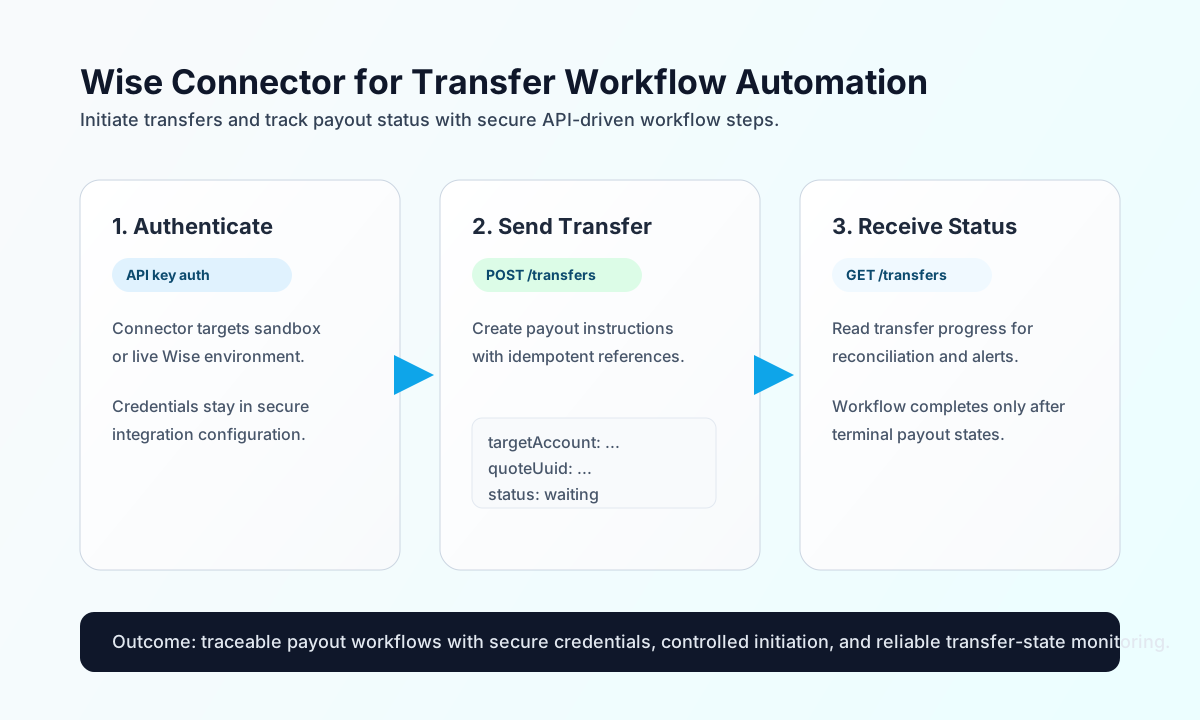
Configure API access
Configure the connector with your Wise API credentials so workflow runs can authenticate safely and execute transfer-related actions without exposing secrets inside step payloads. This improves both security and operational consistency.
The required setting is api_key. Optional settings include environment (sandbox or live; default sandbox) and timeout_seconds (default 30). Run test immediately after configuration to verify authentication before enabling payout or reconciliation workflows.
test is the only operation that validates api_key up front (legacy parity). send and receive require a configured Bearer token at runtime but do not pre-validate integration config before dispatch.
Create transfer actions with send
Use send to initiate transfer or payment operations through Wise endpoints. Keep request bodies explicit and traceable so retries and audit reviews are straightforward.
const baseUrl = "https://api.example.com/api/v1";
const tenantId = "<TENANT_ID>";
const apiKey = "<API_KEY>";

async function createTransfer(integrationId: string) {
  const response = await fetch(`${baseUrl}/integrations/${encodeURIComponent(integrationId)}/execute`, {
    method: "POST",
    headers: {
      "X-API-Key": apiKey,
      "X-Tenant-ID": tenantId,
      "Content-Type": "application/json",
    },
    body: JSON.stringify({
      operation: "send",
      endpoint: "v1/transfers",
      data: {
        targetAccount: "<ENTITY_ID>",
        quoteUuid: "<ENTITY_ID>",
        customerTransactionId: "payout-2026-05-08-001",
        details: {
          reference: "Vendor invoice INV-1042",
          transferPurpose: "verification.transfers"
        }
      }
    }),
  });
  if (!response.ok) throw new Error(`Request failed: ${response.status}`);
  return response.json();
}
curl -X POST "https://api.example.com/api/v1/integrations/<ENTITY_ID>/execute" \
-H "X-API-Key: <API_KEY>" \
-H "X-Tenant-ID: <TENANT_ID>" \
-H "Content-Type: application/json" \
-d '{
"operation": "send",
"endpoint": "v1/transfers",
"data": {
"targetAccount": "<ENTITY_ID>",
"quoteUuid": "<ENTITY_ID>",
"customerTransactionId": "payout-2026-05-08-001",
"details": {
"reference": "Vendor invoice INV-1042",
"transferPurpose": "verification.transfers"
}
}
}'
{
  "success": true,
  "data": {
    "message": "Wise operation completed successfully",
    "result": {
      "id": 91827364,
      "status": "incoming_payment_waiting"
    }
  }
}
Retrieve transfer state with receive
Use receive to fetch transfer status, account information, or filtered transaction data for reconciliation and alerting workflows. Keep query windows bounded so polling remains efficient in high-volume environments.
const baseUrl = "https://api.example.com/api/v1";
const tenantId = "<TENANT_ID>";
const apiKey = "<API_KEY>";

async function getTransfers(integrationId: string) {
  const response = await fetch(`${baseUrl}/integrations/${encodeURIComponent(integrationId)}/execute`, {
    method: "POST",
    headers: {
      "X-API-Key": apiKey,
      "X-Tenant-ID": tenantId,
      "Content-Type": "application/json",
    },
    body: JSON.stringify({
      operation: "receive",
      endpoint: "v1/transfers",
      query: {
        profile: "<ENTITY_ID>",
        limit: 20
      }
    }),
  });
  if (!response.ok) throw new Error(`Request failed: ${response.status}`);
  return response.json();
}
curl -X POST "https://api.example.com/api/v1/integrations/<ENTITY_ID>/execute" \
-H "X-API-Key: <API_KEY>" \
-H "X-Tenant-ID: <TENANT_ID>" \
-H "Content-Type: application/json" \
-d '{
"operation": "receive",
"endpoint": "v1/transfers",
"query": {
"profile": "<ENTITY_ID>",
"limit": 20
}
}'
{
  "success": true,
  "data": {
    "message": "Wise data retrieved successfully",
    "result": [
      {
        "id": 91827364,
        "status": "outgoing_payment_sent",
        "reference": "Vendor invoice INV-1042"
      }
    ]
  }
}
Verify credentials with test
Use test to confirm the configured api_key and environment against GET v1/profiles. A missing or empty api_key returns Configuration validation failed (legacy parity).
{
  "success": true,
  "data": {
    "message": "Wise connection test successful",
    "details": {
      "api_base_url": "https://api.sandbox.transferwise.tech",
      "environment": "sandbox",
      "profiles_found": 1
    }
  }
}
Reliability guidance
Most production failures come from invalid API keys, profile mismatches, and rate-limited polling loops. If requests fail, verify credentials and environment first, then validate profile/account identifiers, and finally apply exponential backoff for 429 responses.
For safer payout automation, enforce idempotent transaction references, log Wise transfer IDs for reconciliation, and monitor status transitions before marking workflows complete. This reduces duplicate payouts and improves auditability.