HubSpot API Connector Guide
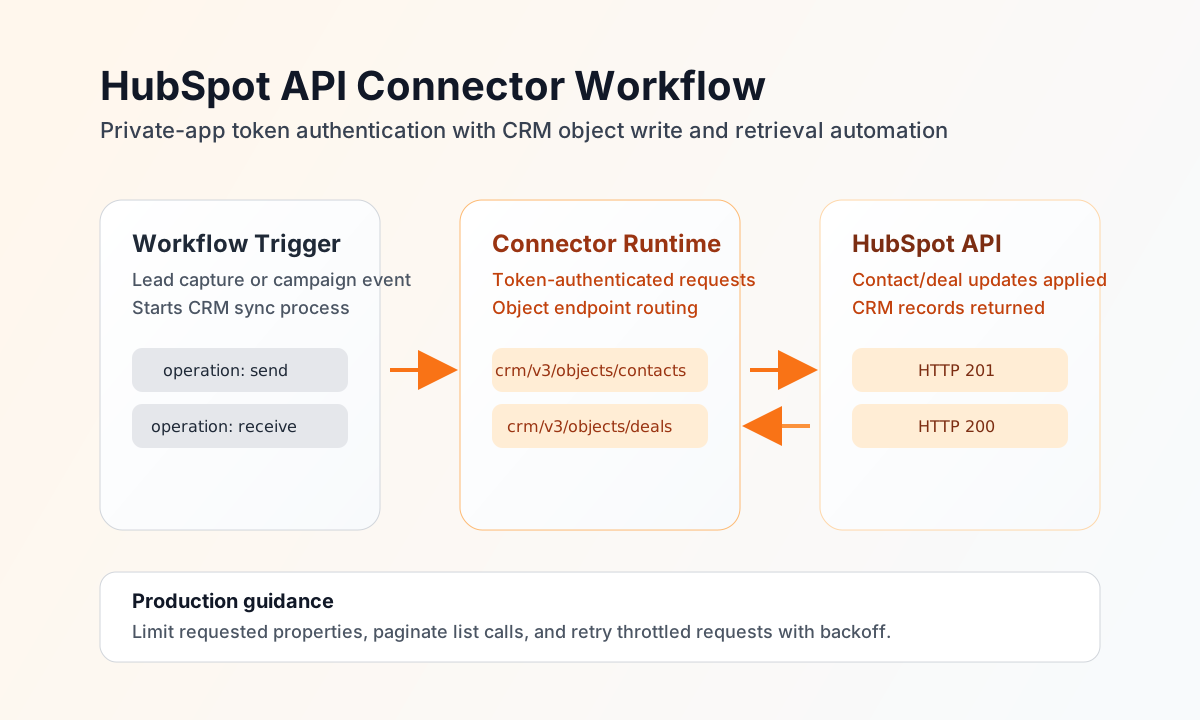
The HubSpot API connector lets Tealfabric workflows automate CRM actions such as creating contacts, updating deals, and retrieving pipeline data for downstream systems. It is designed for teams that need consistent, token-based access to HubSpot objects across marketing, sales, and service processes.
Document information
| Field | Value |
|---|---|
| Canonical URL | /docs/04_connecting-systems/connectors/h/hubspot-api |
| Version (published date) | 2026-05-08 |
| Tags | connectors, reference, hubspot-api |
| Connector ID | hubspot-api-1.0.0 |
Configure private app access
Set access_token to a HubSpot private app token with the scopes needed for your target objects, such as contacts, companies, deals, or tickets. Keep token permissions minimal and specific to the workflow so access remains secure and auditable.
Set timeout_seconds according to expected API latency and object volume. Run test after configuration to confirm token validity and endpoint access before enabling scheduled workflow execution.
Create or update objects with send
Use send for write operations, including creating contacts, updating deal stages, and applying property changes to CRM records. Keep the endpoint aligned to the object API path and include only the properties required by your business process.
const baseUrl = "https://api.example.com/api/v1";
const tenantId = "<TENANT_ID>";
const apiKey = "<API_KEY>";

async function createContact(integrationId: string) {
  const response = await fetch(`${baseUrl}/integrations/${encodeURIComponent(integrationId)}/execute`, {
    method: "POST",
    headers: {
      "X-API-Key": apiKey,
      "X-Tenant-ID": tenantId,
      "Content-Type": "application/json",
    },
    body: JSON.stringify({
      operation: "send",
      endpoint: "crm/v3/objects/contacts",
      method: "POST",
      data: {
        properties: {
          email: "jane.doe@example.com",
          firstname: "Jane",
          lastname: "Doe",
          phone: "+1-555-0101",
          company: "Tealfabric Partners"
        }
      }
    }),
  });
  if (!response.ok) throw new Error(`Request failed: ${response.status}`);
  return response.json();
}
curl -X POST "https://api.example.com/api/v1/integrations/<ENTITY_ID>/execute" \
-H "X-API-Key: <API_KEY>" \
-H "X-Tenant-ID: <TENANT_ID>" \
-H "Content-Type: application/json" \
-d '{
"operation": "send",
"endpoint": "crm/v3/objects/contacts",
"method": "POST",
"data": {
"properties": {
"email": "jane.doe@example.com",
"firstname": "Jane",
"lastname": "Doe",
"phone": "+1-555-0101",
"company": "Tealfabric Partners"
}
}
}'
{
  "success": true,
  "data": {
    "message_count": 1,
    "data": {
      "id": "<ENTITY_ID>",
      "properties": {
        "email": "jane.doe@example.com",
        "firstname": "Jane",
        "lastname": "Doe"
      }
    },
    "response": {
      "id": "<ENTITY_ID>",
      "properties": {
        "email": "jane.doe@example.com",
        "firstname": "Jane",
        "lastname": "Doe"
      }
    }
  }
}
Retrieve CRM records with receive
Use receive to list contacts, search deals, or pull ticket records for follow-up workflows and reporting. Include pagination and property filters so each run returns only the data required for the next action.
const baseUrl = "https://api.example.com/api/v1";
const tenantId = "<TENANT_ID>";
const apiKey = "<API_KEY>";

async function listOpenDeals(integrationId: string) {
  const response = await fetch(`${baseUrl}/integrations/${encodeURIComponent(integrationId)}/execute`, {
    method: "POST",
    headers: {
      "X-API-Key": apiKey,
      "X-Tenant-ID": tenantId,
      "Content-Type": "application/json",
    },
    body: JSON.stringify({
      operation: "receive",
      endpoint: "crm/v3/objects/deals",
      query: {
        limit: 20,
        properties: "dealname,amount,dealstage,pipeline",
        archived: false
      }
    }),
  });
  if (!response.ok) throw new Error(`Request failed: ${response.status}`);
  return response.json();
}
curl -X POST "https://api.example.com/api/v1/integrations/<ENTITY_ID>/execute" \
-H "X-API-Key: <API_KEY>" \
-H "X-Tenant-ID: <TENANT_ID>" \
-H "Content-Type: application/json" \
-d '{
"operation": "receive",
"endpoint": "crm/v3/objects/deals",
"query": {
"limit": 20,
"properties": "dealname,amount,dealstage,pipeline",
"archived": false
}
}'
{
  "success": true,
  "data": {
    "message_count": 1,
    "data": [
      {
        "id": "<ENTITY_ID>",
        "properties": {
          "dealname": "Enterprise Renewal",
          "amount": "50000",
          "dealstage": "qualifiedtobuy"
        }
      }
    ],
    "total_size": 1
  }
}
Operate safely in production
HubSpot enforces request-rate limits, and high-frequency sync jobs can receive throttling responses. Use pagination, incremental fetch patterns, and retry with backoff to keep workflows stable.
Authentication errors generally indicate revoked tokens, missing scopes, or wrong app configuration. Store tokens securely, avoid exposing secrets in logs, and re-run test after rotating credentials.
Related resources
For object schemas and endpoint behavior, see the HubSpot API reference overview and the HubSpot CRM API guide.