Helm Connector Guide
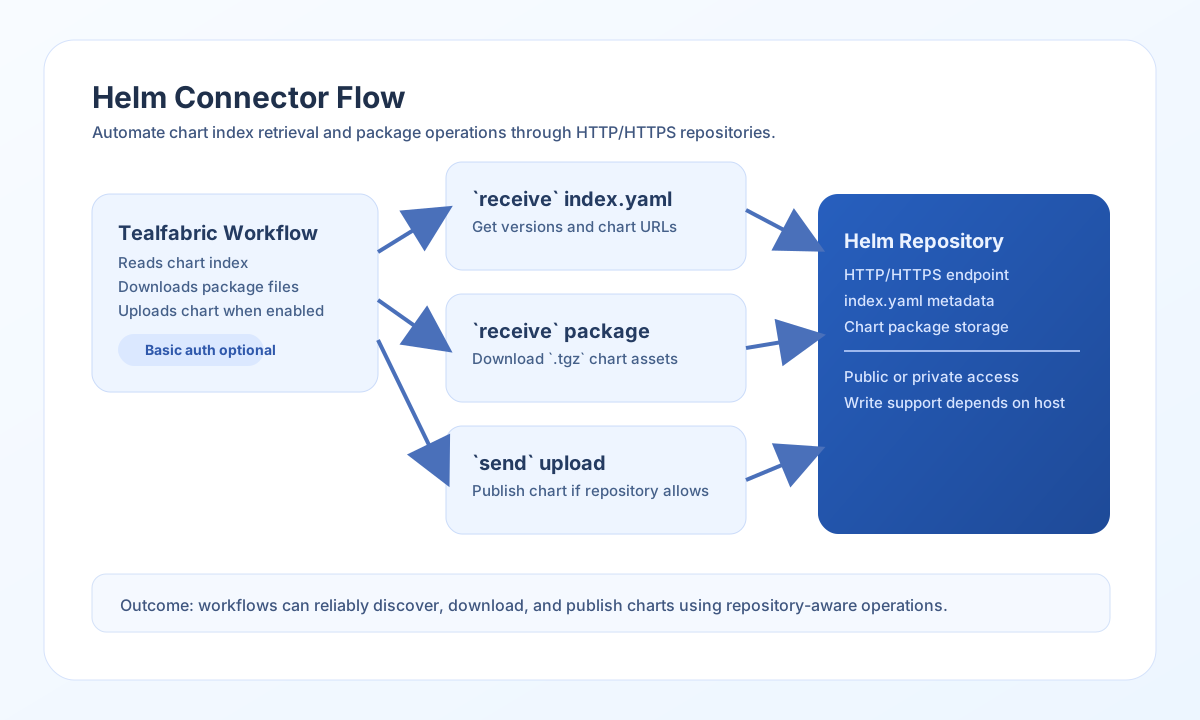
The Helm connector helps Tealfabric workflows interact with Helm chart repositories over HTTP or HTTPS. You can fetch repository metadata, download chart packages, and call repository endpoints for automation use cases such as release catalog synchronization.
Document information
| Field | Value |
|---|---|
| Canonical URL | /docs/04_connecting-systems/connectors/h/helm |
| Version (published date) | 2026-05-08 |
| Tags | connectors, reference, helm |
| Connector ID | helm-1.0.0 |
Configure repository access
Set repository_url to the root URL of your Helm repository, where index.yaml is available. For private repositories, add username and password so the connector can send Basic Authentication headers.
Use timeout_seconds when working with large chart files or slower repositories. After configuration, run test to verify that the repository is reachable and credentials are valid.
Retrieve chart index with receive
Use receive to get index.yaml and discover chart names, versions, and package URLs. This is the most common operation when workflows need to select or validate chart versions automatically.
const baseUrl = "https://api.example.com/api/v1";
const tenantId = "<TENANT_ID>";
const apiKey = "<API_KEY>";

async function fetchChartIndex(integrationId: string) {
  const response = await fetch(`${baseUrl}/integrations/${encodeURIComponent(integrationId)}/execute`, {
    method: "POST",
    headers: {
      "X-API-Key": apiKey,
      "X-Tenant-ID": tenantId,
      "Content-Type": "application/json",
    },
    body: JSON.stringify({
      operation: "receive",
      endpoint: "index.yaml"
    }),
  });
  if (!response.ok) throw new Error(`Request failed: ${response.status}`);
  return response.json();
}
curl -X POST "https://api.example.com/api/v1/integrations/<ENTITY_ID>/execute" \
-H "X-API-Key: <API_KEY>" \
-H "X-Tenant-ID: <TENANT_ID>" \
-H "Content-Type: application/json" \
-d '{
"operation": "receive",
"endpoint": "index.yaml"
}'
{
  "success": true,
  "message": "Helm data retrieved successfully",
  "chart_count": 1,
  "items": ["nginx"]
}
receive returns chart names in items when the response includes an entries map (for example from index.yaml). When the response has no entries key, items contains the full parsed response object.
Test repository connectivity with test
Use test to verify repository_url and optional Basic auth credentials. The connector fetches index.yaml and checks for apiVersion and entries.
curl -X POST "https://api.example.com/api/v1/integrations/<ENTITY_ID>/execute" \
  -H "X-API-Key: <API_KEY>" \
  -H "X-Tenant-ID: <TENANT_ID>" \
  -H "Content-Type: application/json" \
  -d '{
    "operation": "test"
  }'
{
  "success": true,
  "message": "Helm repository connection test successful",
  "details": {
    "repository_url": "https://charts.example.com",
    "charts_found": 12
  }
}
Execute arbitrary repository requests with execute
Use execute when you need a specific HTTP method and path under repository_url. Provide body (or data as an alias) for write methods.
curl -X POST "https://api.example.com/api/v1/integrations/<ENTITY_ID>/execute" \
  -H "X-API-Key: <API_KEY>" \
  -H "X-Tenant-ID: <TENANT_ID>" \
  -H "Content-Type: application/json" \
  -d '{
    "operation": "execute",
    "method": "GET",
    "endpoint": "charts/nginx-15.9.0.tgz"
  }'
{
  "success": true,
  "message": "Helm method executed successfully",
  "result": {}
}
Upload or update repository content with send
Use send for write operations such as uploading a chart package to repositories that allow writes. Many public repositories are read-only, so verify write support before using this operation in production.
const baseUrl = "https://api.example.com/api/v1";
const tenantId = "<TENANT_ID>";
const apiKey = "<API_KEY>";

async function uploadChart(integrationId: string, chartBase64: string) {
  const response = await fetch(`${baseUrl}/integrations/${encodeURIComponent(integrationId)}/execute`, {
    method: "POST",
    headers: {
      "X-API-Key": apiKey,
      "X-Tenant-ID": tenantId,
      "Content-Type": "application/json",
    },
    body: JSON.stringify({
      operation: "send",
      method: "PUT",
      endpoint: "charts/sample-app-1.2.0.tgz",
      data: {
        chart_file_base64: chartBase64,
        content_type: "application/gzip"
      }
    }),
  });
  if (!response.ok) throw new Error(`Request failed: ${response.status}`);
  return response.json();
}
curl -X POST "https://api.example.com/api/v1/integrations/<ENTITY_ID>/execute" \
-H "X-API-Key: <API_KEY>" \
-H "X-Tenant-ID: <TENANT_ID>" \
-H "Content-Type: application/json" \
-d '{
"operation": "send",
"method": "PUT",
"endpoint": "charts/sample-app-1.2.0.tgz",
"data": {
"chart_file_base64": "<BASE64_TGZ_CONTENT>",
"content_type": "application/gzip"
}
}'
{
  "success": true,
  "message": "Helm operation completed successfully",
  "result": {
    "status": "uploaded"
  }
}
Reliability guidance
The most common failures are authentication (401/403), invalid chart paths (404), and repository write restrictions on public endpoints. Validate repository URL structure first, then confirm credentials and operation support for your target endpoint.
For resilient workflows, cache index.yaml responses when possible, retry transient 5xx errors with backoff, and validate chart integrity before deployment. This keeps automation fast, predictable, and safe.