Help Scout API Connector Guide
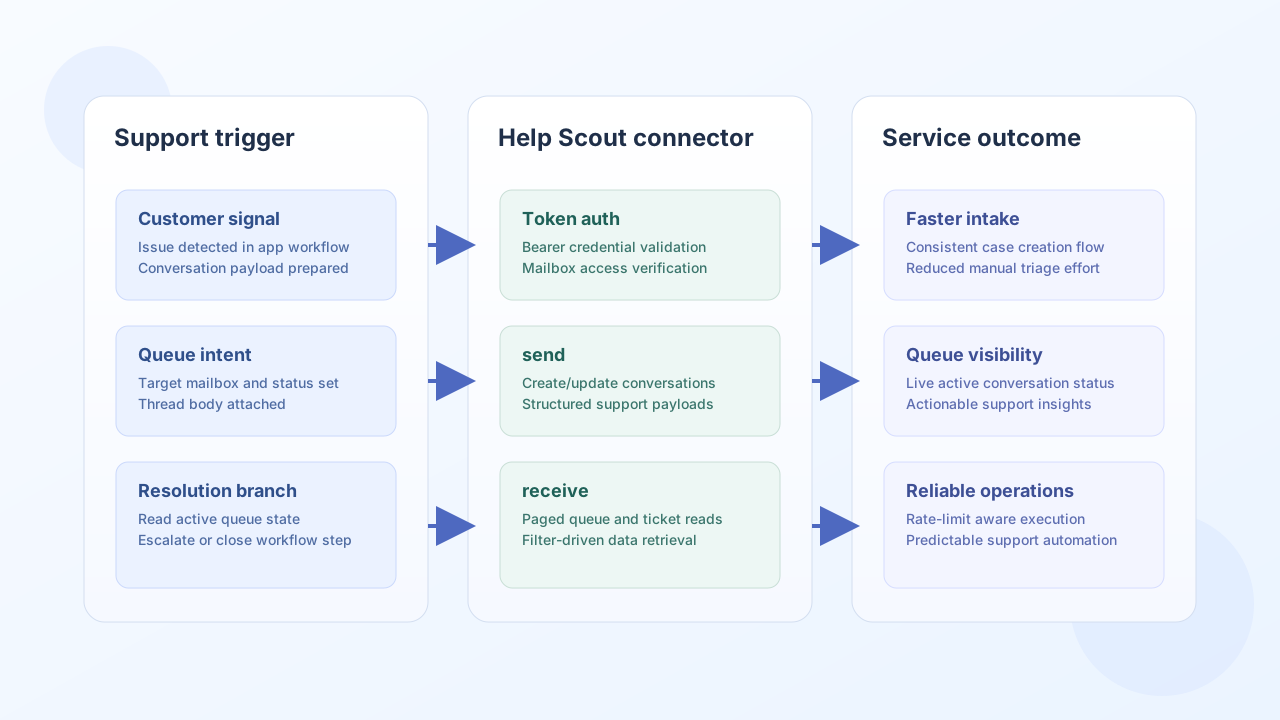
The Help Scout connector lets Tealfabric workflows create and retrieve support conversations, customers, and mailbox data through the Help Scout API. It is useful for automated ticket intake, support routing, and customer context synchronization.
Document information
| Field | Value |
|---|---|
| Canonical URL | /docs/04_connecting-systems/connectors/h/help-scout |
| Version (published date) | 2026-05-08 |
| Tags | connectors, reference, help-scout |
| Connector ID | help-scout-1.0.0 |
Configuration and access setup
Set up the connector with a Help Scout bearer token that has access to the mailboxes and endpoints your workflows require. In most deployments, the default API base URL is correct and only token and timeout settings need adjustment.
token(required): Help Scout bearer token.base_url(optional): defaults tohttps://api.helpscout.net/v2.timeout_seconds(optional): request timeout value.
Before going live, run a low-impact read call to confirm permissions and mailbox visibility.
Create support conversations with send
Use send to create or update Help Scout resources, such as opening a conversation from an external trigger. Keep the payload focused so assignment and triage rules in Help Scout can process it cleanly.
const baseUrl = "https://api.example.com/api/v1";
const tenantId = "<TENANT_ID>";
const apiKey = "<API_KEY>";

async function createSupportConversation(integrationId: string) {
  const response = await fetch(`${baseUrl}/integrations/${encodeURIComponent(integrationId)}/execute`, {
    method: "POST",
    headers: {
      "X-API-Key": apiKey,
      "X-Tenant-ID": tenantId,
      "Content-Type": "application/json",
    },
    body: JSON.stringify({
      operation: "send",
      endpoint: "conversations",
      method: "POST",
      data: {
        type: "email",
        subject: "Payment issue reported by customer",
        mailboxId: 12345,
        customer: {
          email: "customer@example.com",
          firstName: "Alex",
          lastName: "Rivera"
        },
        threads: [
          {
            type: "customer",
            customer: {
              email: "customer@example.com"
            },
            body: "I was charged twice for order #ORD-2041."
          }
        }
      }
    }),
  });
  if (!response.ok) throw new Error(`Request failed: ${response.status}`);
  return response.json();
}
curl -X POST "https://api.example.com/api/v1/integrations/<ENTITY_ID>/execute" \
-H "X-API-Key: <API_KEY>" \
-H "X-Tenant-ID: <TENANT_ID>" \
-H "Content-Type: application/json" \
-d '{
"operation": "send",
"endpoint": "conversations",
"method": "POST",
"data": {
"type": "email",
"subject": "Payment issue reported by customer",
"mailboxId": 12345,
"customer": {
"email": "customer@example.com",
"firstName": "Alex",
"lastName": "Rivera"
},
"threads": [
{
"type": "customer",
"customer": {
"email": "customer@example.com"
},
"body": "I was charged twice for order #ORD-2041."
}
]
}
}'
{
  "success": true,
  "data": {
    "id": "987654321",
    "status": "active",
    "subject": "Payment issue reported by customer"
  }
}
Retrieve conversation queues with receive
Use receive to pull open conversations for dashboards, escalation logic, and service-level monitoring. Filter by mailbox and status so workflow consumers get only relevant tickets.
const baseUrl = "https://api.example.com/api/v1";
const tenantId = "<TENANT_ID>";
const apiKey = "<API_KEY>";

async function listOpenConversations(integrationId: string) {
  const response = await fetch(`${baseUrl}/integrations/${encodeURIComponent(integrationId)}/execute`, {
    method: "POST",
    headers: {
      "X-API-Key": apiKey,
      "X-Tenant-ID": tenantId,
      "Content-Type": "application/json",
    },
    body: JSON.stringify({
      operation: "receive",
      endpoint: "conversations",
      query: {
        mailbox: 12345,
        status: "active",
        page: 1
      }
    }),
  });
  if (!response.ok) throw new Error(`Request failed: ${response.status}`);
  const payload = await response.json();
  return payload.data ?? [];
}
curl -X POST "https://api.example.com/api/v1/integrations/<ENTITY_ID>/execute" \
-H "X-API-Key: <API_KEY>" \
-H "X-Tenant-ID: <TENANT_ID>" \
-H "Content-Type: application/json" \
-d '{
"operation": "receive",
"endpoint": "conversations",
"query": {
"mailbox": 12345,
"status": "active",
"page": 1
}
}'
{
  "success": true,
  "total_size": 2,
  "data": [
    {"id": "987654321", "subject": "Payment issue reported by customer", "status": "active"},
    {"id": "987654322", "subject": "Unable to reset account password", "status": "active"}
  ]
}
Reliability guidance
Most production failures come from token scope issues, mailbox access mismatches, or burst traffic that triggers rate limits. Validate access with test, process paginated responses explicitly, and add retry/backoff logic for transient API throttling.
These controls keep support automation reliable while preserving queue visibility and response speed.