Constant Contact Connector Guide
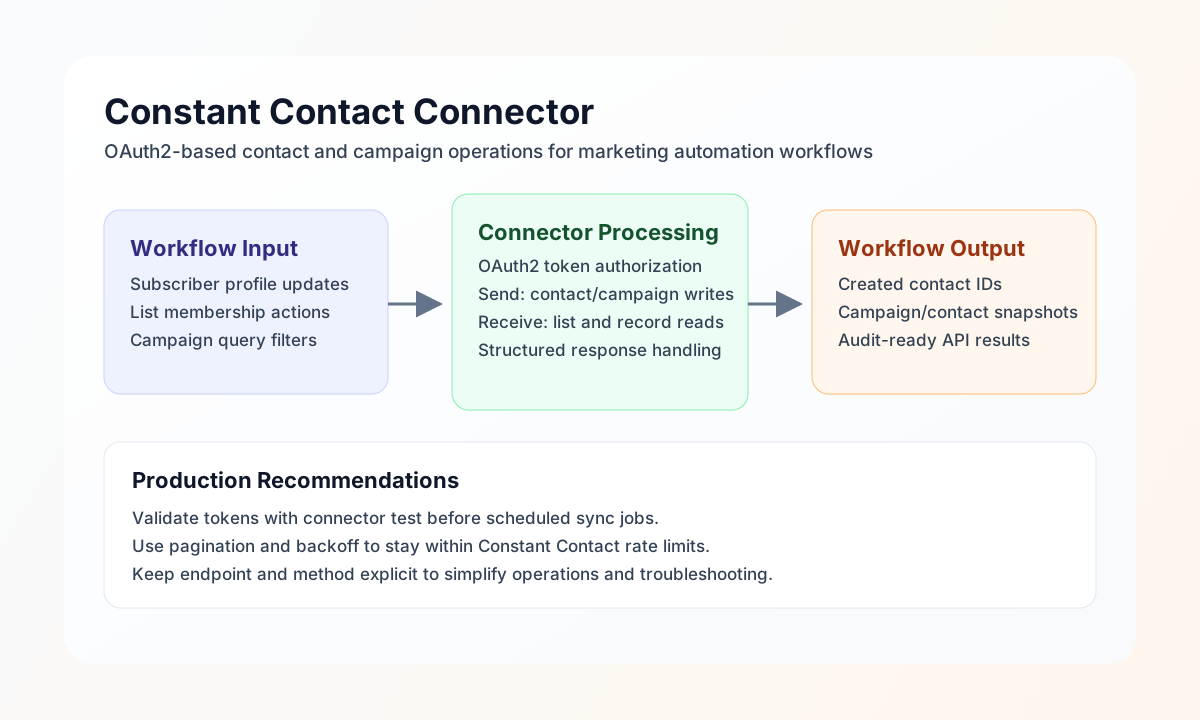
The Constant Contact connector helps Tealfabric workflows manage marketing contacts and campaign data through the Constant Contact API. It is best suited for automations such as subscriber onboarding, list hygiene, and campaign status synchronization between your internal systems and email operations.
Document information
| Field | Value |
|---|---|
| Canonical URL | /docs/04_connecting-systems/connectors/c/constant-contact |
| Version (published date) | 2026-05-08 |
| Tags | connectors, reference, constant-contact |
| Connector ID | constant-contact-1.0.0 |
Configuration and OAuth setup
Configure the connector with your Constant Contact OAuth app credentials so workflows can authenticate without embedding tokens in step payloads. In production, this keeps secret handling centralized and allows token refresh behavior to remain consistent across all jobs.
Required values are client_id, client_secret, and redirect_uri. Optional values include access_token, refresh_token, scope, and timeout_seconds. The test operation validates OAuth app configuration (client_id, client_secret, redirect_uri); other operations require only a valid access_token. After configuration, run test to confirm the account is reachable and authentication is valid before scheduling live automations.
Create or update contacts with send
Use send to write records such as contacts or email resources to Constant Contact endpoints. Keep endpoint and method explicit in each request so behavior is predictable and easy to audit.
const baseUrl = "https://api.example.com/api/v1";
const tenantId = "<TENANT_ID>";
const apiKey = "<API_KEY>";

async function createContact(integrationId: string) {
  const response = await fetch(`${baseUrl}/integrations/${encodeURIComponent(integrationId)}/execute`, {
    method: "POST",
    headers: {
      "X-API-Key": apiKey,
      "X-Tenant-ID": tenantId,
      "Content-Type": "application/json",
    },
    body: JSON.stringify({
      operation: "send",
      endpoint: "contacts",
      method: "POST",
      data: {
        email_address: {
          address: "new.subscriber@example.com",
          permission_to_send: "explicit"
        },
        first_name: "Avery",
        last_name: "Lee",
        list_memberships: ["8f9f40f2-1234-44f0-84aa-7f4e4d000001"]
      }
    }),
  });
  if (!response.ok) throw new Error(`Request failed: ${response.status}`);
  return response.json();
}
curl -X POST "https://api.example.com/api/v1/integrations/<ENTITY_ID>/execute" \
-H "X-API-Key: <API_KEY>" \
-H "X-Tenant-ID: <TENANT_ID>" \
-H "Content-Type: application/json" \
-d '{
"operation": "send",
"endpoint": "contacts",
"method": "POST",
"data": {
"email_address": {
"address": "new.subscriber@example.com",
"permission_to_send": "explicit"
},
"first_name": "Avery",
"last_name": "Lee",
"list_memberships": ["8f9f40f2-1234-44f0-84aa-7f4e4d000001"]
}
}'
{
  "success": true,
  "data": {
    "message_count": 1,
    "data": {
      "contact_id": "4af4a5f6-9876-4382-9b5f-1c7570e0b123",
      "email_address": {
        "address": "new.subscriber@example.com"
      }
    },
    "response": {
      "contact_id": "4af4a5f6-9876-4382-9b5f-1c7570e0b123",
      "email_address": {
        "address": "new.subscriber@example.com"
      }
    }
  }
}
Retrieve contacts and campaigns with receive
Use receive to read existing resources from Constant Contact, either as lists with filters or as single records by ID. This operation is useful for reconciliation workflows that verify contact states or gather campaign metrics for reporting.
const baseUrl = "https://api.example.com/api/v1";
const tenantId = "<TENANT_ID>";
const apiKey = "<API_KEY>";

async function listRecentContacts(integrationId: string) {
  const response = await fetch(`${baseUrl}/integrations/${encodeURIComponent(integrationId)}/execute`, {
    method: "POST",
    headers: {
      "X-API-Key": apiKey,
      "X-Tenant-ID": tenantId,
      "Content-Type": "application/json",
    },
    body: JSON.stringify({
      operation: "receive",
      endpoint: "contacts",
      query: {
        limit: 25,
        include_count: true
      }
    }),
  });
  if (!response.ok) throw new Error(`Request failed: ${response.status}`);
  return response.json();
}
curl -X POST "https://api.example.com/api/v1/integrations/<ENTITY_ID>/execute" \
-H "X-API-Key: <API_KEY>" \
-H "X-Tenant-ID: <TENANT_ID>" \
-H "Content-Type: application/json" \
-d '{
"operation": "receive",
"endpoint": "contacts",
"query": {
"limit": 25,
"include_count": true
}
}'
{
  "success": true,
  "data": {
    "message_count": 1,
    "data": [
      {
        "contact_id": "4af4a5f6-9876-4382-9b5f-1c7570e0b123",
        "first_name": "Avery",
        "last_name": "Lee",
        "email_address": {
          "address": "new.subscriber@example.com"
        }
      }
    ],
    "total_size": 1
  }
}
Reliability and operational guidance
Most integration failures are caused by expired access tokens, invalid scopes, or endpoint-specific payload errors. Running test before large jobs, checking response success values, and logging endpoint-level errors make troubleshooting faster and safer.
For sustained throughput, paginate list requests and respect Constant Contact rate limits with retry delays and backoff. These controls keep marketing automations stable while preserving data accuracy.