Confluence Connector Guide
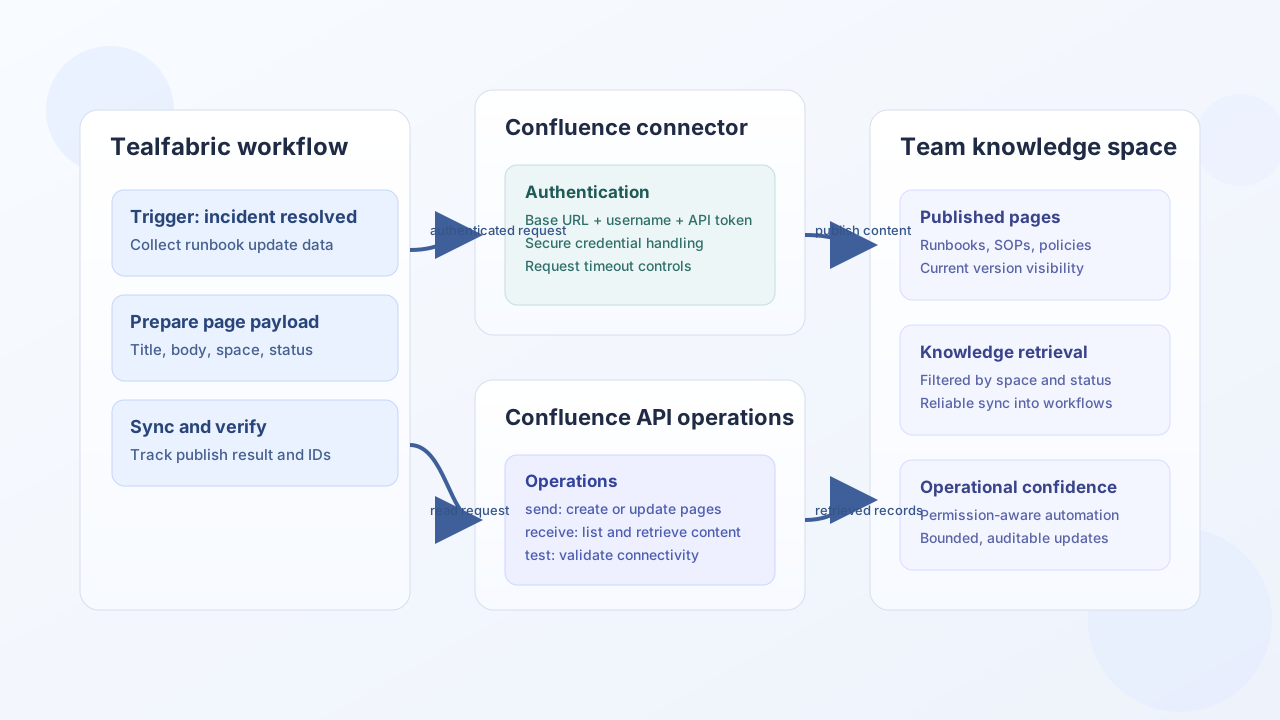
The Confluence connector helps Tealfabric workflows publish and retrieve knowledge content in Atlassian Confluence. It is useful for documentation automation, runbook publishing, and policy synchronization where updates in operational systems should be reflected in shared knowledge spaces.
Document information
| Field | Value |
|---|---|
| Canonical URL | /docs/04_connecting-systems/connectors/c/confluence |
| Version (published date) | 2026-05-08 |
| Tags | connectors, reference, confluence |
| Connector ID | confluence-1.0.0 |
Configuration and authentication
Before connecting, create an Atlassian API token for a service account with access to the required spaces. Use a dedicated account so permission scope and audit history are clear. Keep the base URL and token configuration stable across environments to avoid accidental updates in the wrong tenant.
base_url(required): Confluence base URL.username(required): Atlassian account email for API token auth.api_token(required): Atlassian API token.timeout_seconds(optional): Request timeout in seconds.
Create or update pages with send
Use send to publish new pages or update existing documentation content. Include explicit space and parent identifiers to keep content organized and prevent orphan pages.
const baseUrl = "https://api.example.com/api/v1";
const tenantId = "<TENANT_ID>";
const apiKey = "<API_KEY>";

async function publishRunbookPage(integrationId: string) {
  const response = await fetch(`${baseUrl}/integrations/${encodeURIComponent(integrationId)}/execute`, {
    method: "POST",
    headers: {
      "X-API-Key": apiKey,
      "X-Tenant-ID": tenantId,
      "Content-Type": "application/json",
    },
    body: JSON.stringify({
      operation: "send",
      endpoint: "api/v2/pages",
      method: "POST",
      data: {
        title: "Incident Response Runbook",
        spaceId: "<ENTITY_ID>",
        body: {
          representation: "storage",
          value: "<p>Escalate incident severity 1 within 15 minutes.</p>",
        },
        status: "current",
      },
    }),
  });
  if (!response.ok) throw new Error(`Request failed: ${response.status}`);
  const payload = await response.json();
  return payload.data?.result;
}
curl -X POST "https://api.example.com/api/v1/integrations/<ENTITY_ID>/execute" \
-H "X-API-Key: <API_KEY>" \
-H "X-Tenant-ID: <TENANT_ID>" \
-H "Content-Type: application/json" \
-d '{
"operation": "send",
"endpoint": "wiki/api/v2/pages",
"method": "POST",
"data": {
"title": "Incident Response Runbook",
"spaceId": "<ENTITY_ID>",
"body": {
"representation": "storage",
"value": "<p>Escalate incident severity 1 within 15 minutes.</p>"
},
"status": "current"
}
}'
{
  "success": true,
  "data": {
    "message": "Confluence operation completed successfully",
    "result": {
      "id": "<ENTITY_ID>",
      "title": "Incident Response Runbook",
      "status": "current"
    }
  }
}
Retrieve knowledge content with receive
Use receive to fetch page sets, space content, or targeted records for search and sync workflows. Keep query filters bounded so knowledge sync runs remain predictable and rate-limit friendly.
const baseUrl = "https://api.example.com/api/v1";
const tenantId = "<TENANT_ID>";
const apiKey = "<API_KEY>";

async function listSpacePages(integrationId: string) {
  const response = await fetch(`${baseUrl}/integrations/${encodeURIComponent(integrationId)}/execute`, {
    method: "POST",
    headers: {
      "X-API-Key": apiKey,
      "X-Tenant-ID": tenantId,
      "Content-Type": "application/json",
    },
    body: JSON.stringify({
      operation: "receive",
      endpoint: "api/v2/pages",
      query: {
        spaceId: "<ENTITY_ID>",
        limit: 25,
        status: "current",
      },
    }),
  });
  if (!response.ok) throw new Error(`Request failed: ${response.status}`);
  const payload = await response.json();
  return payload.data?.items ?? [];
}
curl -X POST "https://api.example.com/api/v1/integrations/<ENTITY_ID>/execute" \
-H "X-API-Key: <API_KEY>" \
-H "X-Tenant-ID: <TENANT_ID>" \
-H "Content-Type: application/json" \
-d '{
"operation": "receive",
"endpoint": "wiki/api/v2/pages",
"query": {
"spaceId": "<ENTITY_ID>",
"limit": 25,
"status": "current"
}
}'
{
  "success": true,
  "data": {
    "message": "Confluence data retrieved successfully",
    "page_count": 1,
    "items": [
      {
        "id": "<ENTITY_ID>",
        "title": "Incident Response Runbook",
        "status": "current"
      }
    ]
  }
}
Call arbitrary API methods with execute
Use execute when you need an explicit HTTP method and optional JSON body. Body precedence matches legacy PHP: body, then data, then an empty object.
{
  "operation": "execute",
  "endpoint": "api/v2/spaces",
  "method": "GET"
}
Success responses use the connector envelope: data.message and data.result.
Validate credentials with test
test is the only operation that enforces required configuration (base_url, username, api_token). It probes GET api/v2/user/current.
{
  "success": true,
  "data": {
    "message": "Confluence connection test successful",
    "details": {
      "base_url": "https://<TENANT>.atlassian.net/wiki",
      "user": "<ACCOUNT_ID>"
    }
  }
}
When configuration is incomplete, test returns success: false with error.message of Configuration validation failed (legacy parity).
Reliability guidance
Most production issues come from permission gaps, invalid space IDs, and unbounded page scans. Validate credentials with test, scope reads with explicit limits and filters, and implement backoff for transient 429 responses. These controls keep knowledge automation reliable and easy to operate.