ClickUp Connector Guide
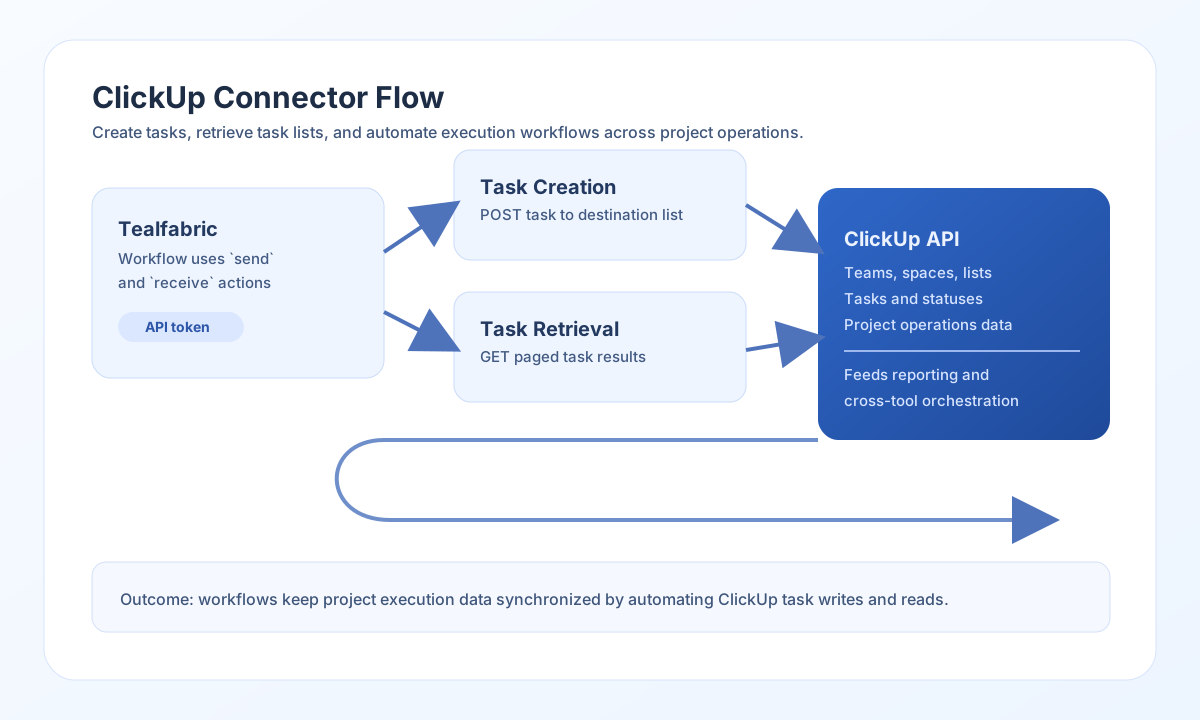
The ClickUp connector lets Tealfabric workflows create and retrieve work-management data such as tasks and lists. It is useful for operational task routing, delivery tracking, and cross-system synchronization where project updates must move between platforms.
Document information
| Field | Value |
|---|---|
| Canonical URL | /docs/04_connecting-systems/connectors/c/clickup |
| Version (published date) | 2026-05-08 |
| Tags | connectors, reference, clickup |
| Connector ID | clickup-1.0.0 |
Configure authentication
Set token to a ClickUp personal API token with access to the target workspace resources. Keep the default base_url unless your environment requires a different API entrypoint, and adjust timeout_seconds for larger task payloads or slower networks.
Before production rollout, test that the token can access the specific team, space, folder, or list your workflow uses. This prevents permission errors during task and list operations.
Create tasks with send
Use send to create or update ClickUp resources such as tasks and lists. A common pattern is creating a task in a destination list when an event occurs in another system.
const baseUrl = "https://api.example.com/api/v1";
const tenantId = "<TENANT_ID>";
const apiKey = "<API_KEY>";

async function createTask(integrationId: string) {
  const response = await fetch(`${baseUrl}/integrations/${encodeURIComponent(integrationId)}/execute`, {
    method: "POST",
    headers: {
      "X-API-Key": apiKey,
      "X-Tenant-ID": tenantId,
      "Content-Type": "application/json",
    },
    body: JSON.stringify({
      operation: "send",
      endpoint: "list/<ENTITY_ID>/task",
      method: "POST",
      data: {
        name: "Prepare Q2 launch checklist",
        description: "Compile owners, dates, and blockers for launch readiness.",
        assignees: ["<ENTITY_ID>"],
        status: "to do",
        priority: 2
      }
    }),
  });
  if (!response.ok) throw new Error(`Request failed: ${response.status}`);
  return response.json();
}
curl -X POST "https://api.example.com/api/v1/integrations/<ENTITY_ID>/execute" \
-H "X-API-Key: <API_KEY>" \
-H "X-Tenant-ID: <TENANT_ID>" \
-H "Content-Type: application/json" \
-d '{
"operation": "send",
"endpoint": "list/<ENTITY_ID>/task",
"method": "POST",
"data": {
"name": "Prepare Q2 launch checklist",
"description": "Compile owners, dates, and blockers for launch readiness.",
"assignees": ["<ENTITY_ID>"],
"status": "to do",
"priority": 2
}
}'
{
  "success": true,
  "data": {
    "message_count": 1,
    "data": {
      "id": "<ENTITY_ID>",
      "name": "Prepare Q2 launch checklist",
      "status": {
        "status": "to do"
      }
    },
    "response": {
      "id": "<ENTITY_ID>",
      "name": "Prepare Q2 launch checklist",
      "status": {
        "status": "to do"
      }
    }
  }
}
Retrieve tasks with receive
Use receive to fetch tasks and feed dashboards, SLAs, or synchronization jobs. Query options such as archived, page, and ordering help keep retrieval efficient for larger lists.
const baseUrl = "https://api.example.com/api/v1";
const tenantId = "<TENANT_ID>";
const apiKey = "<API_KEY>";

async function listTasks(integrationId: string) {
  const response = await fetch(`${baseUrl}/integrations/${encodeURIComponent(integrationId)}/execute`, {
    method: "POST",
    headers: {
      "X-API-Key": apiKey,
      "X-Tenant-ID": tenantId,
      "Content-Type": "application/json",
    },
    body: JSON.stringify({
      operation: "receive",
      endpoint: "list/<ENTITY_ID>/task",
      query: {
        archived: false,
        page: 0,
        order_by: "created"
      }
    }),
  });
  if (!response.ok) throw new Error(`Request failed: ${response.status}`);
  return response.json();
}
curl -X POST "https://api.example.com/api/v1/integrations/<ENTITY_ID>/execute" \
-H "X-API-Key: <API_KEY>" \
-H "X-Tenant-ID: <TENANT_ID>" \
-H "Content-Type: application/json" \
-d '{
"operation": "receive",
"endpoint": "list/<ENTITY_ID>/task",
"query": {
"archived": false,
"page": 0,
"order_by": "created"
}
}'
{
  "success": true,
  "data": {
    "message_count": 2,
    "total_size": 2,
    "data": [
      { "id": "task-1001", "name": "Prepare Q2 launch checklist" },
      { "id": "task-1002", "name": "Validate release notes" }
    ]
  }
}
Test connection with test
Use test to validate the personal API token before production rollout. The connector calls GET user and returns the authenticated user id and username when credentials are valid.
{
  "operation": "test"
}
{
  "success": true,
  "data": {
    "message": "ClickUp connection test successful",
    "details": {
      "base_url": "https://api.clickup.com/api/v2",
      "user_id": "<ENTITY_ID>",
      "username": "ops.automation"
    }
  }
}
Reliability guidance
Most ClickUp failures come from invalid tokens, missing workspace permissions, or malformed endpoint paths. Validate token scope and resource IDs first, then confirm query and payload format.
For stable production automation, paginate long task lists, apply retries with backoff on throttling responses, and check success before downstream actions. This keeps task synchronization predictable as workspace activity grows.