CircleCI Connector Guide
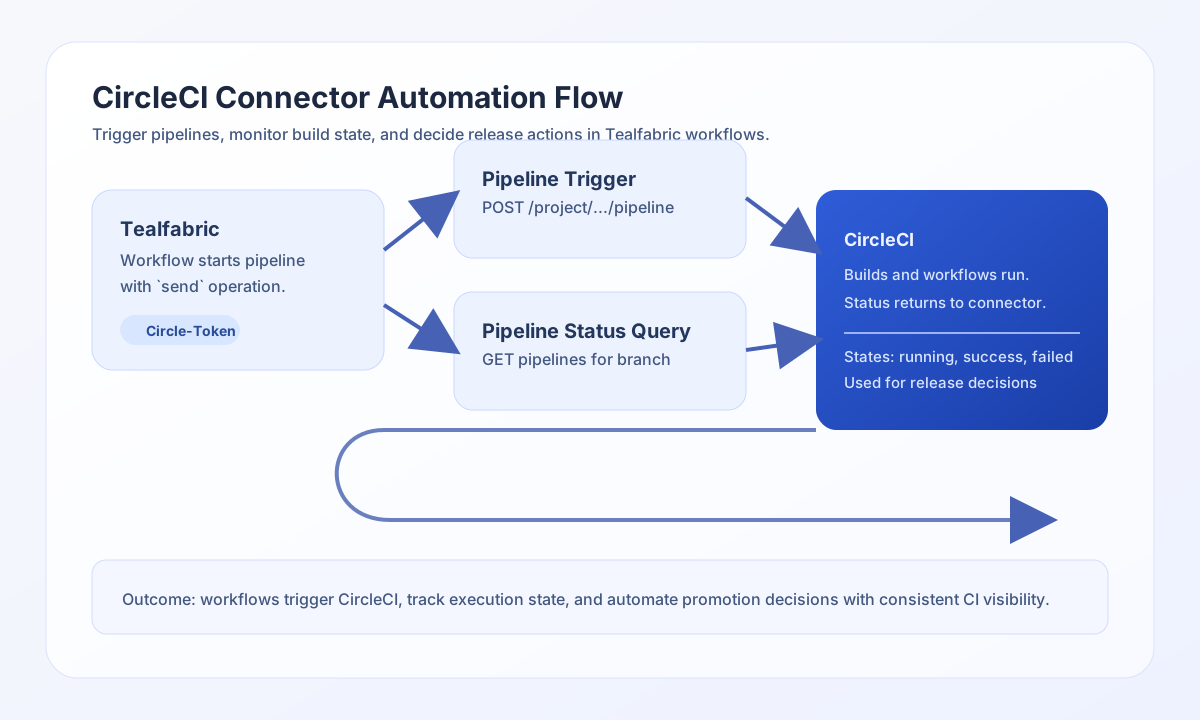
The CircleCI connector lets Tealfabric workflows trigger and monitor CI/CD pipelines through the CircleCI API v2. It is designed for release automation, deployment gating, and build-status checks that run inside broader workflow orchestration.
Document information
| Field | Value |
|---|---|
| Canonical URL | /docs/04_connecting-systems/connectors/c/circleci |
| Version (published date) | 2026-05-08 |
| Tags | connectors, reference, circleci |
| Connector ID | circleci-1.0.0 |
Configure connection
Set api_token to a CircleCI personal or project API token with access to the target organization and repository. The connector sends this credential in the Circle-Token header for each request, so token scope determines which projects your workflow can trigger and inspect.
Set timeout_seconds according to expected API latency. A practical timeout prevents false failures on slow responses while still surfacing real connectivity issues.
Run test to validate that api_token is present and accepted by CircleCI (GET me).
Trigger pipelines with send
Use send to create or update CircleCI resources. The default HTTP method is POST. Provide data for the JSON body, or omit data to send the full call payload (excluding routing fields) as the body, matching legacy behavior.
Paths are relative to https://circleci.com/api/v2/ (no leading slash).
const baseUrl = "https://api.example.com/api/v1";
const tenantId = "<TENANT_ID>";
const apiKey = "<API_KEY>";

async function triggerPipeline(integrationId: string) {
  const response = await fetch(`${baseUrl}/integrations/${encodeURIComponent(integrationId)}/execute`, {
    method: "POST",
    headers: {
      "X-API-Key": apiKey,
      "X-Tenant-ID": tenantId,
      "Content-Type": "application/json",
    },
    body: JSON.stringify({
      operation: "send",
      endpoint: "project/gh/<ORG>/<REPO>/pipeline",
      method: "POST",
      data: {
        branch: "main",
        parameters: {
          deploy_env: "production"
        }
      }
    }),
  });
  if (!response.ok) throw new Error(`Request failed: ${response.status}`);
  return response.json();
}
curl -X POST "https://api.example.com/api/v1/integrations/<ENTITY_ID>/execute" \
-H "X-API-Key: <API_KEY>" \
-H "X-Tenant-ID: <TENANT_ID>" \
-H "Content-Type: application/json" \
-d '{
"operation": "send",
"endpoint": "project/gh/<ORG>/<REPO>/pipeline",
"method": "POST",
"data": {
"branch": "main",
"parameters": {
"deploy_env": "production"
}
}
}'
{
  "success": true,
  "data": {
    "message": "CircleCI operation completed successfully",
    "result": {
      "id": "b7e9f3dc-4b69-47f2-a2d7-8f5d8a5d0a91",
      "state": "created",
      "number": 4821
    }
  }
}
Retrieve pipeline status with receive
Use receive to GET CircleCI resources. When the API returns an items array, the connector exposes pipeline_count and items; otherwise it wraps the single resource as a one-element items array.
const baseUrl = "https://api.example.com/api/v1";
const tenantId = "<TENANT_ID>";
const apiKey = "<API_KEY>";

async function listPipelines(integrationId: string) {
  const response = await fetch(`${baseUrl}/integrations/${encodeURIComponent(integrationId)}/execute`, {
    method: "POST",
    headers: {
      "X-API-Key": apiKey,
      "X-Tenant-ID": tenantId,
      "Content-Type": "application/json",
    },
    body: JSON.stringify({
      operation: "receive",
      endpoint: "project/gh/<ORG>/<REPO>/pipeline",
      query: {
        branch: "main",
        "page-token": "<PAGE_TOKEN>"
      }
    }),
  });
  if (!response.ok) throw new Error(`Request failed: ${response.status}`);
  return response.json();
}
curl -X POST "https://api.example.com/api/v1/integrations/<ENTITY_ID>/execute" \
-H "X-API-Key: <API_KEY>" \
-H "X-Tenant-ID: <TENANT_ID>" \
-H "Content-Type: application/json" \
-d '{
"operation": "receive",
"endpoint": "project/gh/<ORG>/<REPO>/pipeline",
"query": {
"branch": "main",
"page-token": "<PAGE_TOKEN>"
}
}'
{
  "success": true,
  "data": {
    "message": "CircleCI data retrieved successfully",
    "pipeline_count": 2,
    "items": [
      {
        "id": "b7e9f3dc-4b69-47f2-a2d7-8f5d8a5d0a91",
        "state": "success",
        "number": 4821
      },
      {
        "id": "4feef09a-0f69-4452-8f4b-4f61f1c6f4d6",
        "state": "running",
        "number": 4822
      }
    ]
  }
}
Execute arbitrary API calls with execute
Use execute when you need an explicit HTTP method (default GET) and optional JSON body. Provide body or data (alias) for write methods. Empty bodies are omitted on POST/PUT/PATCH, matching legacy PHP !empty($body) behavior.
curl -X POST "https://api.example.com/api/v1/integrations/<ENTITY_ID>/execute" \
  -H "X-API-Key: <API_KEY>" \
  -H "X-Tenant-ID: <TENANT_ID>" \
  -H "Content-Type: application/json" \
  -d '{
    "operation": "execute",
    "method": "GET",
    "endpoint": "pipeline/<PIPELINE_ID>/workflow"
  }'
{
  "success": true,
  "data": {
    "message": "CircleCI method executed successfully",
    "result": {
      "items": []
    }
  }
}
Test credentials with test
Use test to validate api_token and confirm connectivity via GET me. Only test enforces required-parameter validation up front; other operations rely on CircleCI API responses when credentials are missing or invalid.
curl -X POST "https://api.example.com/api/v1/integrations/<ENTITY_ID>/execute" \
  -H "X-API-Key: <API_KEY>" \
  -H "X-Tenant-ID: <TENANT_ID>" \
  -H "Content-Type: application/json" \
  -d '{
    "operation": "test"
  }'
{
  "success": true,
  "data": {
    "message": "CircleCI connection test successful",
    "details": {
      "api_base_url": "https://circleci.com/api/v2",
      "user": "Example User"
    }
  }
}
Reliability guidance
Most issues come from invalid token scope, malformed endpoint paths, or rate-limit responses. Validate credentials with test first, then verify endpoint and payload structure.
For production use, add retry with backoff for HTTP 429 and explicit state checks before promotion or rollback steps. This keeps CI/CD automation predictable and auditable.