ClickHouse Connector Guide
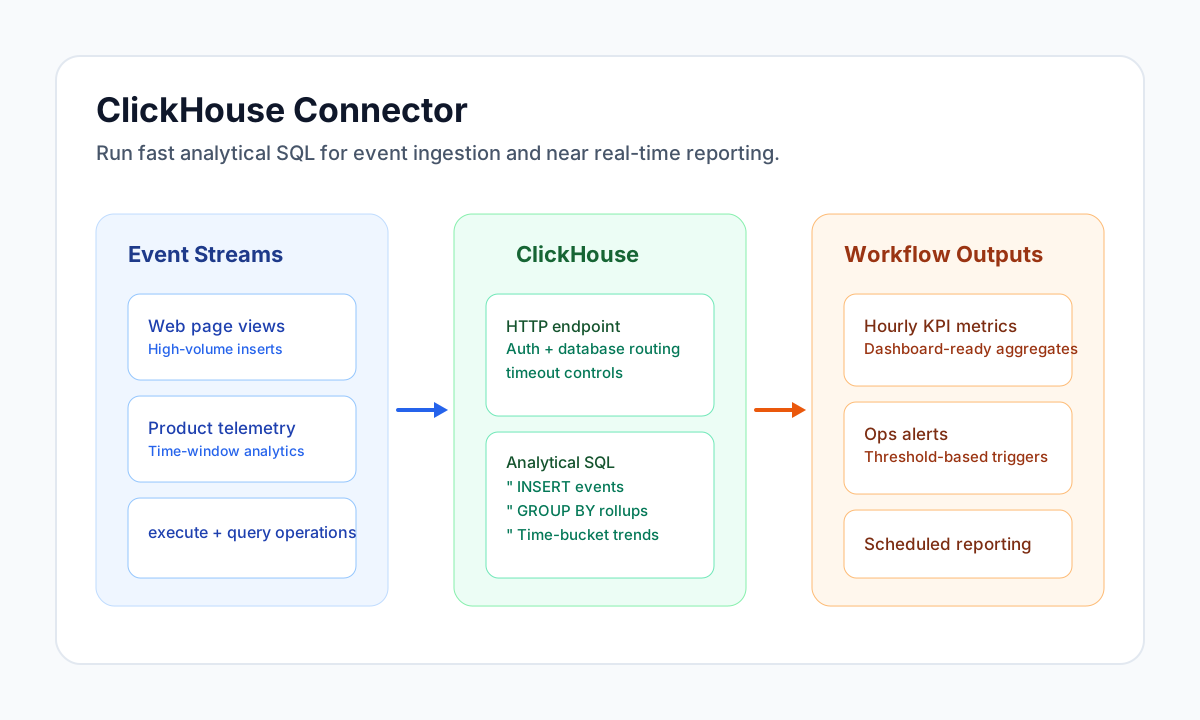
The ClickHouse connector enables Tealfabric workflows to run high-performance analytical SQL against ClickHouse over the HTTP interface. It is useful for near real-time reporting, operational metrics pipelines, and large-scale event analytics where low-latency aggregation matters.
Document information
| Field | Value |
|---|---|
| Canonical URL | /docs/04_connecting-systems/connectors/c/clickhouse |
| Version (published date) | 2026-06-17 |
| Tags | connectors, reference, clickhouse |
| Connector ID | clickhouse-1.0.0 |
Configuration and prerequisites
endpoint_url(required): ClickHouse HTTP endpoint (for examplehttp://localhost:8123orhttps://your-clickhouse-host:8443).username(optional): Username for HTTP Basic authentication when set.password(optional): Password paired withusername.database(optional): Default database sent as thedatabasequery parameter onqueryandinsert.timeout_seconds(optional): HTTP timeout in seconds (default30).
Use test to validate connectivity via GET /ping. Only test performs full configuration validation and returns the generic Configuration validation failed message when endpoint_url is missing; query and insert load configuration and rely on ClickHouse HTTP responses when parameters are incomplete.
Operation reference
query: execute SQL viaPOST /with the SQL text as the request body; non-empty response lines are split on tabs into row arrays.insert: post tab-separated row data viaPOST /(tableplusvaluesordataalias required by validation).test: validate configuration and callGET /ping.
Insert tab-separated data with insert
curl -X POST "https://api.example.com/api/v1/integrations/<INTEGRATION_ID>/execute" \
  -H "X-API-Key: <API_KEY>" \
  -H "X-Tenant-ID: <TENANT_ID>" \
  -H "Content-Type: application/json" \
  -d '{
    "operation": "insert",
    "table": "page_views",
    "values": "2026-05-08 20:24:00\tuser-42\t/pricing\t1830"
  }'
{
  "success": true,
  "data": {
    "row_count": 1,
    "data": {
      "message": "Data inserted successfully"
    }
  }
}
Run analytical reads with query
curl -X POST "https://api.example.com/api/v1/integrations/<INTEGRATION_ID>/execute" \
  -H "X-API-Key: <API_KEY>" \
  -H "X-Tenant-ID: <TENANT_ID>" \
  -H "Content-Type: application/json" \
  -d '{
    "operation": "query",
    "query": "SELECT toStartOfHour(event_time) AS hour_bucket, count() AS views FROM page_views WHERE event_time >= now() - INTERVAL 24 HOUR GROUP BY hour_bucket ORDER BY hour_bucket DESC LIMIT 24"
  }'
{
  "success": true,
  "data": {
    "row_count": 2,
    "data": [
      ["2026-05-08 20:00:00", "412"],
      ["2026-05-08 19:00:00", "388"]
    ]
  }
}
Test connectivity with test
curl -X POST "https://api.example.com/api/v1/integrations/<INTEGRATION_ID>/execute" \
  -H "X-API-Key: <API_KEY>" \
  -H "X-Tenant-ID: <TENANT_ID>" \
  -H "Content-Type: application/json" \
  -d '{
    "operation": "test"
  }'
{
  "success": true,
  "data": {
    "message": "ClickHouse connection test successful",
    "details": {
      "endpoint": "https://your-clickhouse-host:8443"
    }
  }
}
Production guidance
Most integration failures come from endpoint misconfiguration, authentication errors, or long-running queries that exceed timeout settings. Validate connection parameters early with test and implement retry logic for transient network issues.
Query responses are parsed as TabSeparated lines (tab-delimited columns per row). For richer typed output, include FORMAT JSONEachRow or FORMAT JSON in your SQL when your workload requires it.
For sustained performance, partition data appropriately in ClickHouse, avoid unbounded scans, and constrain query windows for scheduled jobs.
Related resources
Use the ClickHouse HTTP interface documentation, SQL reference, and performance guide for deeper tuning and query design.