Chroma Connector Guide
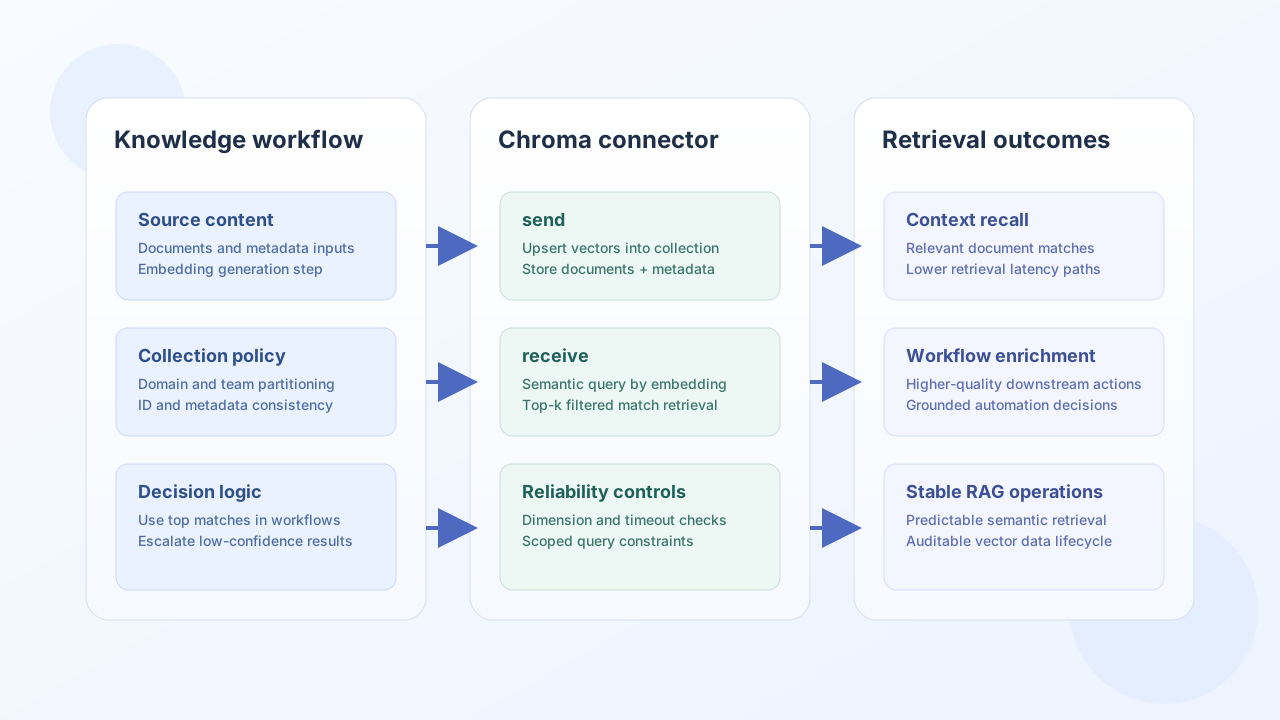
The Chroma connector lets Tealfabric workflows write and query vectorized knowledge for retrieval-augmented use cases. It is useful for semantic search, document matching, and context lookup pipelines that need low-latency vector storage.
Document information
| Field | Value |
|---|---|
| Canonical URL | /docs/04_connecting-systems/connectors/c/chroma |
| Version (published date) | 2026-05-08 |
| Tags | connectors, reference, chroma |
| Connector ID | chroma-1.0.0 |
Configuration and authentication
Configure the connector with your Chroma endpoint and optional API key so workflow requests route to the correct vector service. In production, secure endpoint access and isolate collections by use case to improve reliability and governance.
| Parameter | Required | Description |
|---|---|---|
endpoint_url | Yes | Chroma service URL, for example http://localhost:8000. Trailing slashes are stripped. |
api_key | No | When set, sent as Authorization: Bearer {api_key}. |
timeout_seconds | No | Request timeout in seconds (default 30). |
Run test after setup to verify connectivity via GET /api/v1/heartbeat before indexing or retrieval jobs begin.
Add records with create
Use create to add documents, embeddings, and metadata to a Chroma collection (POST /api/v1/collections/{collection}/add). Pass the Chroma request body in documents as either an object (ids, documents, embeddings, metadatas, …) or a non-empty array payload.
const baseUrl = "https://api.example.com/api/v1";
const tenantId = "<TENANT_ID>";
const apiKey = "<API_KEY>";

async function addChromaRecords(integrationId: string) {
  const response = await fetch(`${baseUrl}/integrations/${encodeURIComponent(integrationId)}/execute`, {
    method: "POST",
    headers: {
      "X-API-Key": apiKey,
      "X-Tenant-ID": tenantId,
      "Content-Type": "application/json",
    },
    body: JSON.stringify({
      operation: "create",
      collection: "support_kb",
      documents: {
        ids: ["doc-1001"],
        documents: ["How to reset MFA for enterprise users."],
        embeddings: [[0.013, -0.441, 0.224, 0.109]],
        metadatas: [{ source: "runbook", team: "support" }],
      },
    }),
  });
  if (!response.ok) throw new Error(`Request failed: ${response.status}`);
  const payload = await response.json();
  return payload.data;
}
curl -X POST "https://api.example.com/api/v1/integrations/<ENTITY_ID>/execute" \
-H "X-API-Key: <API_KEY>" \
-H "X-Tenant-ID: <TENANT_ID>" \
-H "Content-Type: application/json" \
-d '{
"operation": "create",
"collection": "support_kb",
"documents": {
"ids": ["doc-1001"],
"documents": ["How to reset MFA for enterprise users."],
"embeddings": [[0.013, -0.441, 0.224, 0.109]],
"metadatas": [{"source":"runbook","team":"support"}]
}
}'
{
  "success": true,
  "data": {
    "document_count": 4,
    "data": {}
  }
}
Fetch records with get
Use get to retrieve records by id (POST /api/v1/collections/{collection}/get). Omit ids or pass [] to fetch all records allowed by your Chroma deployment.
{
  "operation": "get",
  "collection": "support_kb",
  "ids": ["doc-1001"]
}
{
  "success": true,
  "data": {
    "document_count": 1,
    "data": {
      "ids": ["doc-1001"],
      "documents": ["How to reset MFA for enterprise users."],
      "metadatas": [{ "source": "runbook", "team": "support" }]
    }
  }
}
Query vectors with search
Use search for nearest-neighbor retrieval (POST /api/v1/collections/{collection}/query). Pass the Chroma query body in query.
const baseUrl = "https://api.example.com/api/v1";
const tenantId = "<TENANT_ID>";
const apiKey = "<API_KEY>";

async function searchChromaCollection(integrationId: string) {
  const response = await fetch(`${baseUrl}/integrations/${encodeURIComponent(integrationId)}/execute`, {
    method: "POST",
    headers: {
      "X-API-Key": apiKey,
      "X-Tenant-ID": tenantId,
      "Content-Type": "application/json",
    },
    body: JSON.stringify({
      operation: "search",
      collection: "support_kb",
      query: {
        query_embeddings: [[0.011, -0.420, 0.210, 0.120]],
        n_results: 3,
        where: { team: "support" },
      },
    }),
  });
  if (!response.ok) throw new Error(`Request failed: ${response.status}`);
  const payload = await response.json();
  return payload.data;
}
{
"success": true,
"data": {
"document_count": 1,
"data": {
"ids": [["doc-1001"]],
"documents": [["How to reset MFA for enterprise users."]],
"distances": [[0.08]]
}
}
}
Update and delete records
Use update with the same documents body shape as create (POST .../update). Use delete with a non-empty ids array (POST .../delete).
{
  "operation": "update",
  "collection": "support_kb",
  "documents": {
    "ids": ["doc-1001"],
    "documents": ["How to reset MFA for enterprise users (updated)."]
  }
}
{
  "operation": "delete",
  "collection": "support_kb",
  "ids": ["doc-1001"]
}
Test connectivity with test
test validates endpoint_url and probes GET /api/v1/heartbeat.
{
  "operation": "test"
}
{
  "success": true,
  "data": {
    "message": "Chroma connection test successful",
    "details": { "endpoint": "http://localhost:8000" }
  }
}
Reliability guidance
Most vector-store integration failures come from malformed embedding dimensions, missing collection setup, and broad queries that return irrelevant context. Validate embedding shape before upsert, namespace collections by domain, and monitor query latency with sensible n_results values.
These practices keep retrieval workflows accurate and stable in production.