Cohere API Connector Guide
The Cohere connector lets Tealfabric workflows run language and relevance tasks such as chat completion, classification, reranking, and embeddings through Cohere models. It is a strong fit when you need AI-assisted decisions directly inside workflow steps.
Document information
| Field | Value |
|---|---|
| Canonical URL | /docs/04_connecting-systems/connectors/c/cohere-api |
| Version (published date) | 2026-05-08 |
| Tags | connectors, reference, cohere-api |
| Connector ID | cohere-api-1.0.0 |
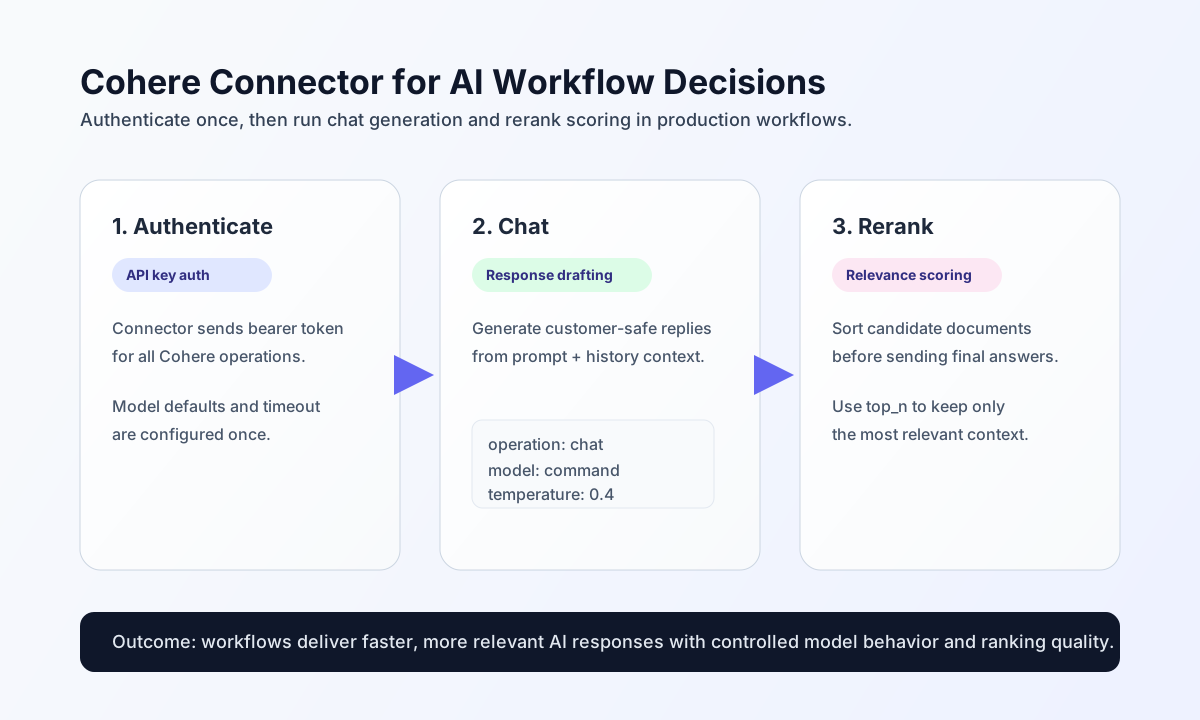
Configure authentication and model defaults
Configure the connector with a Cohere API key so workflows can authenticate without exposing credentials in each step payload. This setup keeps your integration secure and easier to rotate as environments change.
The required setting is api_key. Common optional settings are model (for example command or command-light) and timeout_seconds. Use test after configuration to confirm the key is valid and the connector can reach Cohere endpoints.
Generate assistant responses with chat
Use chat when a workflow needs grounded natural-language output, such as support replies, incident summaries, or triage recommendations. Keep prompts explicit and include short conversation context when continuity matters.
const baseUrl = "https://api.example.com/api/v1";
const tenantId = "<TENANT_ID>";
const apiKey = "<API_KEY>";

async function draftSupportReply(integrationId: string) {
  const response = await fetch(`${baseUrl}/integrations/${encodeURIComponent(integrationId)}/execute`, {
    method: "POST",
    headers: {
      "X-API-Key": apiKey,
      "X-Tenant-ID": tenantId,
      "Content-Type": "application/json",
    },
    body: JSON.stringify({
      operation: "chat",
      model: "command",
      message: "Draft a concise reply to a customer reporting intermittent login failures.",
      temperature: 0.4,
      messages: [
        { role: "user", content: "Our users are seeing random login errors." },
        { role: "assistant", content: "I can help draft a status response." }
      }
    }),
  });
  if (!response.ok) throw new Error(`Request failed: ${response.status}`);
  return response.json();
}
curl -X POST "https://api.example.com/api/v1/integrations/<ENTITY_ID>/execute" \
-H "X-API-Key: <API_KEY>" \
-H "X-Tenant-ID: <TENANT_ID>" \
-H "Content-Type: application/json" \
-d '{
"operation": "chat",
"model": "command",
"message": "Draft a concise reply to a customer reporting intermittent login failures.",
"temperature": 0.4,
"messages": [
{"role": "user", "content": "Our users are seeing random login errors."},
{"role": "assistant", "content": "I can help draft a status response."}
]
}'
{
  "success": true,
  "response": "Thanks for reporting this. We are investigating intermittent login failures and will share an update within 30 minutes."
}
Improve retrieval quality with rerank
Use rerank when your workflow already has candidate documents and needs better relevance ordering before sending content to users or downstream AI steps. This is especially effective in search and support knowledge workflows.
const baseUrl = "https://api.example.com/api/v1";
const tenantId = "<TENANT_ID>";
const apiKey = "<API_KEY>";

async function rerankHelpDocs(integrationId: string) {
  const response = await fetch(`${baseUrl}/integrations/${encodeURIComponent(integrationId)}/execute`, {
    method: "POST",
    headers: {
      "X-API-Key": apiKey,
      "X-Tenant-ID": tenantId,
      "Content-Type": "application/json",
    },
    body: JSON.stringify({
      operation: "rerank",
      model: "rerank-english-v2.0",
      query: "How do I rotate an API key without downtime?",
      documents: [
        "Resetting your password in the admin console...",
        "API key rotation procedure with overlap and rollback steps...",
        "Creating a new billing profile..."
      },
      top_n: 2
    }),
  });
  if (!response.ok) throw new Error(`Request failed: ${response.status}`);
  return response.json();
}
curl -X POST "https://api.example.com/api/v1/integrations/<ENTITY_ID>/execute" \
-H "X-API-Key: <API_KEY>" \
-H "X-Tenant-ID: <TENANT_ID>" \
-H "Content-Type: application/json" \
-d '{
"operation": "rerank",
"model": "rerank-english-v2.0",
"query": "How do I rotate an API key without downtime?",
"documents": [
"Resetting your password in the admin console...",
"API key rotation procedure with overlap and rollback steps...",
"Creating a new billing profile..."
],
"top_n": 2
}'
{
  "success": true,
  "results": [
    {
      "index": 1,
      "relevance_score": 0.992
    },
    {
      "index": 0,
      "relevance_score": 0.184
    }
  ]
}
Operational guidance
Cohere requests can fail due to invalid credentials, model mismatches, or rate limiting. In production workflows, treat 401/403 as credential issues, validate per-operation model compatibility, and apply exponential backoff when you receive 429.
For quality and cost control, keep prompts concise, choose the lightest model that meets your use case, and monitor token-heavy operations. These habits help maintain stable latency and predictable spend as usage grows.