Dropbox API Connector Guide
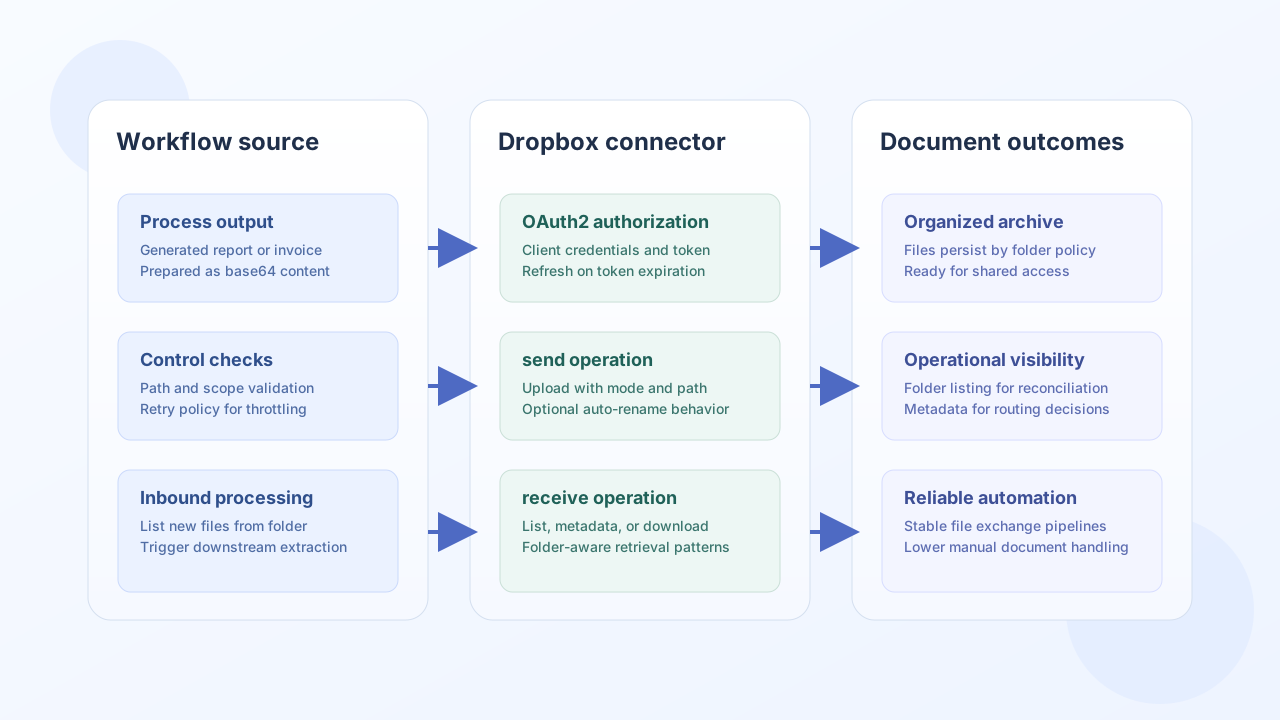
The Dropbox API connector helps Tealfabric workflows move files in and out of Dropbox for document processing, archival automation, and downstream system synchronization. It supports OAuth2 credentials and the core operations most teams need: upload, list, metadata lookup, and download.
Document information
| Field | Value |
|---|---|
| Canonical URL | /docs/04_connecting-systems/connectors/d/dropbox |
| Version (published date) | 2026-05-08 |
| Tags | connectors, reference, dropbox |
| Connector ID | dropbox-1.0.0 |
Configuration and OAuth2 setup
Configure Dropbox app credentials so the connector can request and refresh access tokens. Your app redirect URL must match Dropbox app settings exactly, otherwise authorization will fail before runtime operations begin.
client_id(required): Dropbox OAuth client ID.client_secret(required): Dropbox OAuth client secret.redirect_uri(required): OAuth callback URL registered in Dropbox.access_tokenandrefresh_token(optional): stored tokens after authorization.remote_path(optional): default Dropbox path merged intoreceivebodies whenpathis omitted (default/).scope(optional): space-separated scopes such asfiles.content.read files.content.write.timeout_seconds(optional): request timeout value.
The test operation validates OAuth app configuration (client_id, client_secret, redirect_uri) and returns Configuration validation failed when that check fails. Other operations require a valid access_token but do not re-validate OAuth app credentials on every call.
Before production, complete an authorization pass and verify access with a connector test run. This catches scope and callback issues early.
Upload files with send
Use send for Dropbox API v2 RPC write calls. The default endpoint is files/upload with method POST. Pass RPC arguments in data (or body) per the Dropbox HTTP API reference.
const baseUrl = "https://api.example.com/api/v1";
const tenantId = "<TENANT_ID>";
const apiKey = "<API_KEY>";

async function deleteFile(integrationId: string, dropboxPath: string) {
  const response = await fetch(`${baseUrl}/integrations/${encodeURIComponent(integrationId)}/execute`, {
    method: "POST",
    headers: {
      "X-API-Key": apiKey,
      "X-Tenant-ID": tenantId,
      "Content-Type": "application/json",
    },
    body: JSON.stringify({
      operation: "send",
      endpoint: "files/delete_v2",
      method: "POST",
      data: {
        path: dropboxPath
      }
    }),
  });
  if (!response.ok) throw new Error(`Request failed: ${response.status}`);
  return response.json();
}
curl -X POST "https://api.example.com/api/v1/integrations/<ENTITY_ID>/execute" \
-H "X-API-Key: <API_KEY>" \
-H "X-Tenant-ID: <TENANT_ID>" \
-H "Content-Type: application/json" \
-d '{
"operation": "send",
"endpoint": "files/delete_v2",
"method": "POST",
"data": {
"path": "/reports/weekly-summary.pdf"
}
}'
{
  "success": true,
  "data": {
    "message_count": 1,
    "data": {
      "metadata": {
        ".tag": "file",
        "name": "weekly-summary.pdf",
        "path_display": "/reports/weekly-summary.pdf"
      }
    },
    "response": {
      "metadata": {
        ".tag": "file",
        "name": "weekly-summary.pdf",
        "path_display": "/reports/weekly-summary.pdf"
      }
    }
  }
}
List folder contents with receive
Use receive for Dropbox API v2 RPC read/list calls. The default endpoint is files/list_folder (always POST). Optional query fields merge into the JSON body together with path from remote_path when path is not provided.
const baseUrl = "https://api.example.com/api/v1";
const tenantId = "<TENANT_ID>";
const apiKey = "<API_KEY>";

async function listInboundFiles(integrationId: string) {
  const response = await fetch(`${baseUrl}/integrations/${encodeURIComponent(integrationId)}/execute`, {
    method: "POST",
    headers: {
      "X-API-Key": apiKey,
      "X-Tenant-ID": tenantId,
      "Content-Type": "application/json",
    },
    body: JSON.stringify({
      operation: "receive",
      endpoint: "files/list_folder",
      query: {
        path: "/inbound",
        recursive: false
      }
    }),
  });
  if (!response.ok) throw new Error(`Request failed: ${response.status}`);
  const payload = await response.json();
  return payload.data?.data ?? [];
}
curl -X POST "https://api.example.com/api/v1/integrations/<ENTITY_ID>/execute" \
-H "X-API-Key: <API_KEY>" \
-H "X-Tenant-ID: <TENANT_ID>" \
-H "Content-Type: application/json" \
-d '{
"operation": "receive",
"endpoint": "files/list_folder",
"query": {
"path": "/inbound",
"recursive": false
}
}'
{
  "success": true,
  "data": {
    "message_count": 2,
    "data": [
      {
        ".tag": "file",
        "name": "invoice-1007.pdf",
        "path_display": "/inbound/invoice-1007.pdf",
        "size": 49231
      },
      {
        ".tag": "file",
        "name": "invoice-1008.pdf",
        "path_display": "/inbound/invoice-1008.pdf",
        "size": 50114
      }
    ],
    "total_size": 2
  }
}
Reliability guidance
Most operational issues come from expired OAuth tokens, missing scopes, or incorrect Dropbox paths. Use connector test checks in deployment pipelines, enforce retry with backoff for rate-limited responses, and validate that all paths begin with / before execution.
The connector refreshes access tokens on HTTP 401 when a refresh_token is configured. Refreshed tokens are used in-memory for the current execution only; persistence back to integration secret storage is not wired in this connector runtime.
These practices keep document workflows stable as file volume and automation complexity increase.