DigitalOcean API Connector Guide
The DigitalOcean API connector enables Tealfabric workflows to manage cloud resources such as Droplets, networking, and account data through the DigitalOcean v2 API. It is useful for infrastructure automation where provisioning and state retrieval must run in repeatable workflow steps.
Document information
| Field | Value |
|---|---|
| Canonical URL | /docs/04_connecting-systems/connectors/d/digitalocean-api |
| Version (published date) | 2026-05-08 |
| Tags | connectors, reference, digitalocean-api |
| Connector ID | digitalocean-api-1.0.0 |
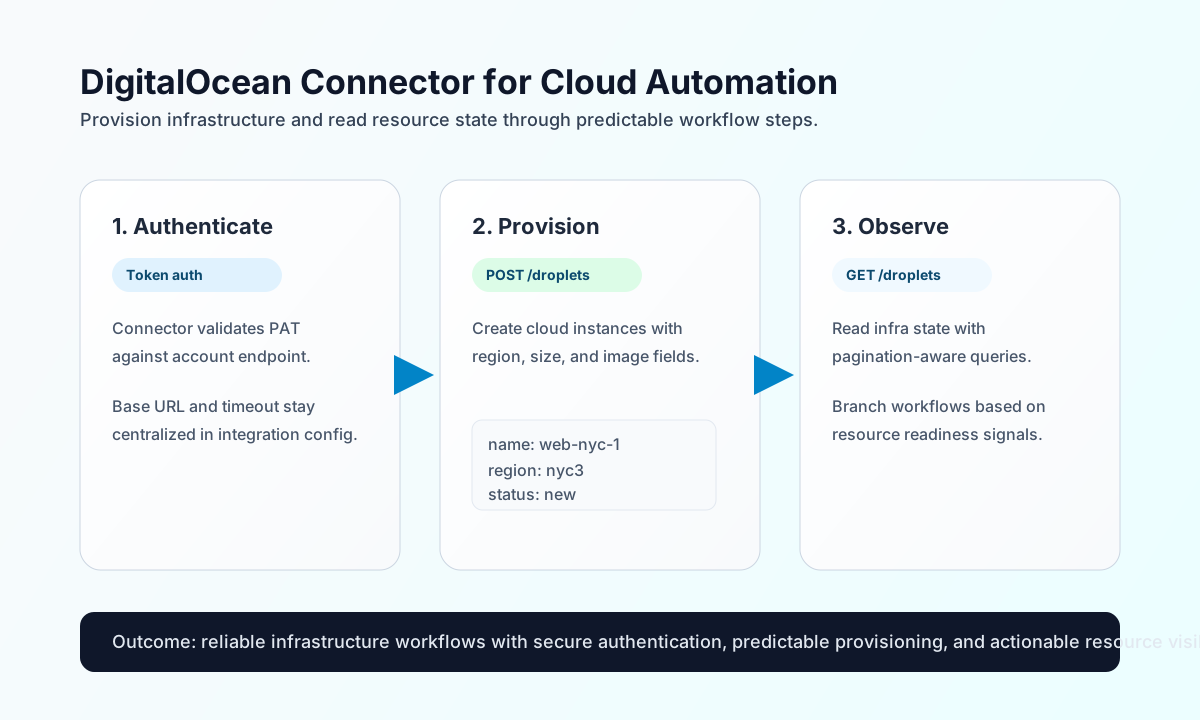
Configure authentication and endpoint defaults
Start by configuring the connector with a DigitalOcean personal access token so workflow runs can authenticate without exposing credentials in individual steps. This setup gives you centralized secret management while keeping deployment automation consistent across environments.
The required setting is api_token. Optional settings include base_url (default https://api.digitalocean.com/v2) and timeout_seconds (default 30). After configuration, run test to validate token access by calling the account endpoint before you automate create or update operations.
Create or update cloud resources with send
Use send for write operations like creating a Droplet or updating infrastructure metadata. Keep method, endpoint, and payload explicit so retries remain predictable and easier to audit.
const baseUrl = "https://api.example.com/api/v1";
const tenantId = "<TENANT_ID>";
const apiKey = "<API_KEY>";

async function createDroplet(integrationId: string) {
  const response = await fetch(`${baseUrl}/integrations/${encodeURIComponent(integrationId)}/execute`, {
    method: "POST",
    headers: {
      "X-API-Key": apiKey,
      "X-Tenant-ID": tenantId,
      "Content-Type": "application/json",
    },
    body: JSON.stringify({
      operation: "send",
      endpoint: "droplets",
      method: "POST",
      data: {
        name: "web-nyc-1",
        region: "nyc3",
        size: "s-1vcpu-1gb",
        image: "ubuntu-24-04-x64"
      }
    }),
  });
  if (!response.ok) throw new Error(`Request failed: ${response.status}`);
  return response.json();
}
curl -X POST "https://api.example.com/api/v1/integrations/<ENTITY_ID>/execute" \
-H "X-API-Key: <API_KEY>" \
-H "X-Tenant-ID: <TENANT_ID>" \
-H "Content-Type: application/json" \
-d '{
"operation": "send",
"endpoint": "droplets",
"method": "POST",
"data": {
"name": "web-nyc-1",
"region": "nyc3",
"size": "s-1vcpu-1gb",
"image": "ubuntu-24-04-x64"
}
}'
{
  "success": true,
  "result": {
    "droplet": {
      "id": 456789123,
      "name": "web-nyc-1",
      "status": "new"
    }
  }
}
Retrieve infrastructure state with receive
Use receive to read resource lists and health state for reporting or conditional workflow branching. Include query parameters such as per_page and page to keep response sizes controlled in larger environments.
const baseUrl = "https://api.example.com/api/v1";
const tenantId = "<TENANT_ID>";
const apiKey = "<API_KEY>";

async function listDroplets(integrationId: string) {
  const response = await fetch(`${baseUrl}/integrations/${encodeURIComponent(integrationId)}/execute`, {
    method: "POST",
    headers: {
      "X-API-Key": apiKey,
      "X-Tenant-ID": tenantId,
      "Content-Type": "application/json",
    },
    body: JSON.stringify({
      operation: "receive",
      endpoint: "droplets",
      query: {
        per_page: 25,
        page: 1
      }
    }),
  });
  if (!response.ok) throw new Error(`Request failed: ${response.status}`);
  return response.json();
}
curl -X POST "https://api.example.com/api/v1/integrations/<ENTITY_ID>/execute" \
-H "X-API-Key: <API_KEY>" \
-H "X-Tenant-ID: <TENANT_ID>" \
-H "Content-Type: application/json" \
-d '{
"operation": "receive",
"endpoint": "droplets",
"query": {
"per_page": 25,
"page": 1
}
}'
{
  "success": true,
  "result": {
    "droplets": [
      {
        "id": 456789123,
        "name": "web-nyc-1",
        "status": "active"
      }
    ]
  }
}
Reliability guidance
Most failures occur due to invalid tokens, permission limits, or API throttling. If calls fail, validate token scope first, then confirm endpoint paths and methods, and finally add retry with exponential backoff for 429 responses.
For stable automation at scale, keep write actions idempotent where possible and read in paginated batches. This reduces duplicate provisioning and improves resilience during high-volume infrastructure events.