Docker Hub Connector Guide
The Docker Hub connector enables Tealfabric workflows to manage repositories and tags through the Docker Hub API. It is useful for image publishing pipelines, tag governance, and release visibility automation.
Document information
| Field | Value |
|---|---|
| Canonical URL | /docs/04_connecting-systems/connectors/d/docker-hub |
| Version (published date) | 2026-05-08 |
| Tags | connectors, reference, docker-hub |
| Connector ID | docker-hub-1.0.0 |
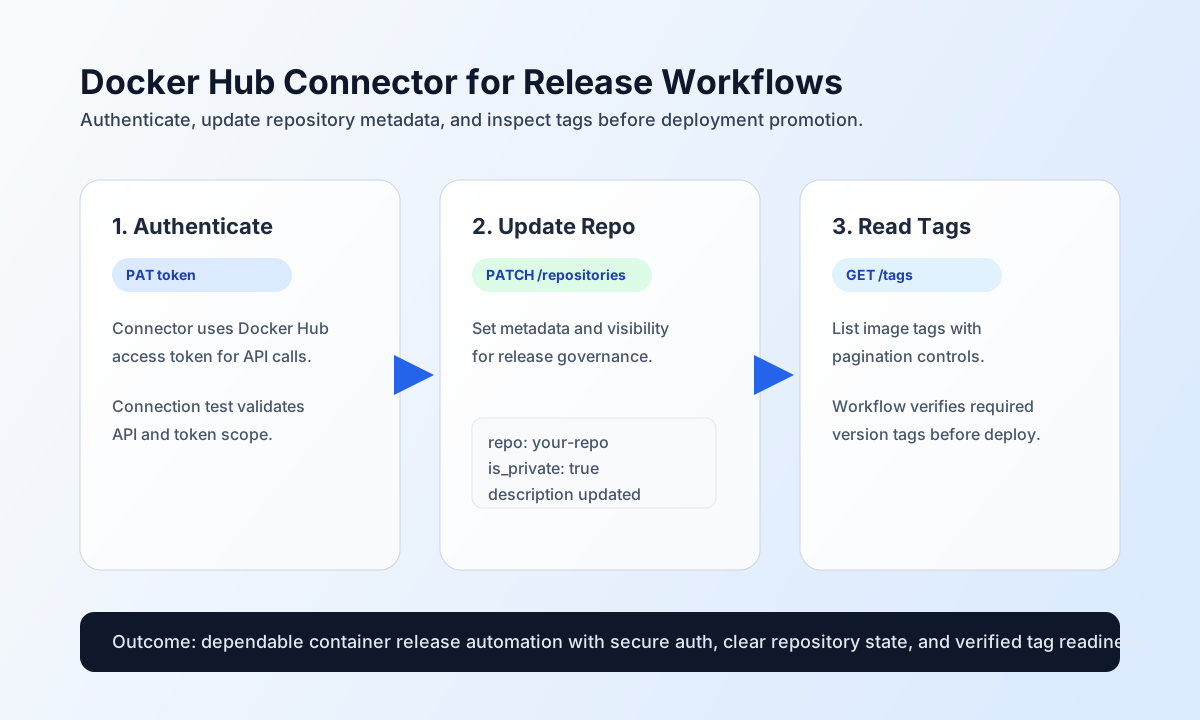
Configure API authentication
Configure the connector with a Docker Hub personal access token so workflows can authenticate without embedding account secrets in each step payload. This setup supports secure, repeatable image management automation.
The required setting is token. Optional settings are base_url (default https://hub.docker.com/v2) and timeout_seconds. Run test to validate the personal access token before production usage; only test enforces required token, while send/receive/sync/batch proceed with the configured bearer token when present.
Create or update repository metadata with send
Use send for repository-side write operations such as creation and metadata updates. Keep namespace and repository identifiers explicit so release workflows remain auditable.
const baseUrl = "https://api.example.com/api/v1";
const tenantId = "<TENANT_ID>";
const apiKey = "<API_KEY>";

async function updateRepository(integrationId: string) {
  const response = await fetch(`${baseUrl}/integrations/${encodeURIComponent(integrationId)}/execute`, {
    method: "POST",
    headers: {
      "X-API-Key": apiKey,
      "X-Tenant-ID": tenantId,
      "Content-Type": "application/json",
    },
    body: JSON.stringify({
      operation: "send",
      endpoint: "repositories/your-namespace/your-repo",
      method: "PATCH",
      data: {
        description: "Production container image for order-service",
        is_private: true
      }
    }),
  });
  if (!response.ok) throw new Error(`Request failed: ${response.status}`);
  return response.json();
}
curl -X POST "https://api.example.com/api/v1/integrations/<ENTITY_ID>/execute" \
-H "X-API-Key: <API_KEY>" \
-H "X-Tenant-ID: <TENANT_ID>" \
-H "Content-Type: application/json" \
-d '{
"operation": "send",
"endpoint": "repositories/your-namespace/your-repo",
"method": "PATCH",
"data": {
"description": "Production container image for order-service",
"is_private": true
}
}'
{
  "success": true,
  "data": {
    "message_count": 1,
    "data": {
      "namespace": "your-namespace",
      "name": "your-repo",
      "is_private": true
    },
    "response": {
      "namespace": "your-namespace",
      "name": "your-repo",
      "is_private": true
    }
  }
}
Retrieve repositories and tags with receive
Use receive to list repositories, inspect tags, and support release-quality checks in deployment workflows. Apply pagination (page, page_size) to keep responses manageable.
const baseUrl = "https://api.example.com/api/v1";
const tenantId = "<TENANT_ID>";
const apiKey = "<API_KEY>";

async function listRepositoryTags(integrationId: string) {
  const response = await fetch(`${baseUrl}/integrations/${encodeURIComponent(integrationId)}/execute`, {
    method: "POST",
    headers: {
      "X-API-Key": apiKey,
      "X-Tenant-ID": tenantId,
      "Content-Type": "application/json",
    },
    body: JSON.stringify({
      operation: "receive",
      endpoint: "repositories/your-namespace/your-repo/tags",
      query: {
        page: 1,
        page_size: 20
      }
    }),
  });
  if (!response.ok) throw new Error(`Request failed: ${response.status}`);
  return response.json();
}
curl -X POST "https://api.example.com/api/v1/integrations/<ENTITY_ID>/execute" \
-H "X-API-Key: <API_KEY>" \
-H "X-Tenant-ID: <TENANT_ID>" \
-H "Content-Type: application/json" \
-d '{
"operation": "receive",
"endpoint": "repositories/your-namespace/your-repo/tags",
"query": {
"page": 1,
"page_size": 20
}
}'
{
  "success": true,
  "data": {
    "message_count": 1,
    "data": [
      {
        "name": "v1.12.0",
        "last_updated": "2026-05-08T15:55:00.000000Z"
      }
    ],
    "total_size": 1
  }
}
Reliability guidance
Most production errors come from invalid tokens, namespace/repository path mismatches, and rate limit responses. If requests fail, validate PAT scope first, then confirm repository identifiers, and apply exponential backoff on 429 results.
For stable release automation, keep pagination enabled on tag listings and verify tag presence before deployment promotion. This prevents drift between image publication and deployment workflows.