Dell Boomi Connector Guide
The Dell Boomi connector allows Tealfabric workflows to trigger Boomi processes and retrieve execution results from AtomSphere. It is useful when Tealfabric orchestrates enterprise integrations and needs process-level visibility for downstream workflow decisions.
Document information
| Field | Value |
|---|---|
| Canonical URL | /docs/04_connecting-systems/connectors/d/dell-boomi |
| Version (published date) | 2026-05-08 |
| Tags | connectors, reference, dell-boomi |
| Connector ID | dell-boomi-1.0.0 |
Configure Boomi access
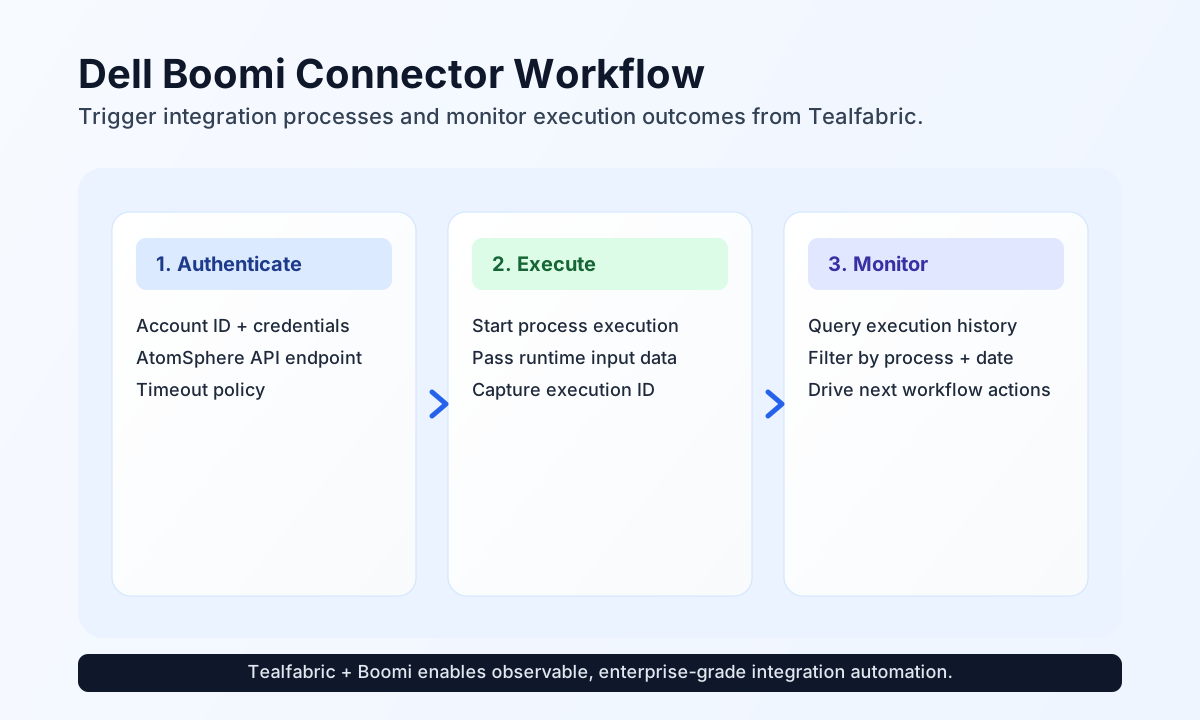
Set up the connector with your base_url, account_id, username, and password so workflow steps can authenticate against the Boomi API with HTTP Basic authentication. The connector always appends accountId to the query string. Most installations also define timeout_seconds based on process runtime expectations.
Before production rollout, confirm that the integration user has permissions for the process and environment resources your workflows call. This prevents execution failures caused by account scope restrictions.
Run test during setup to confirm credentials and list access via GET api/rest/v1/process.
Trigger Boomi processes with send
Use send to initiate process execution and pass runtime input values to Boomi. This is a common pattern for synchronizing operational events from Tealfabric into ERP, CRM, or data service flows managed in AtomSphere.
const baseUrl = "https://api.example.com/api/v1";
const tenantId = "<TENANT_ID>";
const apiKey = "<API_KEY>";

async function executeBoomiProcess(integrationId: string) {
  const response = await fetch(`${baseUrl}/integrations/${encodeURIComponent(integrationId)}/execute`, {
    method: "POST",
    headers: {
      "X-API-Key": apiKey,
      "X-Tenant-ID": tenantId,
      "Content-Type": "application/json",
    },
    body: JSON.stringify({
      operation: "send",
      endpoint: "api/rest/v1/ProcessExecution",
      method: "POST",
      data: {
        ProcessId: "process-uuid-here",
        InputData: {
          orderId: "ORD-10425",
          status: "released"
        }
      }
    }),
  });
  if (!response.ok) throw new Error(`Request failed: ${response.status}`);
  return response.json();
}
curl -X POST "https://api.example.com/api/v1/integrations/<ENTITY_ID>/execute" \
-H "X-API-Key: <API_KEY>" \
-H "X-Tenant-ID: <TENANT_ID>" \
-H "Content-Type: application/json" \
-d '{
"operation": "send",
"endpoint": "api/rest/v1/ProcessExecution",
"method": "POST",
"data": {
"ProcessId": "process-uuid-here",
"InputData": {
"orderId": "ORD-10425",
"status": "released"
}
}
}'
{
  "success": true,
  "data": {
    "message": "Boomi operation completed successfully",
    "result": {
      "id": "execution-uuid-here",
      "status": "STARTED"
    }
  },
  "metadata": {
    "processing_time_ms": 42
  }
}
Monitor execution history with receive
Use receive to fetch execution status and timelines for process observability and error handling. Filtering by process and date range helps workflow logic react only to relevant execution events.
const baseUrl = "https://api.example.com/api/v1";
const tenantId = "<TENANT_ID>";
const apiKey = "<API_KEY>";

async function getExecutionHistory(integrationId: string) {
  const response = await fetch(`${baseUrl}/integrations/${encodeURIComponent(integrationId)}/execute`, {
    method: "POST",
    headers: {
      "X-API-Key": apiKey,
      "X-Tenant-ID": tenantId,
      "Content-Type": "application/json",
    },
    body: JSON.stringify({
      operation: "receive",
      endpoint: "api/rest/v1/ProcessExecution",
      query: {
        filter: "ProcessId=process-uuid-here",
        startDate: "2026-05-01T00:00:00Z",
        endDate: "2026-05-08T23:59:59Z",
        limit: 20
      }
    }),
  });
  if (!response.ok) throw new Error(`Request failed: ${response.status}`);
  return response.json();
}
curl -X POST "https://api.example.com/api/v1/integrations/<ENTITY_ID>/execute" \
-H "X-API-Key: <API_KEY>" \
-H "X-Tenant-ID: <TENANT_ID>" \
-H "Content-Type: application/json" \
-d '{
"operation": "receive",
"endpoint": "api/rest/v1/ProcessExecution",
"query": {
"filter": "ProcessId=process-uuid-here",
"startDate": "2026-05-01T00:00:00Z",
"endDate": "2026-05-08T23:59:59Z",
"limit": 20
}
}'
{
  "success": true,
  "data": {
    "message": "Boomi data retrieved successfully",
    "process_count": 1,
    "items": [
      {
        "id": "execution-uuid-here",
        "status": "COMPLETE",
        "startTime": "2026-05-08T16:10:22Z",
        "endTime": "2026-05-08T16:10:37Z"
      }
    ]
  },
  "metadata": {
    "processing_time_ms": 38
  }
}
When Boomi returns a top-level result array, items is that array and process_count is its length. When result is a single object, items is that object (legacy PHP parity) and process_count reflects count() semantics on the object keys.
Reliability guidance
Most failures come from credential mismatches, endpoint path errors, or rate limiting under burst traffic. If requests fail, verify account credentials and endpoint spelling first, then apply retry with backoff for transient throttling responses.
For dependable production orchestration, treat process execution as asynchronous, poll for status when needed, and log execution IDs in your workflow context. This gives clear observability and makes incident troubleshooting significantly faster.