Discord Gateway Connector Guide
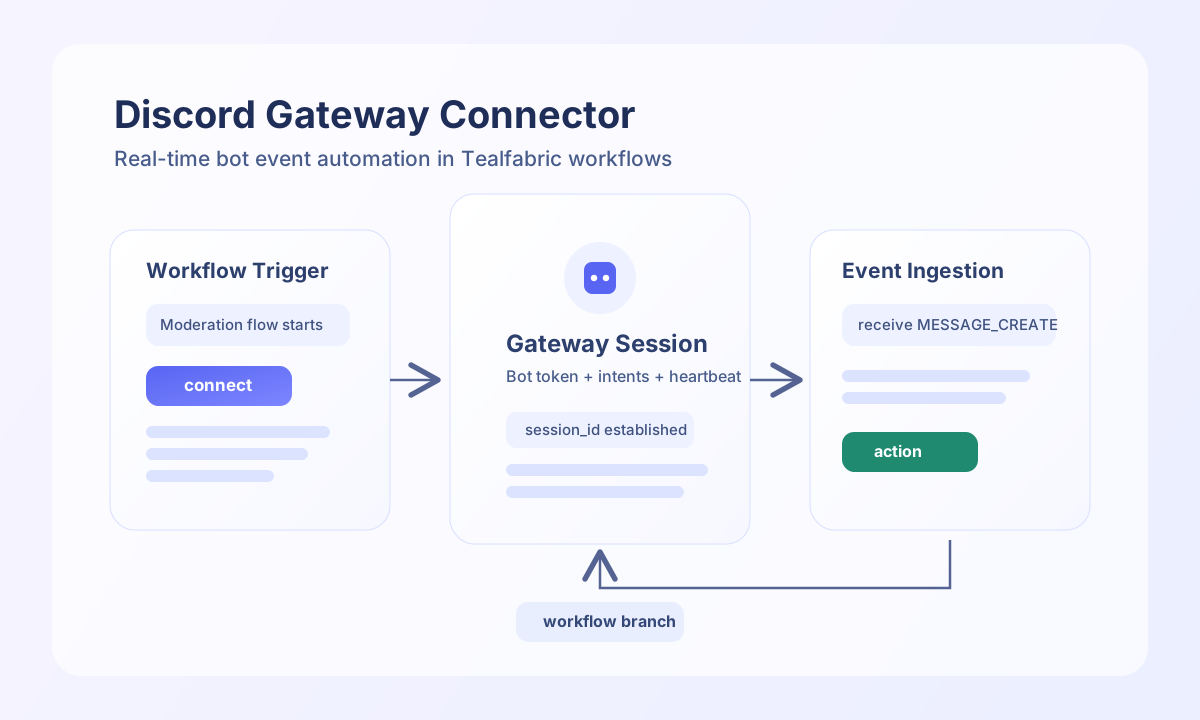
The Discord Gateway connector supports Discord bot workflows that need Gateway-oriented operations. It authenticates with a bot token, probes the Gateway endpoint, and can send channel messages via the Discord REST API. Full in-process WebSocket streaming is not implemented—the connector returns Gateway URLs and echoes supplied event payloads for workflow orchestration.
Document information
| Field | Value |
|---|---|
| Canonical URL | /docs/04_connecting-systems/connectors/d/discord-gateway |
| Version (published date) | 2026-06-17 |
| Tags | connectors, reference, discord-gateway |
| Connector ID | discord-gateway-1.0.0 |
Configuration and authentication
Configure the integration with a Discord bot token and optional Gateway tuning parameters. The connector uses Authorization: Bot <token> against https://discord.com/api/v10.
bot_token(required, aliastoken): Discord bot token from the Developer Portal.intents(optional): Gateway intents bitmask; default513(GUILDS + GUILD_MESSAGES). Used by downstream WebSocket clients, not enforced by this connector's REST calls.timeout_seconds(optional): HTTP timeout; default30.reconnect_attempts(optional): Reconnect budget for external Gateway clients; default5. Not used by in-connector REST operations.
Obtain a Gateway URL with connect
Use connect to call GET /gateway and return a v10 JSON Gateway URL. No WebSocket session is opened inside the connector.
const baseUrl = "https://api.example.com/api/v1";
const tenantId = "<TENANT_ID>";
const apiKey = "<API_KEY>";

async function connectDiscordGateway(integrationId: string) {
  const response = await fetch(`${baseUrl}/integrations/${encodeURIComponent(integrationId)}/execute`, {
    method: "POST",
    headers: {
      "X-API-Key": apiKey,
      "X-Tenant-ID": tenantId,
      "Content-Type": "application/json",
    },
    body: JSON.stringify({ operation: "connect" }),
  });
  if (!response.ok) throw new Error(`Request failed: ${response.status}`);
  return response.json();
}
curl -X POST "https://api.example.com/api/v1/integrations/<ENTITY_ID>/execute" \
-H "X-API-Key: <API_KEY>" \
-H "X-Tenant-ID: <TENANT_ID>" \
-H "Content-Type: application/json" \
-d '{"operation": "connect"}'
{
  "success": true,
  "data": {
    "message_count": 0,
    "gateway_url": "wss://gateway.discord.gg/?v=10&encoding=json",
    "message": "Gateway URL obtained. Full WebSocket implementation requires WebSocket client library."
  }
}
Send channel messages with send
Use send to create a channel message via POST /channels/{channel_id}/messages. Provide channel_id (alias channel) and content (aliases text, message).
const baseUrl = "https://api.example.com/api/v1";
const tenantId = "<TENANT_ID>";
const apiKey = "<API_KEY>";

async function sendGatewayMessage(integrationId: string) {
  const response = await fetch(`${baseUrl}/integrations/${encodeURIComponent(integrationId)}/execute`, {
    method: "POST",
    headers: {
      "X-API-Key": apiKey,
      "X-Tenant-ID": tenantId,
      "Content-Type": "application/json",
    },
    body: JSON.stringify({
      operation: "send",
      channel_id: "123456789012345678",
      content: "Workflow alert: deployment completed."
    }),
  });
  if (!response.ok) throw new Error(`Request failed: ${response.status}`);
  return response.json();
}
curl -X POST "https://api.example.com/api/v1/integrations/<ENTITY_ID>/execute" \
-H "X-API-Key: <API_KEY>" \
-H "X-Tenant-ID: <TENANT_ID>" \
-H "Content-Type: application/json" \
-d '{
"operation": "send",
"channel_id": "123456789012345678",
"content": "Workflow alert: deployment completed."
}'
{
  "success": true,
  "data": {
    "message_count": 1,
    "data": {
      "id": "1311111111111111111",
      "channel_id": "123456789012345678",
      "content": "Workflow alert: deployment completed."
    }
  }
}
Pass through Gateway events with receive
Use receive to echo a supplied Gateway dispatch payload. The connector does not read live WebSocket frames; pass event in call data when your workflow already holds the dispatch object.
{
  "operation": "receive",
  "event": {
    "t": "MESSAGE_CREATE",
    "s": 42,
    "op": 0,
    "d": {
      "channel_id": "123456789012345678",
      "content": "hello"
    }
  }
}
{
  "success": true,
  "data": {
    "message_count": 1,
    "event": {
      "t": "MESSAGE_CREATE",
      "s": 42,
      "op": 0,
      "d": {
        "channel_id": "123456789012345678",
        "content": "hello"
      }
    }
  }
}
Close sessions with disconnect
Use disconnect as a state-cleanup stub. It returns message_count: 0 and performs no remote API call.
Validate credentials with test
Use test to validate bot_token and probe GET /gateway. A successful test returns Gateway URL and shard metadata.
{
  "success": true,
  "data": {
    "message": "Discord Gateway connection test successful",
    "details": {
      "url": "wss://gateway.discord.gg",
      "shards": 1
    }
  }
}
Production reliability guidance
Gateway automation that needs live events must open a WebSocket client against the URL from connect, handle heartbeats, and manage reconnects using your configured intents and reconnect_attempts. This connector provides REST probes and message-send fallback only.
Authentication failures usually indicate an invalid bot token or missing Developer Portal permissions. Review enabled intents whenever expected event types stop arriving in external Gateway clients.
Related resources
For opcode, intent, and event details, refer to the Discord Gateway documentation.