Discord API Connector Guide
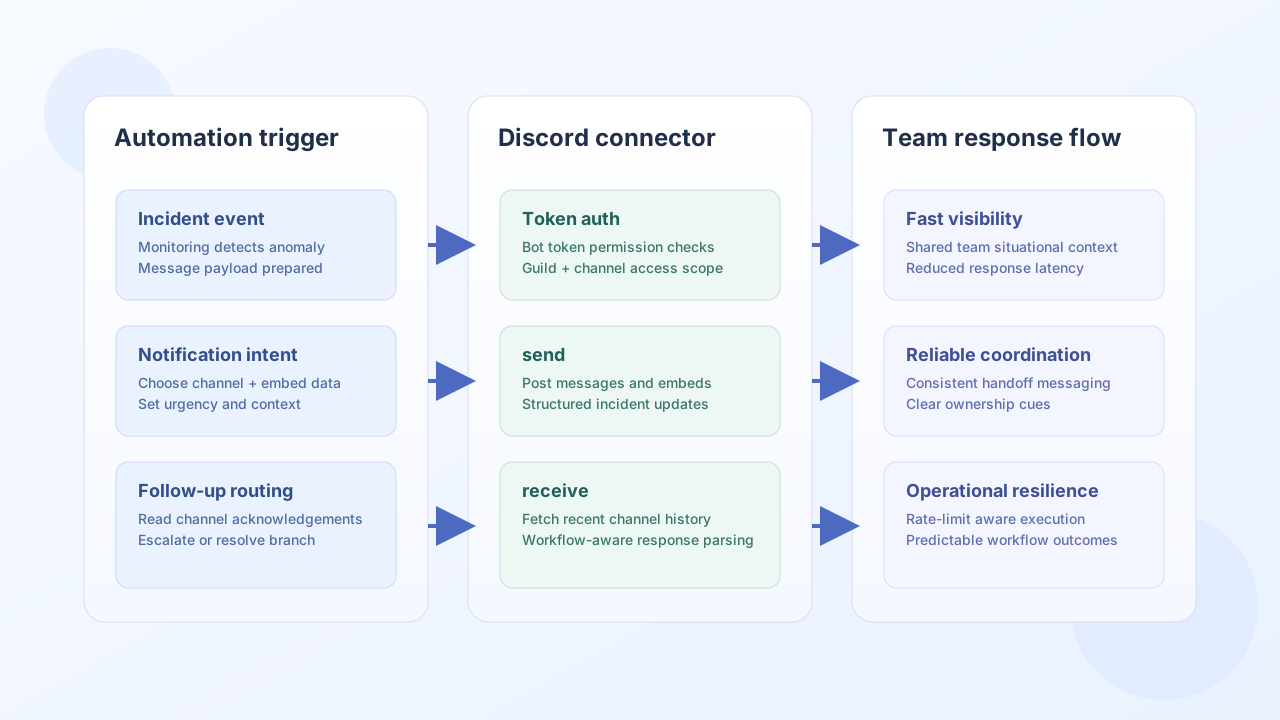
The Discord API connector lets Tealfabric workflows post channel updates and retrieve Discord message data for collaboration automations. Teams typically use it for alerting, incident coordination, and status feeds sent to operational channels.
Document information
| Field | Value |
|---|---|
| Canonical URL | /docs/04_connecting-systems/connectors/d/discord |
| Version (published date) | 2026-05-08 |
| Tags | connectors, reference, discord |
| Connector ID | discord-1.0.0 |
Configuration and authentication
Configure the connector with a Discord bot token or OAuth bearer token that has permission to post and read the target channels. In most production scenarios, a bot token with minimal channel-scoped permissions is the safest and easiest approach.
token(required): Discord bot or bearer token.base_url(optional): defaults tohttps://discord.com/api/v10.timeout_seconds(optional): request timeout setting (default30).rate_limit_per_second(optional): in-process request throttle (default50).
Before production rollout, validate that the bot can view channels, send messages, and read message history in each required guild.
Send channel messages with send
Use send to publish workflow-driven updates into a Discord channel, optionally with embeds for structured summaries. Keep notification payloads concise so responders can act quickly.
const baseUrl = "https://api.example.com/api/v1";
const tenantId = "<TENANT_ID>";
const apiKey = "<API_KEY>";

async function postIncidentAlert(integrationId: string) {
  const response = await fetch(`${baseUrl}/integrations/${encodeURIComponent(integrationId)}/execute`, {
    method: "POST",
    headers: {
      "X-API-Key": apiKey,
      "X-Tenant-ID": tenantId,
      "Content-Type": "application/json",
    },
    body: JSON.stringify({
      operation: "send",
      channel_id: "123456789012345678",
      content: "Incident update: elevated API latency detected.",
      embeds: [
        {
          title: "API Health Alert",
          description: "p95 latency exceeded 900ms for 5 minutes.",
          color: 15158332
        }
      }
    }),
  });
  if (!response.ok) throw new Error(`Request failed: ${response.status}`);
  return response.json();
}
curl -X POST "https://api.example.com/api/v1/integrations/<ENTITY_ID>/execute" \
-H "X-API-Key: <API_KEY>" \
-H "X-Tenant-ID: <TENANT_ID>" \
-H "Content-Type: application/json" \
-d '{
"operation": "send",
"channel_id": "123456789012345678",
"content": "Incident update: elevated API latency detected.",
"embeds": [
{
"title": "API Health Alert",
"description": "p95 latency exceeded 900ms for 5 minutes.",
"color": 15158332
}
]
}'
{
  "success": true,
  "data": {
    "message_count": 1,
    "data": {
      "id": "1311111111111111111",
      "channel_id": "123456789012345678",
      "content": "Incident update: elevated API latency detected."
    },
    "response": {
      "id": "1311111111111111111",
      "channel_id": "123456789012345678",
      "content": "Incident update: elevated API latency detected."
    }
  }
}
Retrieve channel messages with receive
Use receive to pull recent messages for audits, handoff summaries, or workflow correlation logic. Apply query limits so reads stay fast and respect Discord rate constraints.
const baseUrl = "https://api.example.com/api/v1";
const tenantId = "<TENANT_ID>";
const apiKey = "<API_KEY>";

async function fetchRecentMessages(integrationId: string) {
  const response = await fetch(`${baseUrl}/integrations/${encodeURIComponent(integrationId)}/execute`, {
    method: "POST",
    headers: {
      "X-API-Key": apiKey,
      "X-Tenant-ID": tenantId,
      "Content-Type": "application/json",
    },
    body: JSON.stringify({
      operation: "receive",
      endpoint: "channels/123456789012345678/messages",
      query: {
        limit: 10
      }
    }),
  });
  if (!response.ok) throw new Error(`Request failed: ${response.status}`);
  const payload = await response.json();
  return payload.data?.data ?? [];
}
curl -X POST "https://api.example.com/api/v1/integrations/<ENTITY_ID>/execute" \
-H "X-API-Key: <API_KEY>" \
-H "X-Tenant-ID: <TENANT_ID>" \
-H "Content-Type: application/json" \
-d '{
"operation": "receive",
"endpoint": "channels/123456789012345678/messages",
"query": {
"limit": 10
}
}'
{
  "success": true,
  "data": {
    "message_count": 2,
    "total_size": 2,
    "data": [
      {
        "id": "1311111111111111111",
        "content": "Incident update: elevated API latency detected."
      },
      {
        "id": "1311111111111111112",
        "content": "Acknowledged by on-call."
      }
    ]
  }
}
Validate credentials with test
Use test to confirm the bot token and API reachability before production rollout. The connector calls GET users/@me and returns bot metadata in data.details.
{
  "success": true,
  "data": {
    "message": "Discord connection test successful",
    "details": {
      "api_base_url": "https://discord.com/api/v10",
      "bot_id": "123456789012345678",
      "username": "ops-bot"
    }
  }
}
Reliability guidance
Most Discord integration failures come from token scope mismatches, missing channel permissions, and endpoint-specific rate limits. Validate the connector with test, use small batch sizes for high-frequency workflows, and include retry/backoff behavior for transient API throttling.
These controls keep notification workflows dependable without overwhelming channels or API limits.