Dolibarr ERP/CRM Connector Guide
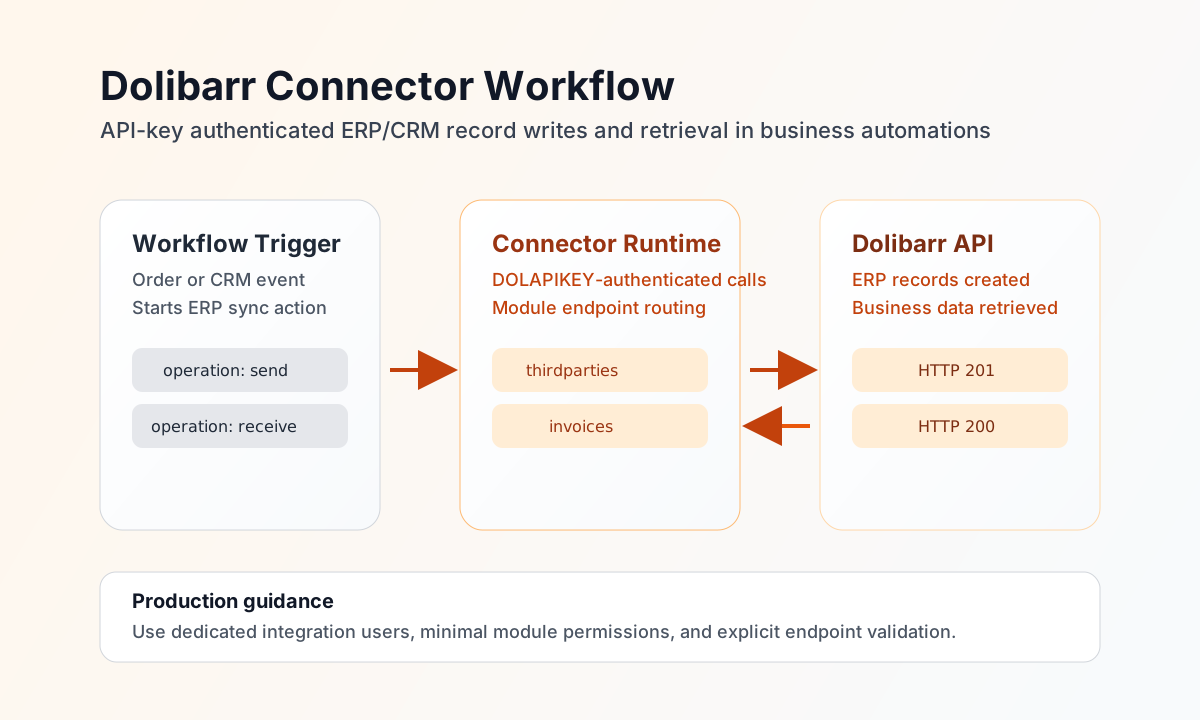
The Dolibarr connector lets Tealfabric workflows create and retrieve ERP/CRM records such as third parties, invoices, and orders through the Dolibarr REST API. It is useful for organizations that need to synchronize customer and finance data across business systems.
Document information
| Field | Value |
|---|---|
| Canonical URL | /docs/04_connecting-systems/connectors/d/dolibarr |
| Version (published date) | 2026-05-08 |
| Tags | connectors, reference, dolibarr |
| Connector ID | dolibarr-1.0.0 |
Configuration and authentication
Set base_url to your Dolibarr instance root URL and set api_key to a key generated for a user with the permissions needed by your workflows. The connector sends the key in the DOLAPIKEY header on every request. Access to modules and records is controlled by that user’s profile.
Optional timeout_seconds defaults to 30. Run test after setup to validate required configuration and probe GET api/index.php/version before production automations. Non-test operations do not pre-validate integration settings (matching legacy connector behavior).
Create records with send
Use send for write operations on Dolibarr REST resources under api/index.php/{object}. Provide the resource segment in object (alias object_type), the HTTP verb in method (POST/CREATE, PUT/UPDATE, DELETE), and the JSON body in data (alias object_data). When data is omitted, remaining callData fields (excluding routing keys and integration config) are sent as the body. POST/PUT/PATCH bodies are omitted when PHP-empty() (for example {} or []).
const baseUrl = "https://api.example.com/api/v1";
const tenantId = "<TENANT_ID>";
const apiKey = "<API_KEY>";

async function createThirdParty(integrationId: string) {
  const response = await fetch(`${baseUrl}/integrations/${encodeURIComponent(integrationId)}/execute`, {
    method: "POST",
    headers: {
      "X-API-Key": apiKey,
      "X-Tenant-ID": tenantId,
      "Content-Type": "application/json",
    },
    body: JSON.stringify({
      operation: "send",
      object: "thirdparties",
      method: "POST",
      data: {
        name: "Tealfabric Distribution Ltd",
        email: "ops@tealfabric.example",
        client: 1,
        fournisseur: 0,
        phone: "+1-555-0102"
      }
    }),
  });
  if (!response.ok) throw new Error(`Request failed: ${response.status}`);
  return response.json();
}
curl -X POST "https://api.example.com/api/v1/integrations/<ENTITY_ID>/execute" \
-H "X-API-Key: <API_KEY>" \
-H "X-Tenant-ID: <TENANT_ID>" \
-H "Content-Type: application/json" \
-d '{
"operation": "send",
"object": "thirdparties",
"method": "POST",
"data": {
"name": "Tealfabric Distribution Ltd",
"email": "ops@tealfabric.example",
"client": 1,
"fournisseur": 0,
"phone": "+1-555-0102"
}
}'
{
  "success": true,
  "data": {
    "message": "Dolibarr object POSTd successfully",
    "id": 51,
    "data": {
      "id": 51,
      "ref": "CUST-00051",
      "name": "Tealfabric Distribution Ltd"
    }
  }
}
Retrieve records with receive
Use receive to list or fetch Dolibarr objects via GET api/index.php/{object} or GET api/index.php/{object}/{id}. For list calls, pass sqlfilters, sortfield, sortorder, limit, and page as top-level callData fields (not nested under query).
const baseUrl = "https://api.example.com/api/v1";
const tenantId = "<TENANT_ID>";
const apiKey = "<API_KEY>";

async function listRecentInvoices(integrationId: string) {
  const response = await fetch(`${baseUrl}/integrations/${encodeURIComponent(integrationId)}/execute`, {
    method: "POST",
    headers: {
      "X-API-Key": apiKey,
      "X-Tenant-ID": tenantId,
      "Content-Type": "application/json",
    },
    body: JSON.stringify({
      operation: "receive",
      object: "invoices",
      sortfield: "t.datec",
      sortorder: "DESC",
      limit: 20
    }),
  });
  if (!response.ok) throw new Error(`Request failed: ${response.status}`);
  return response.json();
}
curl -X POST "https://api.example.com/api/v1/integrations/<ENTITY_ID>/execute" \
-H "X-API-Key: <API_KEY>" \
-H "X-Tenant-ID: <TENANT_ID>" \
-H "Content-Type: application/json" \
-d '{
"operation": "receive",
"object": "invoices",
"sortfield": "t.datec",
"sortorder": "DESC",
"limit": 20
}'
{
  "success": true,
  "data": {
    "message": "Dolibarr objects retrieved successfully",
    "record_count": 1,
    "records": [
      {
        "id": 7,
        "ref": "FA2605-0007",
        "total_ttc": "1250.00",
        "status": "1"
      }
    ]
  }
}
Generic API calls with execute
Use execute for arbitrary Dolibarr REST paths under api/index.php/ when send/receive routing is not sufficient. Provide endpoint (path after api/index.php/), optional method (default GET), and body or data for write verbs.
Operate safely in production
Dolibarr permissions are user-driven, so API key behavior changes with user rights and module activation. Use dedicated integration users, least-privilege access, and explicit module-level testing before deployment.
Failures typically come from invalid API keys, endpoint mismatches, or permission denials on specific objects. Keep credentials secure, verify endpoint paths against module APIs, and apply retry with backoff only for transient network issues.
Related resources
For endpoint and payload details, see the Dolibarr REST API documentation.