Freshsales Connector Guide
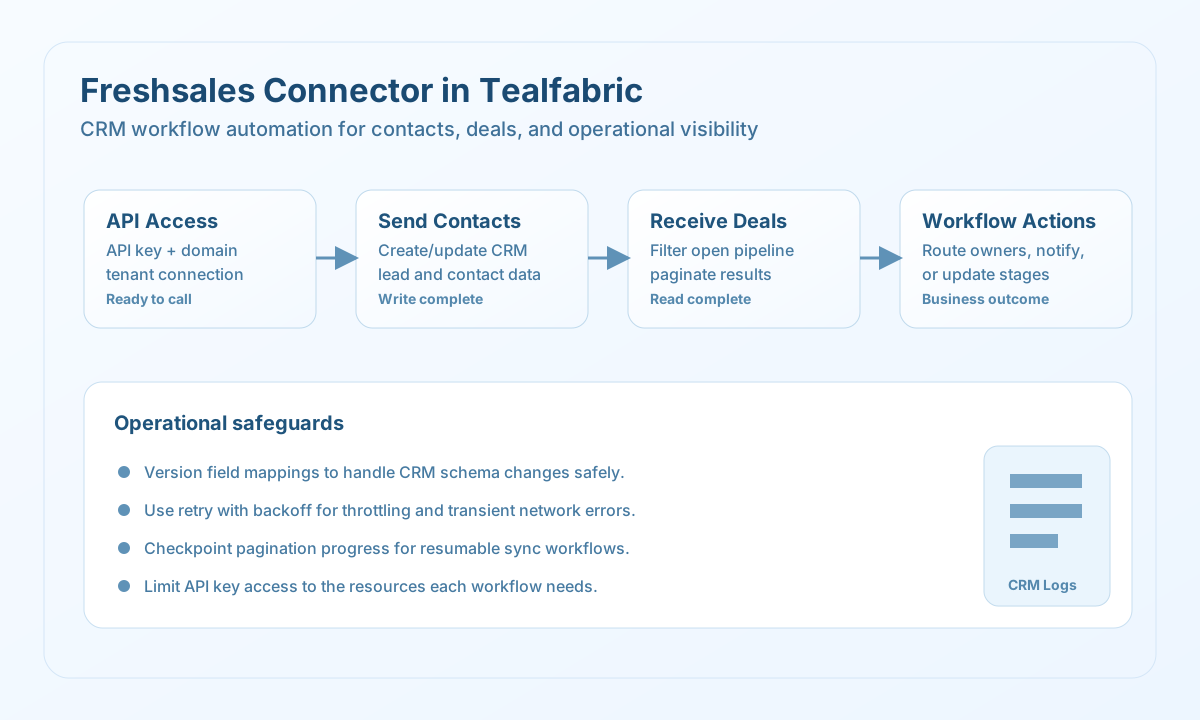
The Freshsales connector lets Tealfabric workflows send and retrieve CRM records such as contacts and deals through the Freshsales API. It is useful for pipeline automation, lead routing, and lifecycle updates where sales teams rely on current CRM data.
Document information
| Field | Value |
|---|---|
| Canonical URL | /docs/04_connecting-systems/connectors/f/freshsales |
| Version (published date) | 2026-05-08 |
| Tags | connectors, reference, freshsales |
| Connector ID | freshsales-1.0.0 |
When to use this connector
Use this connector when workflows need to create or update CRM objects and then read them for downstream actions. Common scenarios include routing inbound leads, syncing lifecycle stages, and triggering notifications when deal values or statuses change. The connector is most effective when endpoint usage and field mappings are standardized across teams.
Prerequisites
Before configuring the integration, create a Freshsales API key with permissions for the resources your workflow needs. Confirm your account domain and ensure the API base URL points to the correct tenant. Establish an ownership process for key rotation and API usage monitoring before production rollout.
Configuration
Store these values in the integration profile:
api_key(required): Freshsales API key.base_url(optional): Freshsales tenant URL, for examplehttps://domain.freshsales.io.api_secret(optional): Additional secret if required by your environment.timeout_seconds(optional): Request timeout in seconds; default30.
Create contacts with send
Use send to create or update CRM records. Keep payloads minimal and schema-aligned so records remain consistent across automations.
const baseUrl = "https://api.example.com/api/v1";
const tenantId = "<TENANT_ID>";
const apiKey = "<API_KEY>";

type ContactResult = {
  message_count: number;
  data: { contact?: { id?: string; email?: string } };
  response: { contact?: { id?: string; email?: string } };
};

async function createContact(integrationId: string): Promise<ContactResult> {
  const response = await fetch(
    `${baseUrl}/integrations/${encodeURIComponent(integrationId)}/execute`,
    {
      method: "POST",
      headers: {
        "X-API-Key": apiKey,
        "X-Tenant-ID": tenantId,
        "Content-Type": "application/json",
      },
      body: JSON.stringify({
        operation: "send",
        endpoint: "api/contacts",
        method: "POST",
        data: {
          contact: {
            first_name: "Jordan",
            last_name: "Lee",
            email: "jordan.lee@example.com",
            phone: "555-2048",
            job_title: "Revenue Operations Manager",
          },
        },
      }),
    }
  );
  if (!response.ok) throw new Error(`Request failed: ${response.status}`);
  const payload = (await response.json()) as { success?: boolean; data?: ContactResult };
  if (!payload.success || !payload.data) throw new Error("Freshsales send failed");
  return payload.data;
}
curl -X POST "https://api.example.com/api/v1/integrations/<ENTITY_ID>/execute" \
-H "X-API-Key: <API_KEY>" \
-H "X-Tenant-ID: <TENANT_ID>" \
-H "Content-Type: application/json" \
-d '{
"operation": "send",
"endpoint": "api/contacts",
"method": "POST",
"data": {
"contact": {
"first_name": "Jordan",
"last_name": "Lee",
"email": "jordan.lee@example.com",
"phone": "555-2048"
}
}
}'
{
  "success": true,
  "data": {
    "message_count": 1,
    "data": {
      "contact": {
        "id": "<ENTITY_ID>",
        "email": "jordan.lee@example.com"
      }
    },
    "response": {
      "contact": {
        "id": "<ENTITY_ID>",
        "email": "jordan.lee@example.com"
      }
    }
  }
}
Retrieve deals with receive
Use receive to query deals and contacts for workflow decisions such as routing high-value opportunities. Apply pagination and filters so large datasets can be processed predictably.
const baseUrl = "https://api.example.com/api/v1";
const tenantId = "<TENANT_ID>";
const apiKey = "<API_KEY>";

type Deal = {
  id?: string;
  name?: string;
  amount?: number;
  deal_stage_id?: number;
};

async function listOpenDeals(integrationId: string): Promise<Deal[]> {
  const response = await fetch(
    `${baseUrl}/integrations/${encodeURIComponent(integrationId)}/execute`,
    {
      method: "POST",
      headers: {
        "X-API-Key": apiKey,
        "X-Tenant-ID": tenantId,
        "Content-Type": "application/json",
      },
      body: JSON.stringify({
        operation: "receive",
        endpoint: "api/deals",
        query: {
          per_page: 20,
          page: 1,
          filter_type: "open",
        },
      }),
    }
  );
  if (!response.ok) throw new Error(`Request failed: ${response.status}`);
  const payload = (await response.json()) as {
    success?: boolean;
    data?: { message_count?: number; data?: Deal[]; total_size?: number };
  };
  if (!payload.success || !payload.data?.data) throw new Error("Freshsales receive failed");
  return payload.data.data;
}
curl -X POST "https://api.example.com/api/v1/integrations/<ENTITY_ID>/execute" \
-H "X-API-Key: <API_KEY>" \
-H "X-Tenant-ID: <TENANT_ID>" \
-H "Content-Type: application/json" \
-d '{
"operation": "receive",
"endpoint": "api/deals",
"query": {
"per_page": 20,
"page": 1,
"filter_type": "open"
}
}'
{
  "success": true,
  "data": {
    "message_count": 1,
    "data": [
      {
        "id": "<ENTITY_ID>",
        "name": "Q2 Renewal Expansion",
        "amount": 85000,
        "deal_stage_id": 2
      }
    ],
    "total_size": 1
  }
}
Test connection with test
Use test to validate api_key and tenant reachability. Only test enforces required api_key validation up front; other operations attempt the API call and surface remote auth errors when credentials are missing or invalid.
{
  "success": true,
  "data": {
    "message": "Freshsales connection test successful",
    "details": {
      "api_base_url": "https://domain.freshsales.io"
    }
  }
}
Reliability guidance
Freshsales API limits can vary by account plan, so use pacing and bounded retries for production workflows. Keep field mapping definitions versioned to prevent silent failures when CRM schemas change. For large data pulls, rely on pagination checkpoints so jobs can resume safely after interruptions.