Freshdesk Connector Guide
The Freshdesk connector lets Tealfabric workflows create, update, and retrieve support resources such as tickets and contacts through the Freshdesk API. It is typically used for support automation, customer lifecycle routing, and SLA-driven escalation flows.
Document information
| Field | Value |
|---|---|
| Canonical URL | /docs/04_connecting-systems/connectors/f/freshdesk |
| Version (published date) | 2026-05-08 |
| Tags | connectors, reference, freshdesk |
| Connector ID | freshdesk-1.0.0 |
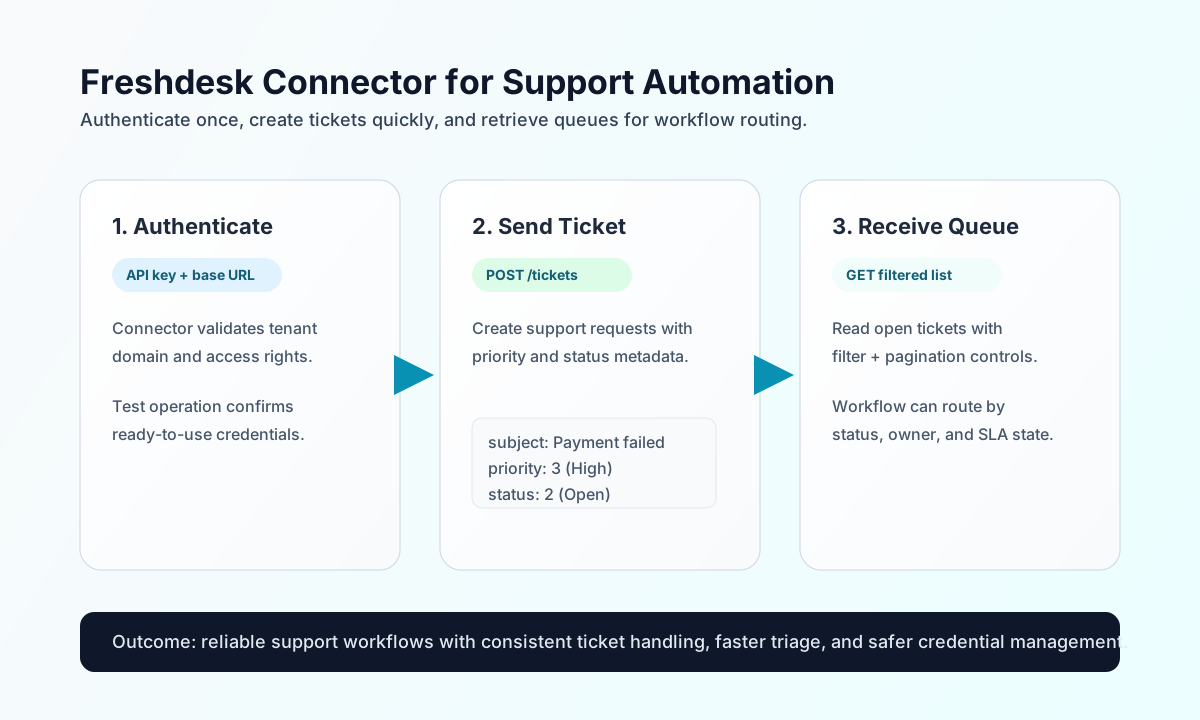
Configure authentication and endpoint access
Configure the connector with your Freshdesk account URL and API key so workflows can authenticate reliably and call the correct tenant endpoints. This keeps credentials centralized and prevents exposing secrets in step payloads.
Required settings are api_key and base_url. An optional timeout_seconds value controls request duration for slower operations. Run test before deployment so you can confirm API access and domain configuration early. The test operation validates api_key and base_url; send, receive, sync, and batch require only base_url at runtime (matching legacy execution flow).
Create or update tickets with send
Use send for support write operations such as creating tickets and updating status or priority. Keep payload fields explicit so downstream workflows can branch on stable ticket metadata.
const baseUrl = "https://api.example.com/api/v1";
const tenantId = "<TENANT_ID>";
const apiKey = "<API_KEY>";

async function createTicket(integrationId: string) {
  const response = await fetch(`${baseUrl}/integrations/${encodeURIComponent(integrationId)}/execute`, {
    method: "POST",
    headers: {
      "X-API-Key": apiKey,
      "X-Tenant-ID": tenantId,
      "Content-Type": "application/json",
    },
    body: JSON.stringify({
      operation: "send",
      endpoint: "api/v2/tickets",
      method: "POST",
      data: {
        subject: "Payment failed during checkout",
        description: "Customer reports repeated card authorization failures.",
        email: "customer@example.com",
        priority: 3,
        status: 2
      }
    }),
  });
  if (!response.ok) throw new Error(`Request failed: ${response.status}`);
  return response.json();
}
curl -X POST "https://api.example.com/api/v1/integrations/<ENTITY_ID>/execute" \
-H "X-API-Key: <API_KEY>" \
-H "X-Tenant-ID: <TENANT_ID>" \
-H "Content-Type: application/json" \
-d '{
"operation": "send",
"endpoint": "api/v2/tickets",
"method": "POST",
"data": {
"subject": "Payment failed during checkout",
"description": "Customer reports repeated card authorization failures.",
"email": "customer@example.com",
"priority": 3,
"status": 2
}
}'
{
  "success": true,
  "data": {
    "message_count": 1,
    "data": {
      "id": 10482,
      "subject": "Payment failed during checkout",
      "status": 2,
      "priority": 3
    },
    "response": {
      "id": 10482,
      "subject": "Payment failed during checkout",
      "status": 2,
      "priority": 3
    }
  }
}
Retrieve tickets and contacts with receive
Use receive to fetch single resources or list filtered records for dashboards, notification rules, and queue-routing logic. For predictable performance, include filters and pagination fields (per_page, page) when reading larger sets.
const baseUrl = "https://api.example.com/api/v1";
const tenantId = "<TENANT_ID>";
const apiKey = "<API_KEY>";

async function listOpenTickets(integrationId: string) {
  const response = await fetch(`${baseUrl}/integrations/${encodeURIComponent(integrationId)}/execute`, {
    method: "POST",
    headers: {
      "X-API-Key": apiKey,
      "X-Tenant-ID": tenantId,
      "Content-Type": "application/json",
    },
    body: JSON.stringify({
      operation: "receive",
      endpoint: "api/v2/tickets",
      query: {
        filter: "new_and_my_open",
        per_page: 25,
        page: 1
      }
    }),
  });
  if (!response.ok) throw new Error(`Request failed: ${response.status}`);
  return response.json();
}
curl -X POST "https://api.example.com/api/v1/integrations/<ENTITY_ID>/execute" \
-H "X-API-Key: <API_KEY>" \
-H "X-Tenant-ID: <TENANT_ID>" \
-H "Content-Type: application/json" \
-d '{
"operation": "receive",
"endpoint": "api/v2/tickets",
"query": {
"filter": "new_and_my_open",
"per_page": 25,
"page": 1
}
}'
{
  "success": true,
  "data": {
    "message_count": 1,
    "data": [
      {
        "id": 10482,
        "subject": "Payment failed during checkout",
        "status": 2,
        "priority": 3
      }
    ],
    "total_size": 1
  }
}
Reliability guidance
Most integration issues come from invalid keys, tenant URL mismatches, or request bursts that hit rate limits. If failures occur, validate credentials first, then verify endpoint paths and required payload fields, and finally apply backoff handling for 429 responses.
For stable support automation, map status and priority values consistently across workflows and avoid oversized list reads in a single call. This keeps queues accurate and helps maintain predictable run times.