Facebook Graph API Connector Guide
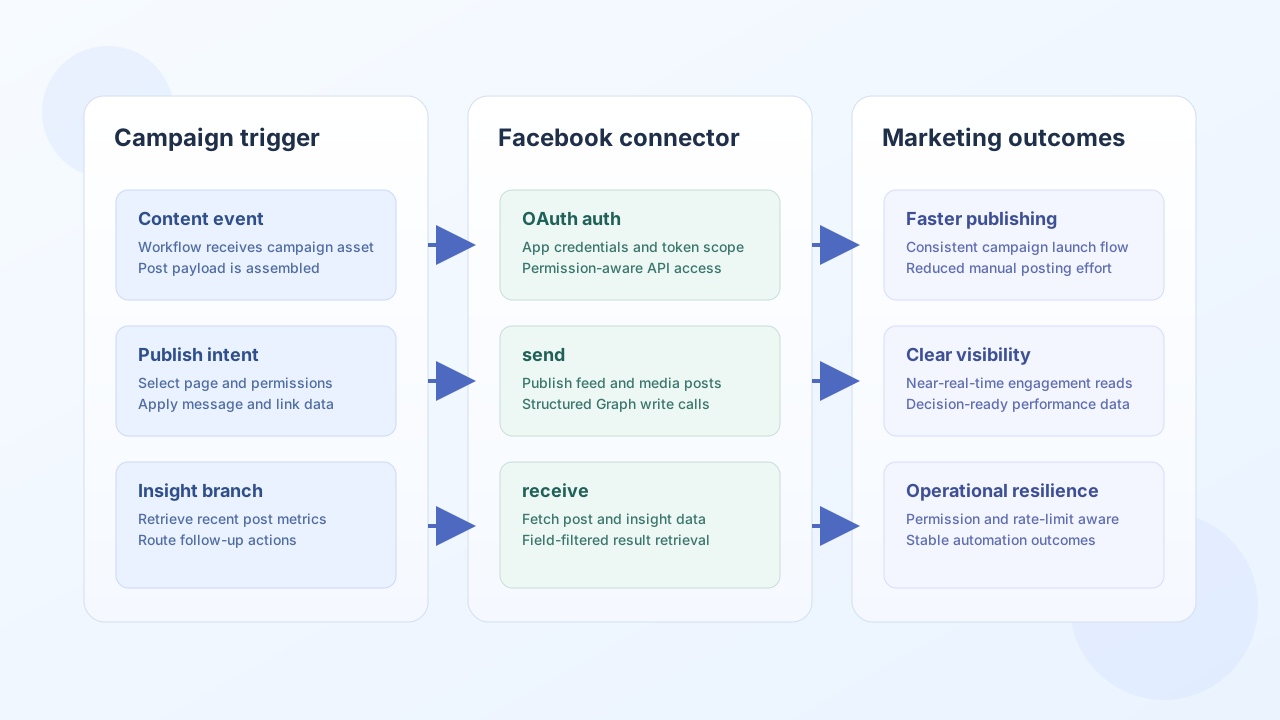
The Facebook Graph API connector helps Tealfabric workflows publish and retrieve page content through Facebook Graph endpoints. Teams commonly use it for campaign publishing, post monitoring, and engagement reporting flows.
Document information
| Field | Value |
|---|---|
| Canonical URL | /docs/04_connecting-systems/connectors/f/facebook |
| Version (published date) | 2026-05-08 |
| Tags | connectors, reference, facebook |
| Connector ID | facebook-1.0.0 |
Configuration and OAuth setup
Configure the connector with your Facebook app credentials and redirect URI so OAuth token exchange can complete successfully. In production, use only the scopes required by your workflow use case and keep long-lived tokens protected.
client_id(required): Facebook app ID.client_secret(required): Facebook app secret.redirect_uri(required): OAuth callback URL configured in your app.access_token(optional): active OAuth token.refresh_token(optional): refresh token when available.scope(optional): requested Graph permissions.timeout_seconds(optional): request timeout value.
The test operation validates client_id, client_secret, and redirect_uri. Other operations require only a valid access_token (and use refresh_token on HTTP 401 when configured).
For page publishing workflows, verify app review and page-level permissions before rollout.
Publish page content with send
Use send to create page posts or update existing resources. Keep publish payloads explicit and permission-aligned so failures are easy to diagnose.
const baseUrl = "https://api.example.com/api/v1";
const tenantId = "<TENANT_ID>";
const apiKey = "<API_KEY>";

async function publishPagePost(integrationId: string) {
  const response = await fetch(`${baseUrl}/integrations/${encodeURIComponent(integrationId)}/execute`, {
    method: "POST",
    headers: {
      "X-API-Key": apiKey,
      "X-Tenant-ID": tenantId,
      "Content-Type": "application/json",
    },
    body: JSON.stringify({
      operation: "send",
      endpoint: "<ENTITY_ID>/feed",
      method: "POST",
      data: {
        message: "New product release is live. Explore details at our website.",
        link: "https://example.com/releases/spring"
      }
    }),
  });
  if (!response.ok) throw new Error(`Request failed: ${response.status}`);
  return response.json();
}
curl -X POST "https://api.example.com/api/v1/integrations/<ENTITY_ID>/execute" \
-H "X-API-Key: <API_KEY>" \
-H "X-Tenant-ID: <TENANT_ID>" \
-H "Content-Type: application/json" \
-d '{
"operation": "send",
"endpoint": "<ENTITY_ID>/feed",
"method": "POST",
"data": {
"message": "New product release is live. Explore details at our website.",
"link": "https://example.com/releases/spring"
}
}'
{
  "success": true,
  "data": {
    "message_count": 1,
    "data": {
      "id": "123456789012345_998877665544332"
    },
    "response": {
      "id": "123456789012345_998877665544332"
    }
  }
}
Retrieve page data with receive
Use receive to pull page posts and engagement metadata for analytics or follow-up automations. Request only the fields you need to keep responses lightweight and faster to process.
const baseUrl = "https://api.example.com/api/v1";
const tenantId = "<TENANT_ID>";
const apiKey = "<API_KEY>";

async function fetchRecentPagePosts(integrationId: string) {
  const response = await fetch(`${baseUrl}/integrations/${encodeURIComponent(integrationId)}/execute`, {
    method: "POST",
    headers: {
      "X-API-Key": apiKey,
      "X-Tenant-ID": tenantId,
      "Content-Type": "application/json",
    },
    body: JSON.stringify({
      operation: "receive",
      endpoint: "<ENTITY_ID>/posts",
      query: {
        limit: 10,
        fields: "id,message,created_time,permalink_url"
      }
    }),
  });
  if (!response.ok) throw new Error(`Request failed: ${response.status}`);
  const payload = await response.json();
  return payload.data?.data ?? [];
}
curl -X POST "https://api.example.com/api/v1/integrations/<ENTITY_ID>/execute" \
-H "X-API-Key: <API_KEY>" \
-H "X-Tenant-ID: <TENANT_ID>" \
-H "Content-Type: application/json" \
-d '{
"operation": "receive",
"endpoint": "<ENTITY_ID>/posts",
"query": {
"limit": 10,
"fields": "id,message,created_time,permalink_url"
}
}'
{
  "success": true,
  "data": {
    "message_count": 2,
    "total_size": 2,
    "paging": {
      "cursors": {
        "before": "QVFIUj...",
        "after": "QVFIUj..."
      }
    },
    "data": [
      {
        "id": "123456789012345_998877665544332",
        "message": "New product release is live. Explore details at our website."
      },
      {
        "id": "123456789012345_998877665544333",
        "message": "Reminder: webinar starts tomorrow."
      }
    ]
  }
}
Reliability guidance
Most production issues come from missing scopes, expired tokens, or app-review restrictions on certain endpoints. Test permissions with a low-impact receive call first, refresh tokens proactively, and apply backoff logic for rate-limited responses.
Run test after token rotation or permission changes to detect authentication drift early.
{
  "operation": "test"
}
{
  "success": true,
  "data": {
    "message": "Facebook connection test successful",
    "details": {
      "api_base_url": "https://graph.facebook.com/v22.0",
      "user_id": "1234567890",
      "name": "Example User",
      "email": "user@example.com"
    }
  }
}
These controls keep page automation stable while reducing publishing and reporting failures.