FIRST API Connector Guide
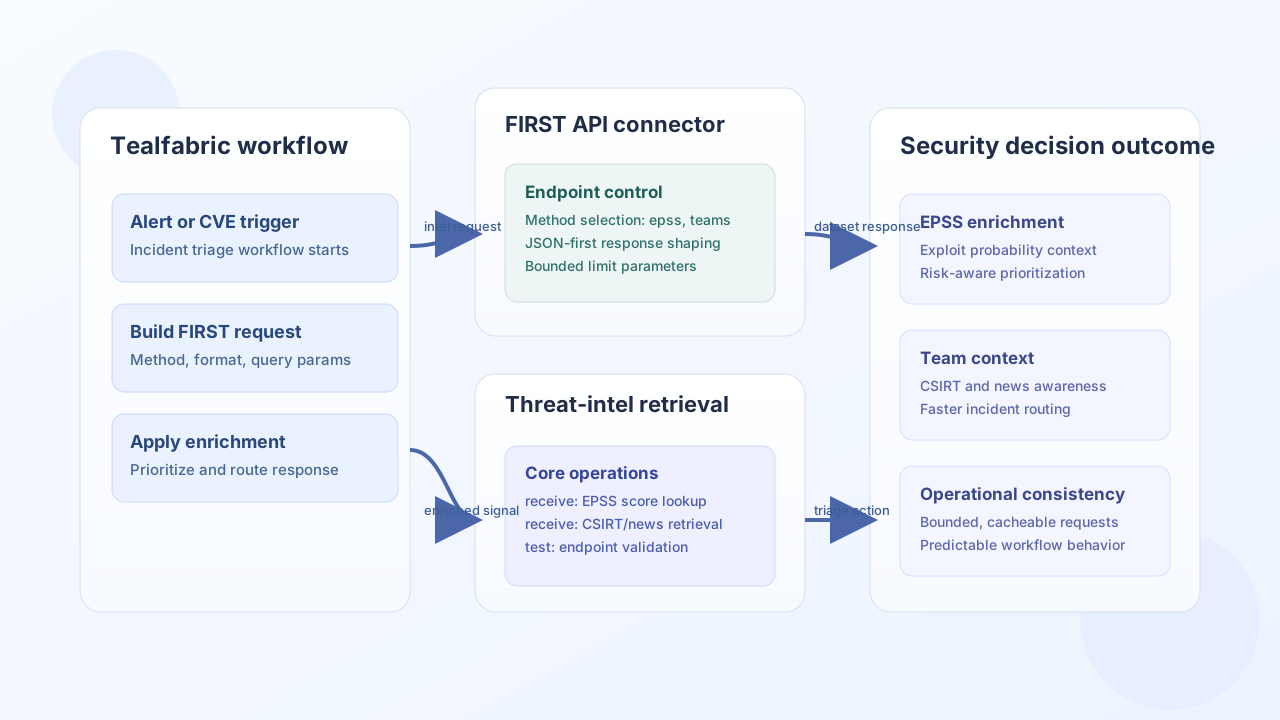
The FIRST API connector gives Tealfabric workflows access to public cybersecurity intelligence endpoints from FIRST.org, including EPSS scores, CSIRT team data, and related reference datasets. It is useful for security operations workflows that enrich alerts, prioritize vulnerabilities, and route incident tasks.
Document information
| Field | Value |
|---|---|
| Canonical URL | /docs/04_connecting-systems/connectors/f/firstapi-org |
| Version (published date) | 2026-05-08 |
| Tags | connectors, reference, firstapi-org |
| Connector ID | firstapi-org-1.0.0 |
Configuration and request scope
Configure the connector with a default response format and method so recurring workflows remain consistent. The FIRST API is public and read-only; no API key is sent by the connector.
Integration configuration parameters:
method(required): Endpoint method such asteams,news,channels,countries, orepss.format(required): Response format (json,yml,xml,csv,xls,xlsx).base_url(optional): Defaults tohttps://api.first.org/data/v1.parameters(optional): Default query parameters object (for examplelimit,envelope,cve).timeout_seconds(optional): Request timeout in seconds (default30).
Per-operation call data can override method, format, and parameters on receive and batch.
Retrieve EPSS data with receive
Use receive with method: epss to enrich vulnerability events with exploit probability context.
const baseUrl = "https://api.example.com/api/v1";
const tenantId = "<TENANT_ID>";
const apiKey = "<API_KEY>";

async function fetchEpssScore(integrationId: string) {
  const response = await fetch(`${baseUrl}/integrations/${encodeURIComponent(integrationId)}/execute`, {
    method: "POST",
    headers: {
      "X-API-Key": apiKey,
      "X-Tenant-ID": tenantId,
      "Content-Type": "application/json",
    },
    body: JSON.stringify({
      operation: "receive",
      method: "epss",
      format: "json",
      parameters: {
        cve: "CVE-2024-1234",
        envelope: "false",
      },
    }),
  });
  if (!response.ok) throw new Error(`Request failed: ${response.status}`);
  const payload = await response.json();
  return payload.data;
}
curl -X POST "https://api.example.com/api/v1/integrations/<ENTITY_ID>/execute" \
-H "X-API-Key: <API_KEY>" \
-H "X-Tenant-ID: <TENANT_ID>" \
-H "Content-Type: application/json" \
-d '{
"operation": "receive",
"method": "epss",
"format": "json",
"parameters": {
"cve": "CVE-2024-1234",
"envelope": "false"
}
}'
{
  "success": true,
  "data": {
    "message_count": 1,
    "data": [
      {
        "cve": "CVE-2024-1234",
        "epss": "0.74256",
        "percentile": "0.98845"
      }
    ],
    "metadata": {}
  }
}
Retrieve teams and news with receive
Use receive with teams or news to enrich incident context with organizational and situational signals.
{
  "success": true,
  "data": {
    "message_count": 2,
    "data": [
      {
        "name": "Example CSIRT Team",
        "country": "US",
        "constituency": "National"
      }
    ],
    "metadata": {}
  }
}
Batch multiple requests with batch
Use batch to run multiple receive-style GET requests sequentially. Each item in requests may specify method, format, and parameters. When requests is omitted, the input object is treated as a single receive call.
{
  "operation": "batch",
  "requests": [
    { "method": "teams", "format": "json", "parameters": { "limit": 1, "envelope": "false" } },
    { "method": "epss", "format": "json", "parameters": { "cve": "CVE-2024-1234", "envelope": "false" } }
  ]
}
Test connectivity with test
The test operation probes GET teams with limit=1 and envelope=false. The send operation always fails because the FIRST API is read-only.
Reliability guidance
Public threat-intelligence calls fail most often because of unsupported method names, invalid format choices, or unbounded queries. Keep method and format values explicit, set practical limits, and cache stable data where possible for repeat workflows.