Evernote Connector Guide
The Evernote connector lets Tealfabric workflows create, update, and retrieve notes and notebooks through the Evernote API. It is useful when teams need to automate knowledge capture, synchronize structured notes, or trigger downstream actions from notebook content.
Document information
| Field | Value |
|---|---|
| Canonical URL | /docs/04_connecting-systems/connectors/e/evernote |
| Version (published date) | 2026-05-08 |
| Tags | connectors, reference, evernote |
| Connector ID | evernote-1.0.0 |
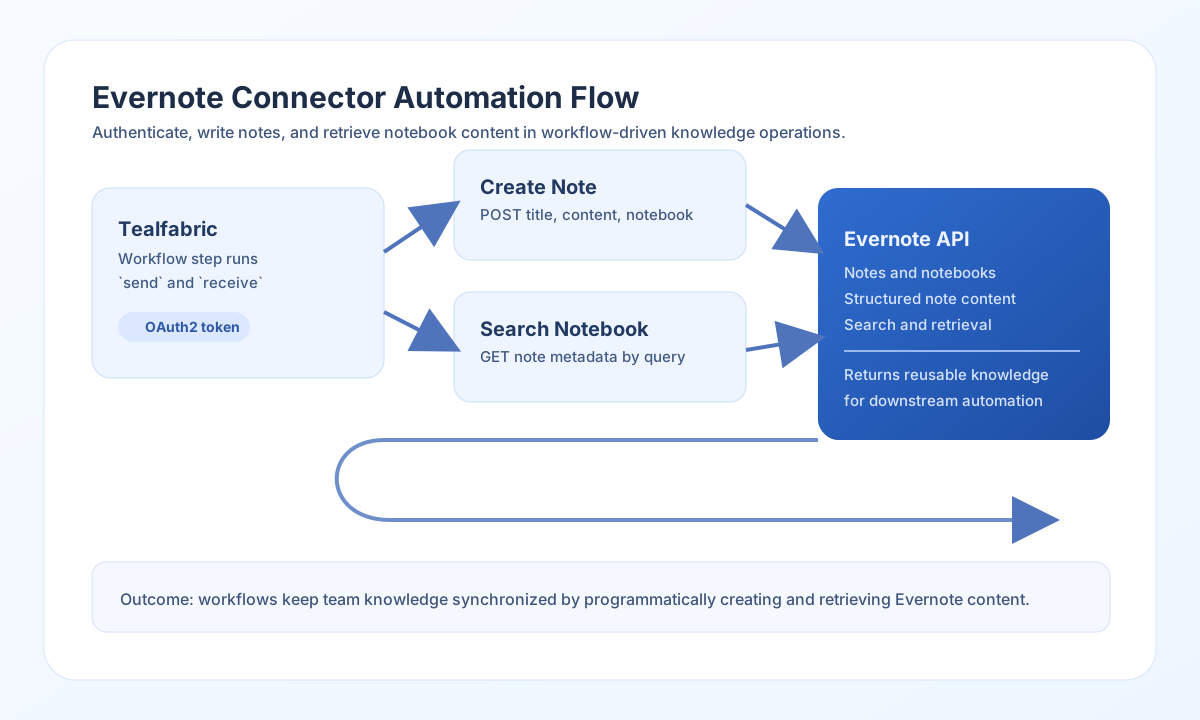
Configure authentication
Set client_id, client_secret, and access_token from your Evernote OAuth2 app so the connector can authenticate each request. Add refresh_token when your setup uses renewable delegated access, and use timeout_seconds to match expected API response times.
A valid token scope is required for note and notebook operations. Before enabling production workflows, confirm that your credentials can access the target user account and required notebooks.
Create notes with send
Use send to create or update notes when your workflow needs to publish structured content to Evernote. This is a common pattern for meeting summaries, customer logs, and automated operational journals.
send accepts endpoint, optional method (default POST), and data (or the full input object when data is omitted). OAuth app fields (client_id, client_secret) are validated only by test; runtime send calls require a bearer access_token.
const baseUrl = "https://api.example.com/api/v1";
const tenantId = "<TENANT_ID>";
const apiKey = "<API_KEY>";

async function createEvernoteNote(integrationId: string) {
  const response = await fetch(`${baseUrl}/integrations/${encodeURIComponent(integrationId)}/execute`, {
    method: "POST",
    headers: {
      "X-API-Key": apiKey,
      "X-Tenant-ID": tenantId,
      "Content-Type": "application/json",
    },
    body: JSON.stringify({
      operation: "send",
      endpoint: "notes",
      method: "POST",
      data: {
        title: "Daily Operations Summary",
        content: "<en-note><div>All systems operational.</div></en-note>",
        notebookGuid: "<ENTITY_ID>"
      }
    }),
  });
  if (!response.ok) throw new Error(`Request failed: ${response.status}`);
  return response.json();
}
curl -X POST "https://api.example.com/api/v1/integrations/<ENTITY_ID>/execute" \
-H "X-API-Key: <API_KEY>" \
-H "X-Tenant-ID: <TENANT_ID>" \
-H "Content-Type: application/json" \
-d '{
"operation": "send",
"endpoint": "notes",
"method": "POST",
"data": {
"title": "Daily Operations Summary",
"content": "<en-note><div>All systems operational.</div></en-note>",
"notebookGuid": "<ENTITY_ID>"
}
}'
{
  "success": true,
  "data": {
    "message": "Evernote operation completed successfully",
    "result": {
      "guid": "<ENTITY_ID>",
      "title": "Daily Operations Summary",
      "notebookGuid": "<ENTITY_ID>"
    }
  }
}
Retrieve notebook content with receive
Use receive to list notes, read note metadata, or synchronize notebook content into reporting and search workflows. This is useful when Evernote acts as a source of truth for operational or project documentation.
receive issues a GET request and unwraps notes when that key is present (even if empty), otherwise notebooks, otherwise wraps the full JSON response in a one-element items array.
const baseUrl = "https://api.example.com/api/v1";
const tenantId = "<TENANT_ID>";
const apiKey = "<API_KEY>";

async function listNotebookNotes(integrationId: string) {
  const response = await fetch(`${baseUrl}/integrations/${encodeURIComponent(integrationId)}/execute`, {
    method: "POST",
    headers: {
      "X-API-Key": apiKey,
      "X-Tenant-ID": tenantId,
      "Content-Type": "application/json",
    },
    body: JSON.stringify({
      operation: "receive",
      endpoint: "notes",
      query: {
        notebookGuid: "<ENTITY_ID>",
        words: "intitle:Operations",
        limit: 20
      }
    }),
  });
  if (!response.ok) throw new Error(`Request failed: ${response.status}`);
  return response.json();
}
curl -X POST "https://api.example.com/api/v1/integrations/<ENTITY_ID>/execute" \
-H "X-API-Key: <API_KEY>" \
-H "X-Tenant-ID: <TENANT_ID>" \
-H "Content-Type: application/json" \
-d '{
"operation": "receive",
"endpoint": "notes",
"query": {
"notebookGuid": "<ENTITY_ID>",
"words": "intitle:Operations",
"limit": 20
}
}'
{
  "success": true,
  "data": {
    "message": "Evernote data retrieved successfully",
    "note_count": 2,
    "items": [
      {
        "guid": "8f7ad5c8-9832-4d44-9174-f98f18dc3f44",
        "title": "Operations Update - 2026-05-08"
      },
      {
        "guid": "1178f3ab-0d4f-40eb-a9ab-5f5b6ad2f4cc",
        "title": "Operations Update - 2026-05-07"
      }
    ]
  }
}
Test connection with test
Use test to validate OAuth configuration (client_id, client_secret, access_token) and probe GET edam/user. When required configuration is missing, the connector returns Configuration validation failed (matching legacy testConnection behavior).
{
  "success": true,
  "data": {
    "message": "Evernote connection test successful",
    "details": {
      "api_base_url": "https://www.evernote.com",
      "user": "<USERNAME>"
    }
  }
}
Reliability guidance
Most connector failures are caused by expired OAuth tokens, insufficient scope, or malformed Evernote query parameters. Validate credentials and permission scope first, then verify endpoint names and request payload fields.
For production automation, use retries with backoff for temporary rate-limit responses and monitor note-sync jobs for pagination behavior. This keeps Evernote-based workflows stable as notebook volume grows.