ElevenLabs Connector Guide
The ElevenLabs connector lets Tealfabric workflows generate speech from text and retrieve available voices for dynamic voice automation. It is useful for notification audio, voice assistants, and content pipelines that need high-quality synthesized speech.
Document information
| Field | Value |
|---|---|
| Canonical URL | /docs/04_connecting-systems/connectors/e/elevenlabs |
| Version (published date) | 2026-05-08 |
| Tags | connectors, reference, elevenlabs |
| Connector ID | elevenlabs-1.0.0 |
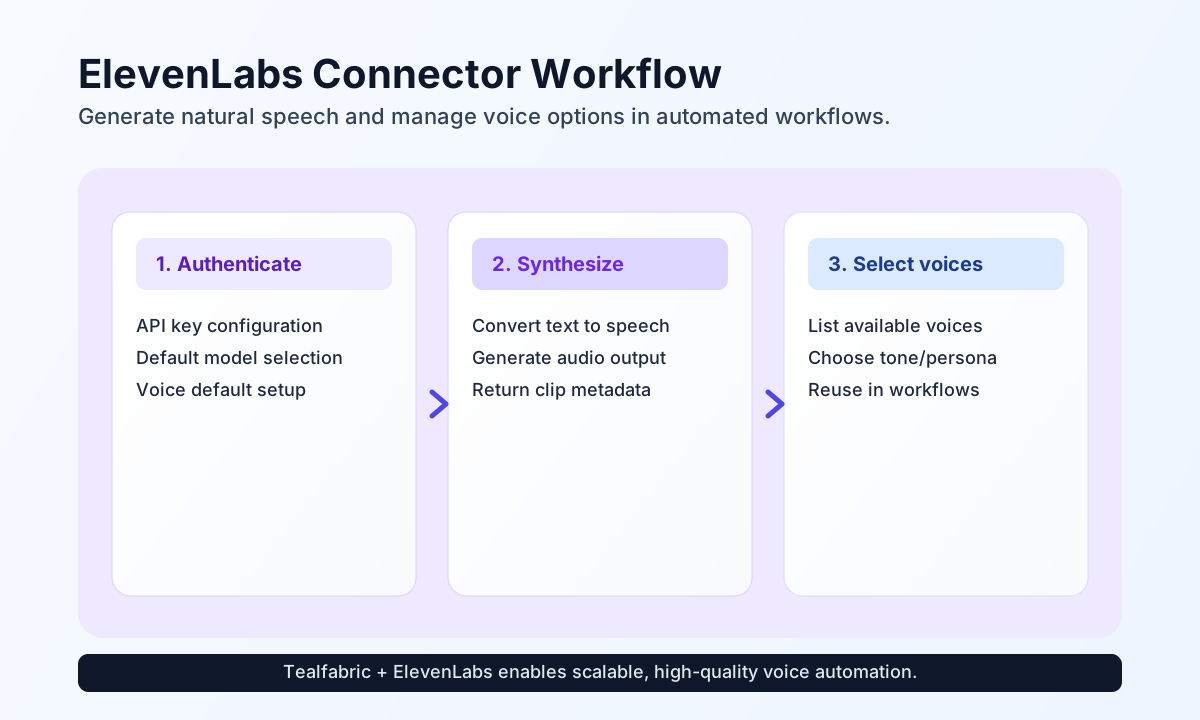
Configure API key and voice defaults
Configure the connector with your api_key so workflow requests can authenticate with ElevenLabs APIs. You can also set default voice_id and model_id values to avoid repeating them in every synthesis step.
Adjust timeout_seconds for larger generations or busy periods. This helps prevent false failures when generating longer clips or using high-fidelity models.
Generate speech with synthesize
Use synthesize to transform workflow text into spoken output. This is commonly used for outbound call prompts, spoken alerts, and multilingual content generation.
const baseUrl = "https://api.example.com/api/v1";
const tenantId = "<TENANT_ID>";
const apiKey = "<API_KEY>";

async function synthesizeStatusUpdate(integrationId: string) {
  const response = await fetch(`${baseUrl}/integrations/${encodeURIComponent(integrationId)}/execute`, {
    method: "POST",
    headers: {
      "X-API-Key": apiKey,
      "X-Tenant-ID": tenantId,
      "Content-Type": "application/json",
    },
    body: JSON.stringify({
      operation: "synthesize",
      voice_id: "21m00Tcm4TlvDq8ikWAM",
      model_id: "eleven_multilingual_v2",
      text: "Your deployment completed successfully and all health checks are green."
    }),
  });
  if (!response.ok) throw new Error(`Request failed: ${response.status}`);
  return response.json();
}
curl -X POST "https://api.example.com/api/v1/integrations/<ENTITY_ID>/execute" \
-H "X-API-Key: <API_KEY>" \
-H "X-Tenant-ID: <TENANT_ID>" \
-H "Content-Type: application/json" \
-d '{
"operation": "synthesize",
"voice_id": "21m00Tcm4TlvDq8ikWAM",
"model_id": "eleven_multilingual_v2",
"text": "Your deployment completed successfully and all health checks are green."
}'
{
  "success": true,
  "data": {
    "audio_count": 1,
    "audio_data": "<base64-mp3-audio>",
    "audio_format": "mp3"
  }
}
Retrieve voices with voices
Use voices to list available voice profiles and select the right tone for each workflow context. This helps keep generated speech consistent across customer-facing automation.
const baseUrl = "https://api.example.com/api/v1";
const tenantId = "<TENANT_ID>";
const apiKey = "<API_KEY>";

async function listVoices(integrationId: string) {
  const response = await fetch(`${baseUrl}/integrations/${encodeURIComponent(integrationId)}/execute`, {
    method: "POST",
    headers: {
      "X-API-Key": apiKey,
      "X-Tenant-ID": tenantId,
      "Content-Type": "application/json",
    },
    body: JSON.stringify({
      operation: "voices"
    }),
  });
  if (!response.ok) throw new Error(`Request failed: ${response.status}`);
  return response.json();
}
curl -X POST "https://api.example.com/api/v1/integrations/<ENTITY_ID>/execute" \
-H "X-API-Key: <API_KEY>" \
-H "X-Tenant-ID: <TENANT_ID>" \
-H "Content-Type: application/json" \
-d '{
"operation": "voices"
}'
{
  "success": true,
  "data": {
    "audio_count": 1,
    "voices": [
      {
        "voice_id": "21m00Tcm4TlvDq8ikWAM",
        "name": "Rachel"
      }
    ],
    "data": {
      "voices": [
        {
          "voice_id": "21m00Tcm4TlvDq8ikWAM",
          "name": "Rachel"
        }
      ]
    }
  }
}
Validate connectivity with test
Use test to verify that your api_key is valid and that the connector can reach ElevenLabs successfully.
curl -X POST "https://api.example.com/api/v1/integrations/<ENTITY_ID>/execute" \
  -H "X-API-Key: <API_KEY>" \
  -H "X-Tenant-ID: <TENANT_ID>" \
  -H "Content-Type: application/json" \
  -d '{
    "operation": "test"
  }'
{
  "success": true,
  "data": {
    "message": "ElevenLabs connection test successful",
    "details": {
      "endpoint": "https://api.elevenlabs.io/v1",
      "voices_count": 54
    }
  }
}
Clone operation behavior
clone validates that name and files are provided, then intentionally returns a validation error because multipart upload handling is not implemented in this connector package yet.
Reliability guidance
Most failures come from invalid API keys, unsupported model/voice combinations, or quota and rate-limit constraints. If synthesis fails, verify key scope first, then confirm model and voice IDs, and finally apply controlled retry for transient failures.
For production reliability, cache frequently used voice metadata, keep synthesis text concise per request, and monitor generation latency trends. This keeps audio workflows responsive and predictable at scale.