ERPNext Connector Guide
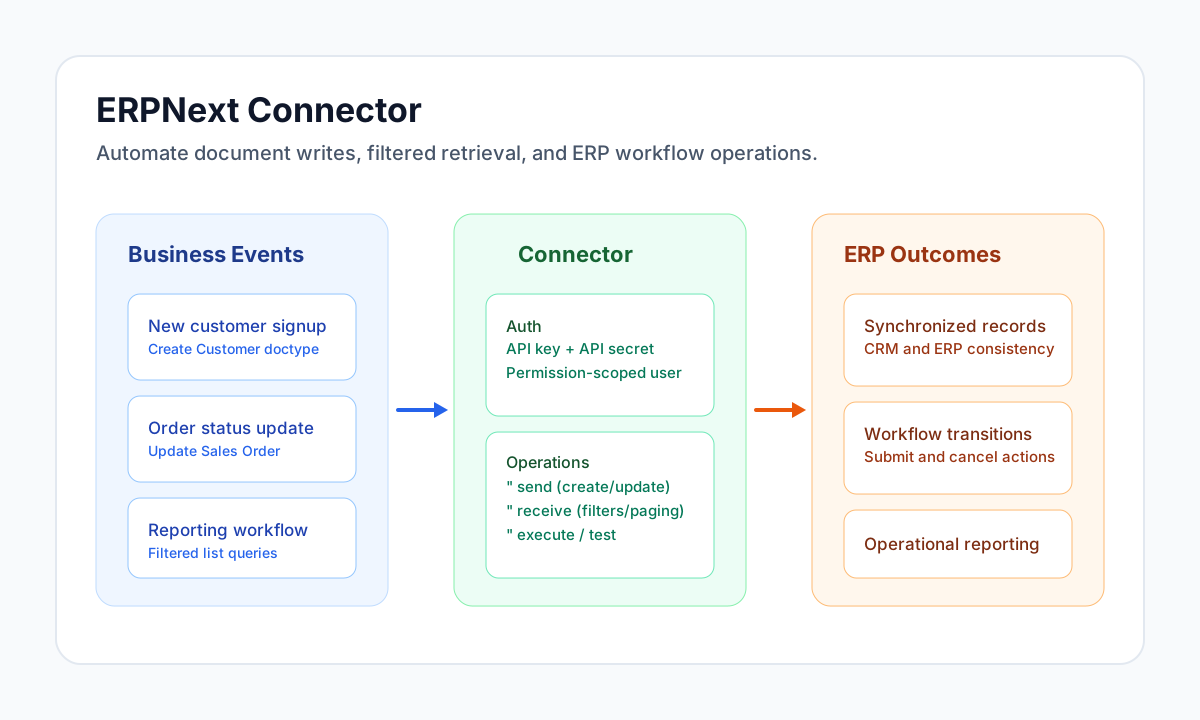
The ERPNext connector lets Tealfabric workflows create, update, retrieve, and process ERPNext documents through API-driven automations. It is useful for integrating CRM, sales, inventory, and finance flows where data must stay synchronized across systems.
Document information
| Field | Value |
|---|---|
| Canonical URL | /docs/04_connecting-systems/connectors/e/erpnext |
| Version (published date) | 2026-05-08 |
| Tags | connectors, reference, erpnext |
| Connector ID | erpnext-1.0.0 |
Configure ERPNext access
Set base_url to your ERPNext instance URL, then provide api_key and api_secret from the ERPNext user that should own API activity. This user's roles and permissions determine which doctypes and records the connector can access.
Use timeout_seconds to accommodate heavier operations such as large filtered reads or workflow transitions. Run test during setup to confirm authentication and endpoint reachability before production scheduling.
Create or update documents with send
Use send for document lifecycle actions such as create, update, and delete. Set method to POST/CREATE (create), PUT/UPDATE (update, requires name), or DELETE (requires name). The doctype and field payload must match your ERPNext schema and validation rules.
const baseUrl = "https://api.example.com/api/v1";
const tenantId = "<TENANT_ID>";
const apiKey = "<API_KEY>";

async function createCustomer(integrationId: string) {
  const response = await fetch(`${baseUrl}/integrations/${encodeURIComponent(integrationId)}/execute`, {
    method: "POST",
    headers: {
      "X-API-Key": apiKey,
      "X-Tenant-ID": tenantId,
      "Content-Type": "application/json",
    },
    body: JSON.stringify({
      operation: "send",
      doctype: "Customer",
      method: "CREATE",
      data: {
        customer_name: "Acme Distribution Ltd",
        customer_type: "Company",
        customer_group: "Commercial",
        territory: "United States",
        email_id: "ops@acme.example"
      }
    }),
  });
  if (!response.ok) throw new Error(`Request failed: ${response.status}`);
  return response.json();
}
curl -X POST "https://api.example.com/api/v1/integrations/<ENTITY_ID>/execute" \
-H "X-API-Key: <API_KEY>" \
-H "X-Tenant-ID: <TENANT_ID>" \
-H "Content-Type: application/json" \
-d '{
"operation": "send",
"doctype": "Customer",
"method": "CREATE",
"data": {
"customer_name": "Acme Distribution Ltd",
"customer_type": "Company",
"customer_group": "Commercial",
"territory": "United States",
"email_id": "ops@acme.example"
}
}'
{
  "success": true,
  "data": {
    "message": "ERPNext document CREATEd successfully",
    "name": "CUST-00045",
    "data": {
      "name": "CUST-00045",
      "customer_name": "Acme Distribution Ltd"
    }
  }
}
Retrieve records with receive
Use receive to fetch one document by name (or doc_name) or list records using ERPNext filter syntax. Pagination uses limit and offset callData fields (mapped to ERPNext limit_page_length and limit_start query parameters). Keep field selection narrow to reduce payload size and improve workflow performance.
const baseUrl = "https://api.example.com/api/v1";
const tenantId = "<TENANT_ID>";
const apiKey = "<API_KEY>";

async function findCommercialCustomers(integrationId: string) {
  const response = await fetch(`${baseUrl}/integrations/${encodeURIComponent(integrationId)}/execute`, {
    method: "POST",
    headers: {
      "X-API-Key": apiKey,
      "X-Tenant-ID": tenantId,
      "Content-Type": "application/json",
    },
    body: JSON.stringify({
      operation: "receive",
      doctype: "Customer",
      filters: [
        ["customer_group", "=", "Commercial"],
        ["territory", "=", "United States"]
      ],
      fields: ["name", "customer_name", "email_id"],
      limit: 25,
      offset: 0
    }),
  });
  if (!response.ok) throw new Error(`Request failed: ${response.status}`);
  return response.json();
}
curl -X POST "https://api.example.com/api/v1/integrations/<ENTITY_ID>/execute" \
-H "X-API-Key: <API_KEY>" \
-H "X-Tenant-ID: <TENANT_ID>" \
-H "Content-Type: application/json" \
-d '{
"operation": "receive",
"doctype": "Customer",
"filters": [
["customer_group", "=", "Commercial"],
["territory", "=", "United States"]
],
"fields": ["name", "customer_name", "email_id"],
"limit": 25,
"offset": 0
}'
{
  "success": true,
  "data": {
    "message": "ERPNext documents retrieved successfully",
    "record_count": 2,
    "records": [
      {
        "name": "CUST-00045",
        "customer_name": "Acme Distribution Ltd",
        "email_id": "ops@acme.example"
      }
    ]
  }
}
Invoke Frappe methods with execute
Use execute to call whitelisted Frappe methods via GET api/method/{method}. Provide args as an object or array; arrays are indexed 0..n in the query string, matching legacy PHP http_build_query behavior.
curl -X POST "https://api.example.com/api/v1/integrations/<ENTITY_ID>/execute" \
  -H "X-API-Key: <API_KEY>" \
  -H "X-Tenant-ID: <TENANT_ID>" \
  -H "Content-Type: application/json" \
  -d '{
    "operation": "execute",
    "method": "frappe.client.get_count",
    "args": {
      "doctype": "Customer"
    }
  }'
{
  "success": true,
  "data": {
    "message": "ERPNext method executed successfully",
    "result": {
      "message": 42
    }
  }
}
Test credentials with test
Use test to validate base_url, api_key, and api_secret and confirm connectivity via GET api/method/frappe.auth.get_logged_user. Only test enforces required-parameter validation up front; other operations rely on ERPNext API responses when credentials are missing or invalid.
curl -X POST "https://api.example.com/api/v1/integrations/<ENTITY_ID>/execute" \
  -H "X-API-Key: <API_KEY>" \
  -H "X-Tenant-ID: <TENANT_ID>" \
  -H "Content-Type: application/json" \
  -d '{
    "operation": "test"
  }'
{
  "success": true,
  "data": {
    "message": "ERPNext connection test successful",
    "details": {
      "base_url": "https://erpnext.example.com",
      "user": "Administrator"
    }
  }
}
Operational guidance
Permission errors and validation failures are the most common production issues with ERPNext integrations. Use a dedicated API user with least-privilege access, validate required fields before write operations, and monitor revoked or rotated API keys.
For high-volume retrievals, paginate with limit and offset, and request only required fields. These practices keep workflows fast, reduce payload size, and make retries more predictable.
Related resources
Use the ERPNext API documentation, the Frappe REST API reference, and the ERPNext manual for doctype and workflow details.