SMTP Email Connector Guide
The SMTP Email connector lets Tealfabric workflows send transactional and operational emails through your SMTP provider. It is well suited for notifications, approval handoffs, and batched outbound communication where delivery reliability and sender controls are important.
Document information
| Field | Value |
|---|---|
| Canonical URL | /docs/04_connecting-systems/connectors/e/email-smtp |
| Version (published date) | 2026-05-08 |
| Tags | connectors, reference, email-smtp |
| Connector ID | email-smtp-1.0.0 |
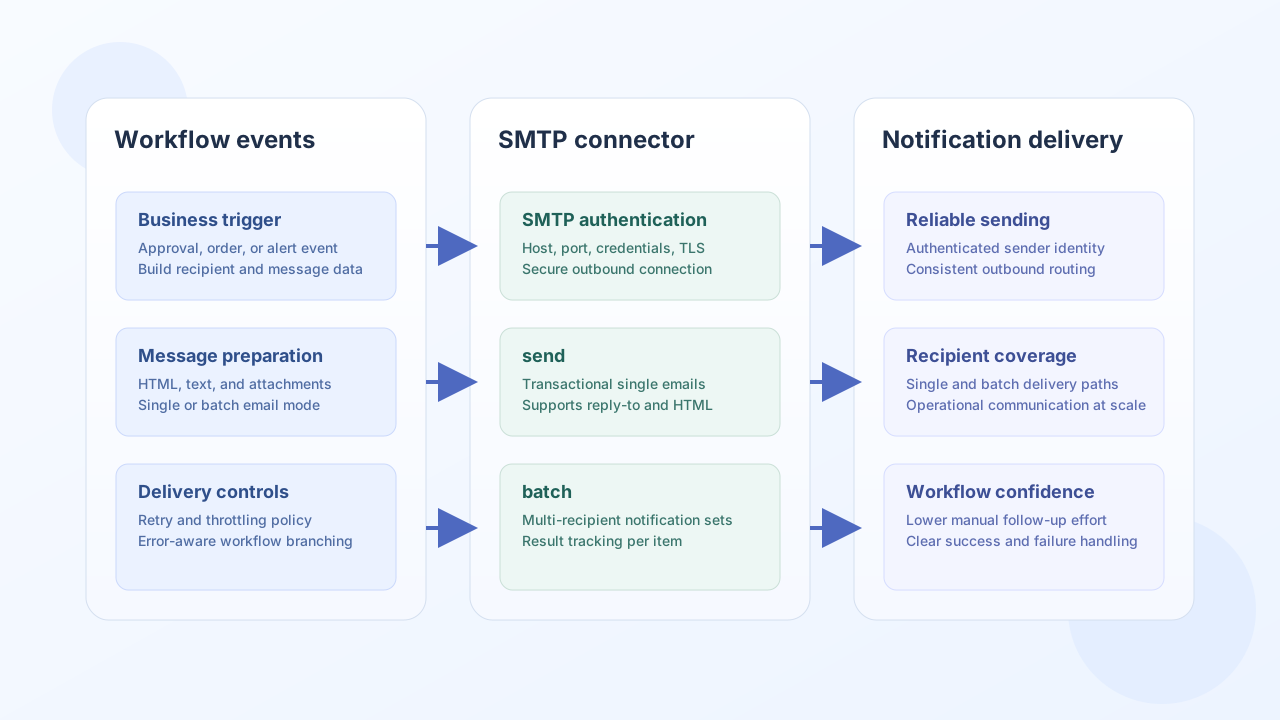
Configuration and authentication
Configure your SMTP server details and sender identity so workflow-generated messages are delivered from a trusted account. The connector uses raw SMTP (EHLO, optional STARTTLS when advertised, AUTH LOGIN with AUTH PLAIN fallback, then MAIL/RCPT/DATA).
smtp_host(required): SMTP host such assmtp.gmail.com.smtp_port(required): SMTP port, typically587for STARTTLS submission.username(required): SMTP login username.password(required): SMTP password or app password.from_email(required): default sender address.from_name(optional): default sender name (defaults toTealfabric).use_tls(optional): whentrue(default), upgrades withSTARTTLSif the server advertises it.timeout_seconds(optional): connection timeout in seconds (default30).
Port 465 implicit SSL is not implemented in this connector version (same as legacy PHP). Use port 587 with use_tls: true for STARTTLS.
Run test after configuration to verify connectivity and authentication before sending production traffic.
Test connectivity with test
test connects, sends EHLO, optionally negotiates STARTTLS, authenticates, and sends QUIT without delivering mail.
{
  "success": true,
  "data": {
    "message": "SMTP connection test successful",
    "details": {
      "smtp_host": "smtp.example.com",
      "smtp_port": 587,
      "use_tls": true,
      "from_email": "noreply@example.com"
    }
  }
}
Send an email with send
Use send for one-off transactional messages such as order confirmations, alerts, or lifecycle notifications. You can send plain text or HTML content. CC and BCC recipients are supported via additional RCPT TO commands; attachments are not supported in this connector version.
Payload aliases: to or recipient; body, message, or content.
const baseUrl = "https://api.example.com/api/v1";
const tenantId = "<TENANT_ID>";
const apiKey = "<API_KEY>";

async function sendOrderConfirmation(integrationId: string) {
  const response = await fetch(`${baseUrl}/integrations/${encodeURIComponent(integrationId)}/execute`, {
    method: "POST",
    headers: {
      "X-API-Key": apiKey,
      "X-Tenant-ID": tenantId,
      "Content-Type": "application/json",
    },
    body: JSON.stringify({
      operation: "send",
      to: "buyer@example.com",
      subject: "Order ORD-9001 confirmed",
      body: "<h1>Thank you for your order</h1><p>Your order is now being processed.</p>",
      is_html: true,
      reply_to: "support@example.com",
    }),
  });
  if (!response.ok) throw new Error(`Request failed: ${response.status}`);
  const payload = await response.json();
  return payload.data;
}
curl -X POST "https://api.example.com/api/v1/integrations/<ENTITY_ID>/execute" \
-H "X-API-Key: <API_KEY>" \
-H "X-Tenant-ID: <TENANT_ID>" \
-H "Content-Type: application/json" \
-d '{
"operation": "send",
"to": "buyer@example.com",
"subject": "Order ORD-9001 confirmed",
"body": "<h1>Thank you for your order</h1><p>Your order is now being processed.</p>",
"is_html": true,
"reply_to": "support@example.com"
}'
{
  "success": true,
  "data": {
    "message_count": 1,
    "message_id": "smtp_abc123_def456"
  }
}
Send multiple emails with batch
Use batch when a workflow needs to notify multiple recipients in a single step. Each item uses the same fields as send. The batch array key can be emails or items. Partial success is supported: success is true when at least one message sends.
const baseUrl = "https://api.example.com/api/v1";
const tenantId = "<TENANT_ID>";
const apiKey = "<API_KEY>";

async function sendDailyDigestBatch(integrationId: string) {
  const response = await fetch(`${baseUrl}/integrations/${encodeURIComponent(integrationId)}/execute`, {
    method: "POST",
    headers: {
      "X-API-Key": apiKey,
      "X-Tenant-ID": tenantId,
      "Content-Type": "application/json",
    },
    body: JSON.stringify({
      operation: "batch",
      emails: [
        { to: "ops@example.com", subject: "Daily Digest", body: "Operations summary." },
        { to: "sales@example.com", subject: "Daily Digest", body: "Sales summary." },
      ],
    }),
  });
  if (!response.ok) throw new Error(`Request failed: ${response.status}`);
  const payload = await response.json();
  return payload.data;
}
curl -X POST "https://api.example.com/api/v1/integrations/<ENTITY_ID>/execute" \
-H "X-API-Key: <API_KEY>" \
-H "X-Tenant-ID: <TENANT_ID>" \
-H "Content-Type: application/json" \
-d '{
"operation": "batch",
"emails": [
{"to": "ops@example.com", "subject": "Daily Digest", "body": "Operations summary."},
{"to": "sales@example.com", "subject": "Daily Digest", "body": "Sales summary."}
]
}'
{
  "success": true,
  "data": {
    "message_count": 2,
    "total_emails": 2,
    "successful_emails": 2,
    "results": [
      { "index": 0, "success": true, "result": { "success": true, "message_count": 1, "message_id": "smtp_..." } },
      { "index": 1, "success": true, "result": { "success": true, "message_count": 1, "message_id": "smtp_..." } }
    ]
  }
}
Reliability guidance
Most SMTP incidents come from invalid credentials, mismatched TLS settings, and unsupported operation usage. Validate configuration with test, enforce address validation before send, and monitor provider throughput limits to avoid delivery throttling.
These practices keep notification workflows stable and reduce undelivered-message debugging effort.