Bitbucket Connector Guide
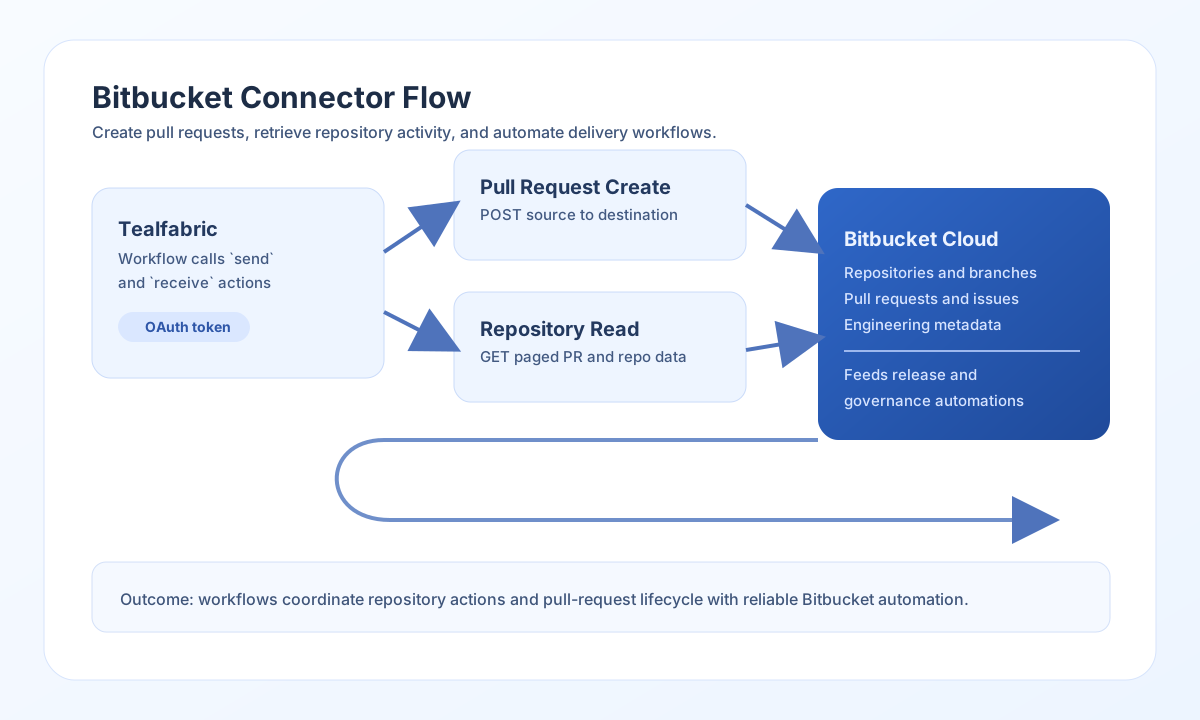
The Bitbucket connector lets Tealfabric workflows create and retrieve repository collaboration data in Bitbucket Cloud. It is useful for pull-request automation, repository governance, and engineering workflow synchronization.
Document information
| Field | Value |
|---|---|
| Canonical URL | /docs/04_connecting-systems/connectors/b/bitbucket |
| Version (published date) | 2026-05-08 |
| Tags | connectors, reference, bitbucket |
| Connector ID | bitbucket-1.0.0 |
Configure authentication
Set client_id, client_secret, and redirect_uri from your Bitbucket OAuth consumer. Store access_token after consent and include refresh_token when token renewal is required for long-running workflows.
Keep scopes aligned with the operations you execute, such as repository read/write or pull request permissions. The test operation validates OAuth app configuration (client_id, client_secret, redirect_uri) and confirms the current access token via GET user. Other operations (send, receive, sync, batch) require a valid access_token at runtime.
Configuration parameters:
client_id,client_secret,redirect_uri(required fortestand token refresh)access_token(required at execute time)refresh_token(optional; used for refresh-on-401)scope(optional; space-separated OAuth scopes)timeout_seconds(optional; default30)
Create pull requests with send
Use send to create or update resources such as pull requests and issues. A common pattern is opening a pull request automatically after a branch promotion step.
const baseUrl = "https://api.example.com/api/v1";
const tenantId = "<TENANT_ID>";
const apiKey = "<API_KEY>";

async function createPullRequest(integrationId: string) {
  const response = await fetch(`${baseUrl}/integrations/${encodeURIComponent(integrationId)}/execute`, {
    method: "POST",
    headers: {
      "X-API-Key": apiKey,
      "X-Tenant-ID": tenantId,
      "Content-Type": "application/json",
    },
    body: JSON.stringify({
      operation: "send",
      endpoint: "repositories/<WORKSPACE>/<REPO_SLUG>/pullrequests",
      method: "POST",
      data: {
        title: "Release: Promote feature branch",
        description: "Automated PR created by release workflow.",
        source: { branch: { name: "release/2026-05" } },
        destination: { branch: { name: "main" } }
      }
    }),
  });
  if (!response.ok) throw new Error(`Request failed: ${response.status}`);
  const payload = await response.json();
  return payload.data?.data ?? payload.data?.response;
}
curl -X POST "https://api.example.com/api/v1/integrations/<ENTITY_ID>/execute" \
-H "X-API-Key: <API_KEY>" \
-H "X-Tenant-ID: <TENANT_ID>" \
-H "Content-Type: application/json" \
-d '{
"operation": "send",
"endpoint": "repositories/<WORKSPACE>/<REPO_SLUG>/pullrequests",
"method": "POST",
"data": {
"title": "Release: Promote feature branch",
"description": "Automated PR created by release workflow.",
"source": { "branch": { "name": "release/2026-05" } },
"destination": { "branch": { "name": "main" } }
}
}'
{
  "success": true,
  "data": {
    "message_count": 1,
    "data": {
      "id": 184,
      "title": "Release: Promote feature branch",
      "state": "OPEN"
    },
    "response": {
      "id": 184,
      "title": "Release: Promote feature branch",
      "state": "OPEN"
    }
  }
}
Retrieve repository data with receive
Use receive to fetch repositories, pull requests, or issues for dashboarding and workflow decisions. Query parameters such as pagination and state filters help keep API usage efficient. List responses unwrap values when present; top-level JSON arrays and single-object payloads are also normalized into data.
const baseUrl = "https://api.example.com/api/v1";
const tenantId = "<TENANT_ID>";
const apiKey = "<API_KEY>";

async function listOpenPullRequests(integrationId: string) {
  const response = await fetch(`${baseUrl}/integrations/${encodeURIComponent(integrationId)}/execute`, {
    method: "POST",
    headers: {
      "X-API-Key": apiKey,
      "X-Tenant-ID": tenantId,
      "Content-Type": "application/json",
    },
    body: JSON.stringify({
      operation: "receive",
      endpoint: "repositories/<WORKSPACE>/<REPO_SLUG>/pullrequests",
      query: {
        state: "OPEN",
        pagelen: 20,
        page: 1
      }
    }),
  });
  if (!response.ok) throw new Error(`Request failed: ${response.status}`);
  const payload = await response.json();
  return payload.data?.data ?? [];
}
curl -X POST "https://api.example.com/api/v1/integrations/<ENTITY_ID>/execute" \
-H "X-API-Key: <API_KEY>" \
-H "X-Tenant-ID: <TENANT_ID>" \
-H "Content-Type: application/json" \
-d '{
"operation": "receive",
"endpoint": "repositories/<WORKSPACE>/<REPO_SLUG>/pullrequests",
"query": {
"state": "OPEN",
"pagelen": 20,
"page": 1
}
}'
{
  "success": true,
  "data": {
    "message_count": 2,
    "data": [
      { "id": 184, "title": "Release: Promote feature branch", "state": "OPEN" },
      { "id": 185, "title": "Fix: Resolve webhook retry issue", "state": "OPEN" }
    ],
    "total_size": 2
  }
}
Test connection with test
Use test to validate OAuth app settings and confirm the stored access token against GET user.
{
  "operation": "test"
}
{
  "success": true,
  "data": {
    "message": "Bitbucket connection test successful",
    "details": {
      "api_base_url": "https://api.bitbucket.org/2.0",
      "user_uuid": "{user-uuid}",
      "username": "example-user"
    }
  }
}
Reliability guidance
Most Bitbucket API issues are caused by missing OAuth scopes, expired tokens, or incorrect workspace and repository slugs. Validate authentication and endpoint paths first, then confirm payload structure for the target operation.
The connector applies a local 1000 requests/hour limiter (matching legacy behavior) and refreshes access tokens on HTTP 401 when refresh_token is configured. Refreshed tokens are used in-process for the current execution and are not persisted back to tenant secret storage.
For production stability, paginate list calls, apply retry with backoff for API throttling responses, and validate success before passing data to downstream steps. This keeps repository workflows resilient during busy development cycles.