BambooHR Connector Guide
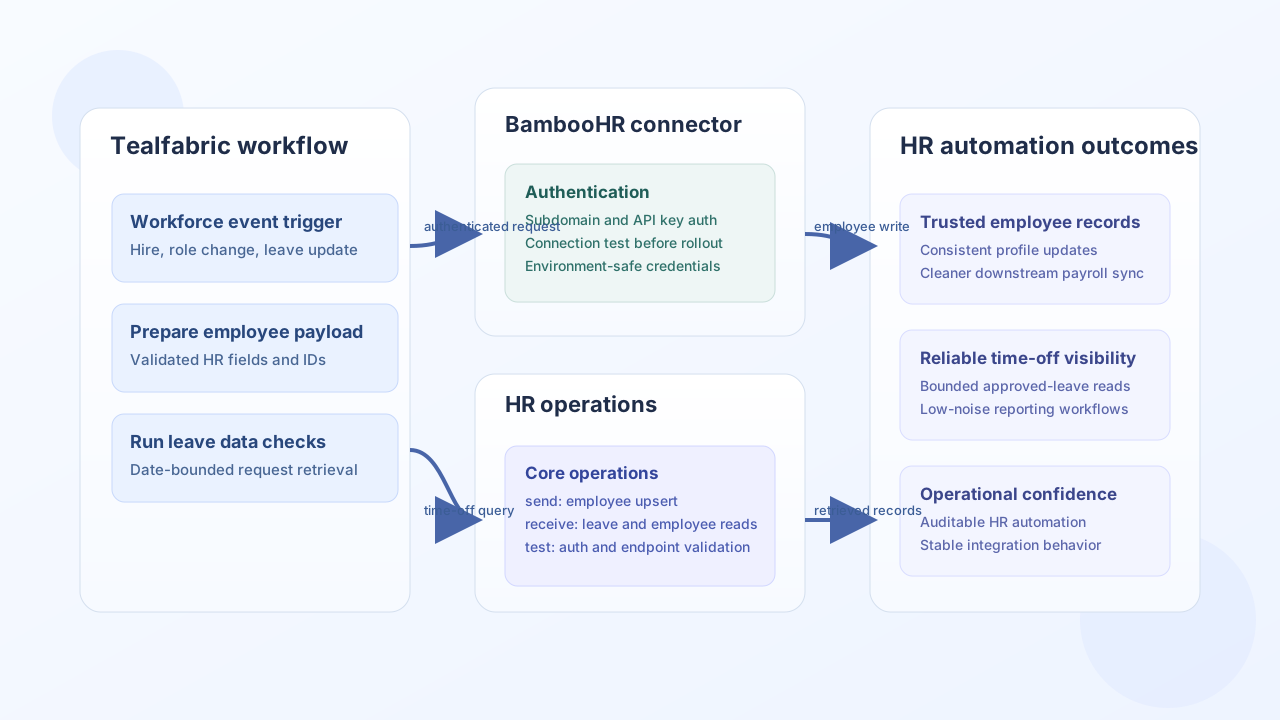
The BambooHR connector allows Tealfabric workflows to keep employee records and HR lifecycle data synchronized with BambooHR. It is most useful when onboarding, role changes, and leave-management updates should move automatically between internal systems and your HR platform.
Document information
| Field | Value |
|---|---|
| Canonical URL | /docs/04_connecting-systems/connectors/b/bamboohr |
| Version (published date) | 2026-05-08 |
| Tags | connectors, reference, bamboohr |
| Connector ID | bamboohr-1.0.0 |
Configuration and authentication
Configure BambooHR access using your BambooHR subdomain and an API key generated for a service-owned account. This connector uses BambooHR API authentication with subdomain-scoped routing, so keeping credentials environment-specific helps avoid accidental writes to the wrong tenant. Before production rollout, run test to validate connectivity and permissions.
username(required): BambooHR subdomain (for example,mycompany).password(required): BambooHR API key.base_url(optional): Defaults tohttps://api.bamboohr.com/api/gateway.timeout_seconds(optional): Request timeout in seconds.
Create or update employee records with send
Use send to create new employee profiles or update existing records after hiring, transfer, or status changes. Keep required HR fields complete and validate business identifiers in upstream systems before writing to BambooHR.
const baseUrl = "https://api.example.com/api/v1";
const tenantId = "<TENANT_ID>";
const apiKey = "<API_KEY>";

async function upsertEmployeeRecord(integrationId: string) {
  const response = await fetch(`${baseUrl}/integrations/${encodeURIComponent(integrationId)}/execute`, {
    method: "POST",
    headers: {
      "X-API-Key": apiKey,
      "X-Tenant-ID": tenantId,
      "Content-Type": "application/json",
    },
    body: JSON.stringify({
      operation: "send",
      endpoint: "<ENTITY_ID>/v1/employees",
      method: "POST",
      data: {
        firstName: "Jordan",
        lastName: "Miles",
        workEmail: "jordan.miles@example.com",
        jobTitle: "Operations Manager",
        department: "Operations",
      },
    }),
  });
  if (!response.ok) throw new Error(`Request failed: ${response.status}`);
  const payload = await response.json();
  return payload.data;
}
curl -X POST "https://api.example.com/api/v1/integrations/<ENTITY_ID>/execute" \
-H "X-API-Key: <API_KEY>" \
-H "X-Tenant-ID: <TENANT_ID>" \
-H "Content-Type: application/json" \
-d '{
"operation": "send",
"endpoint": "<ENTITY_ID>/v1/employees",
"method": "POST",
"data": {
"firstName": "Jordan",
"lastName": "Miles",
"workEmail": "jordan.miles@example.com",
"jobTitle": "Operations Manager",
"department": "Operations"
}
}'
{
  "success": true,
  "data": {
    "id": "<ENTITY_ID>",
    "firstName": "Jordan",
    "lastName": "Miles",
    "workEmail": "jordan.miles@example.com"
  }
}
Retrieve employee and leave data with receive
Use receive to pull current employee details or time-off windows for reporting, payroll preparation, and workflow checks. Keep field lists and date ranges explicit so runs remain efficient and predictable.
const baseUrl = "https://api.example.com/api/v1";
const tenantId = "<TENANT_ID>";
const apiKey = "<API_KEY>";

async function listTimeOffRequests(integrationId: string) {
  const response = await fetch(`${baseUrl}/integrations/${encodeURIComponent(integrationId)}/execute`, {
    method: "POST",
    headers: {
      "X-API-Key": apiKey,
      "X-Tenant-ID": tenantId,
      "Content-Type": "application/json",
    },
    body: JSON.stringify({
      operation: "receive",
      endpoint: "<ENTITY_ID>/v1/time_off/requests",
      query: {
        start: "2026-05-01",
        end: "2026-05-31",
        status: "approved",
      },
    }),
  });
  if (!response.ok) throw new Error(`Request failed: ${response.status}`);
  const payload = await response.json();
  return payload.data ?? [];
}
curl -X POST "https://api.example.com/api/v1/integrations/<ENTITY_ID>/execute" \
-H "X-API-Key: <API_KEY>" \
-H "X-Tenant-ID: <TENANT_ID>" \
-H "Content-Type: application/json" \
-d '{
"operation": "receive",
"endpoint": "<ENTITY_ID>/v1/time_off/requests",
"query": {
"start": "2026-05-01",
"end": "2026-05-31",
"status": "approved"
}
}'
{
  "success": true,
  "record_count": 1,
  "data": [
    {
      "id": "<ENTITY_ID>",
      "employeeId": "<ENTITY_ID>",
      "status": "approved",
      "start": "2026-05-12",
      "end": "2026-05-14"
    }
  ]
}
Reliability guidance
Most BambooHR integration failures come from invalid API keys, subdomain mismatches, and broad queries that run too frequently. Validate credentials on deployment, scope retrieval queries by date and status, and add retry backoff for transient failures. These practices keep HR automations stable and auditable.