BigCommerce Connector Guide
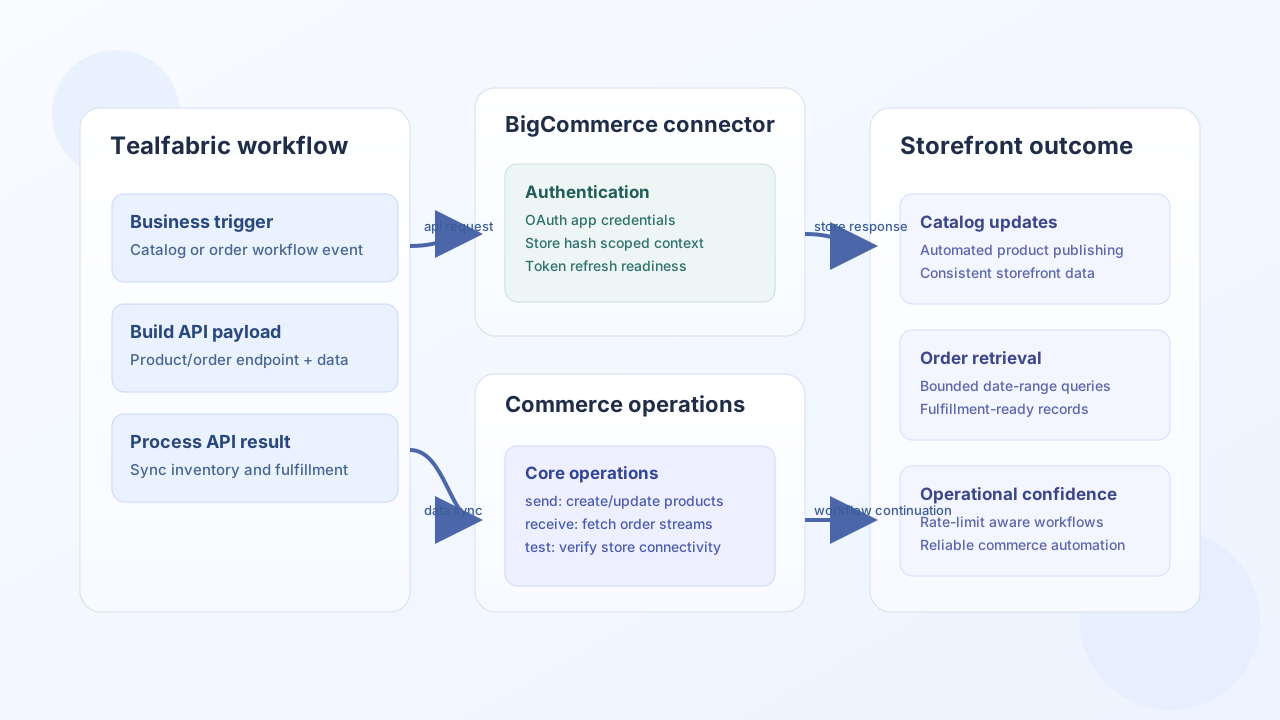
The BigCommerce connector helps Tealfabric workflows synchronize catalog and order data with BigCommerce stores. It is useful for commerce automation tasks such as product publishing, order ingestion, and downstream fulfillment workflows.
Document information
| Field | Value |
|---|---|
| Canonical URL | /docs/04_connecting-systems/connectors/b/bigcommerce |
| Version (published date) | 2026-05-08 |
| Tags | connectors, reference, bigcommerce |
| Connector ID | bigcommerce-1.0.0 |
Configuration and authentication
Configure this connector with a BigCommerce app client and OAuth tokens for the target store. Keep store_hash and token values environment-specific so API calls always target the correct storefront context.
client_id(required): BigCommerce OAuth client ID.client_secret(required): BigCommerce OAuth client secret.redirect_uri(required): Redirect URI registered in the app configuration.access_token(optional): Store access token after OAuth exchange.refresh_token(optional): Refresh token when available.store_hash(optional): Store identifier used in API base URL paths.scope(optional): OAuth scopes for products, orders, and related resources.timeout_seconds(optional): Request timeout in seconds.
OAuth app parameters (client_id, client_secret, redirect_uri) are validated only during the test operation, matching legacy behavior. Execute-time operations require access_token and store_hash.
Create or update products with send
Use send for product creation and updates so catalog changes can be triggered from internal workflows. Keep payloads minimal and valid for the chosen API version.
const baseUrl = "https://api.example.com/api/v1";
const tenantId = "<TENANT_ID>";
const apiKey = "<API_KEY>";

async function createCatalogProduct(integrationId: string) {
  const response = await fetch(`${baseUrl}/integrations/${encodeURIComponent(integrationId)}/execute`, {
    method: "POST",
    headers: {
      "X-API-Key": apiKey,
      "X-Tenant-ID": tenantId,
      "Content-Type": "application/json",
    },
    body: JSON.stringify({
      operation: "send",
      endpoint: "v2/products",
      method: "POST",
      data: {
        name: "Premium Travel Backpack",
        type: "physical",
        price: "129.99",
        weight: "1.20",
        categories: [12],
        availability: "available",
      },
    }),
  });
  if (!response.ok) throw new Error(`Request failed: ${response.status}`);
  const payload = await response.json();
  return payload.data?.data ?? payload.data ?? {};
}
curl -X POST "https://api.example.com/api/v1/integrations/<ENTITY_ID>/execute" \
-H "X-API-Key: <API_KEY>" \
-H "X-Tenant-ID: <TENANT_ID>" \
-H "Content-Type: application/json" \
-d '{
"operation": "send",
"endpoint": "v2/products",
"method": "POST",
"data": {
"name": "Premium Travel Backpack",
"type": "physical",
"price": "129.99",
"weight": "1.20",
"categories": [12],
"availability": "available"
}
}'
{
  "success": true,
  "data": {
    "message_count": 1,
    "data": {
      "id": "<ENTITY_ID>",
      "name": "Premium Travel Backpack",
      "price": "129.99"
    },
    "response": {
      "id": "<ENTITY_ID>",
      "name": "Premium Travel Backpack",
      "price": "129.99"
    }
  }
}
Retrieve orders with receive
Use receive to query order data for fulfillment, reconciliation, and support workflows. Keep date ranges and limits explicit so runs stay performant and easy to monitor.
const baseUrl = "https://api.example.com/api/v1";
const tenantId = "<TENANT_ID>";
const apiKey = "<API_KEY>";

async function listRecentOrders(integrationId: string) {
  const response = await fetch(`${baseUrl}/integrations/${encodeURIComponent(integrationId)}/execute`, {
    method: "POST",
    headers: {
      "X-API-Key": apiKey,
      "X-Tenant-ID": tenantId,
      "Content-Type": "application/json",
    },
    body: JSON.stringify({
      operation: "receive",
      endpoint: "v2/orders",
      query: {
        min_date_created: "2026-05-01",
        max_date_created: "2026-05-08",
        limit: 25,
      },
    }),
  });
  if (!response.ok) throw new Error(`Request failed: ${response.status}`);
  const payload = await response.json();
  return payload.data?.data ?? payload.data ?? [];
}
curl -X POST "https://api.example.com/api/v1/integrations/<ENTITY_ID>/execute" \
-H "X-API-Key: <API_KEY>" \
-H "X-Tenant-ID: <TENANT_ID>" \
-H "Content-Type: application/json" \
-d '{
"operation": "receive",
"endpoint": "v2/orders",
"query": {
"min_date_created": "2026-05-01",
"max_date_created": "2026-05-08",
"limit": 25
}
}'
{
  "success": true,
  "data": {
    "message_count": 2,
    "total_size": 2,
    "data": [
      {"id": "<ENTITY_ID>", "status": "Awaiting Shipment", "total_inc_tax": "129.99"},
      {"id": "<ENTITY_ID>", "status": "Completed", "total_inc_tax": "244.50"}
    ]
  }
}
Reliability guidance
Most production issues come from expired OAuth tokens, incorrect store hash values, and unbounded list queries. Validate token refresh behavior, confirm store context during deployment, and use paging/filters for large datasets. These controls keep BigCommerce workflows stable and cost-aware.