Basware Connector Guide
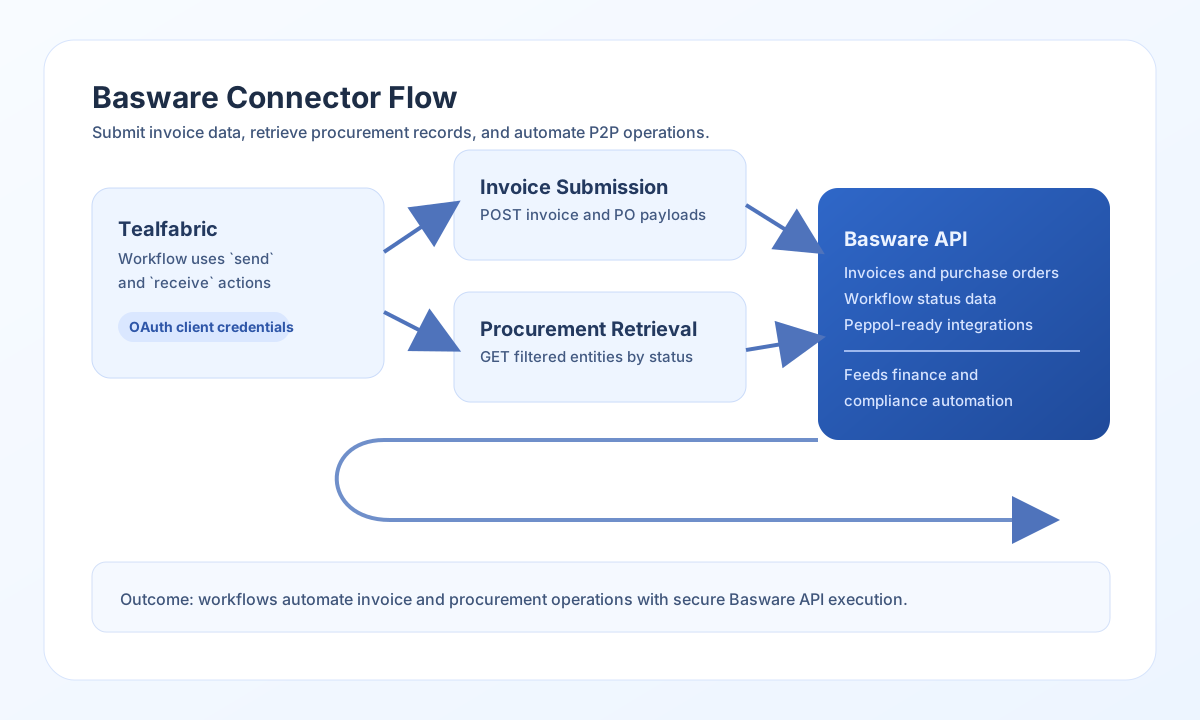
The Basware connector lets Tealfabric workflows create and retrieve e-invoicing and purchase-to-pay data through Basware APIs. It is useful for invoice automation, procurement workflows, and compliance reporting across finance operations.
Document information
| Field | Value |
|---|---|
| Canonical URL | /docs/04_connecting-systems/connectors/b/basware |
| Version (published date) | 2026-05-08 |
| Tags | connectors, reference, basware |
| Connector ID | basware-1.0.0 |
Configure authentication
Set base_url, client_id, and client_secret from your Basware OAuth2 application. The connector uses client-credentials authentication to request access tokens at {base_url}/oauth/token, then calls {base_url}/api/{endpoint} with a Bearer token.
Use timeout_seconds for operations that may involve larger invoice or purchase-order payloads (default 30). Run test immediately after configuration to verify OAuth credentials and API access before enabling production workflows.
test is the only operation that validates integration config up front (legacy parity). send, receive, and execute obtain an access token at runtime but do not pre-validate base_url, client_id, or client_secret before dispatch.
Create invoices with send
Use send to create or update finance entities such as invoices and purchase orders. Provide endpoint as the path relative to {base_url}/api/ (no leading slash). The JSON body is taken from data when present; otherwise the full call payload is sent (legacy data ?? input).
const baseUrl = "https://api.example.com/api/v1";
const tenantId = "<TENANT_ID>";
const apiKey = "<API_KEY>";

async function createInvoice(integrationId: string) {
  const response = await fetch(`${baseUrl}/integrations/${encodeURIComponent(integrationId)}/execute`, {
    method: "POST",
    headers: {
      "X-API-Key": apiKey,
      "X-Tenant-ID": tenantId,
      "Content-Type": "application/json",
    },
    body: JSON.stringify({
      operation: "send",
      endpoint: "invoices",
      method: "POST",
      data: {
        invoiceNumber: "INV-2026-0510",
        supplierId: "SUP-1002",
        invoiceDate: "2026-05-10",
        dueDate: "2026-06-10",
        amount: 4200.0,
        currency: "EUR"
      }
    }),
  });
  if (!response.ok) throw new Error(`Request failed: ${response.status}`);
  return response.json();
}
curl -X POST "https://api.example.com/api/v1/integrations/<ENTITY_ID>/execute" \
-H "X-API-Key: <API_KEY>" \
-H "X-Tenant-ID: <TENANT_ID>" \
-H "Content-Type: application/json" \
-d '{
"operation": "send",
"endpoint": "invoices",
"method": "POST",
"data": {
"invoiceNumber": "INV-2026-0510",
"supplierId": "SUP-1002",
"invoiceDate": "2026-05-10",
"dueDate": "2026-06-10",
"amount": 4200.00,
"currency": "EUR"
}
}'
{
  "success": true,
  "data": {
    "message": "Basware operation completed successfully",
    "result": {
      "id": "inv-918273",
      "status": "Pending"
    }
  }
}
Retrieve procurement data with receive
Use receive to read invoices, purchase orders, or workflow entities for reconciliation and reporting. Provide endpoint and optional query parameters per the Basware API reference. When the response includes invoices or purchase_orders arrays, those are returned in data.items; otherwise the full response object is wrapped as a single item (legacy parity).
const baseUrl = "https://api.example.com/api/v1";
const tenantId = "<TENANT_ID>";
const apiKey = "<API_KEY>";

async function listPendingInvoices(integrationId: string) {
  const response = await fetch(`${baseUrl}/integrations/${encodeURIComponent(integrationId)}/execute`, {
    method: "POST",
    headers: {
      "X-API-Key": apiKey,
      "X-Tenant-ID": tenantId,
      "Content-Type": "application/json",
    },
    body: JSON.stringify({
      operation: "receive",
      endpoint: "invoices",
      query: {
        status: "Pending",
        limit: 25,
        offset: 0
      }
    }),
  });
  if (!response.ok) throw new Error(`Request failed: ${response.status}`);
  return response.json();
}
curl -X POST "https://api.example.com/api/v1/integrations/<ENTITY_ID>/execute" \
-H "X-API-Key: <API_KEY>" \
-H "X-Tenant-ID: <TENANT_ID>" \
-H "Content-Type: application/json" \
-d '{
"operation": "receive",
"endpoint": "invoices",
"query": {
"status": "Pending",
"limit": 25,
"offset": 0
}
}'
{
  "success": true,
  "data": {
    "message": "Basware data retrieved successfully",
    "invoice_count": 2,
    "items": [
      {
        "invoiceNumber": "INV-2026-0510",
        "supplierId": "SUP-1002",
        "amount": 4200.0,
        "status": "Pending"
      },
      {
        "invoiceNumber": "INV-2026-0511",
        "supplierId": "SUP-1010",
        "amount": 985.5,
        "status": "Pending"
      }
    ]
  }
}
Call arbitrary API methods with execute
Use execute when you need an explicit HTTP method and optional JSON body. The body is taken from body, then data, then defaults to [] when both are omitted (legacy parity).
{
  "operation": "execute",
  "endpoint": "workflows",
  "method": "GET"
}
{
  "success": true,
  "data": {
    "message": "Basware method executed successfully",
    "result": {
      "workflows": []
    }
  }
}
Verify credentials with test
Use test to validate base_url, client_id, and client_secret, obtain an OAuth token, and probe GET invoices. Missing required config returns Configuration validation failed (legacy parity).
{
  "success": true,
  "data": {
    "message": "Basware connection test successful",
    "details": {
      "base_url": "https://api.basware.com",
      "invoices_found": 3
    }
  }
}
Reliability guidance
Most Basware failures are caused by incorrect OAuth credentials, missing API permissions, or malformed entity payloads. Validate authentication and permissions first, then verify endpoint paths and field formats.
For stable production automation, paginate large reads with query parameters, apply retry with backoff for rate-limit (429) responses, and enforce strict input validation on invoice and purchase-order fields.