Basecamp Connector Guide
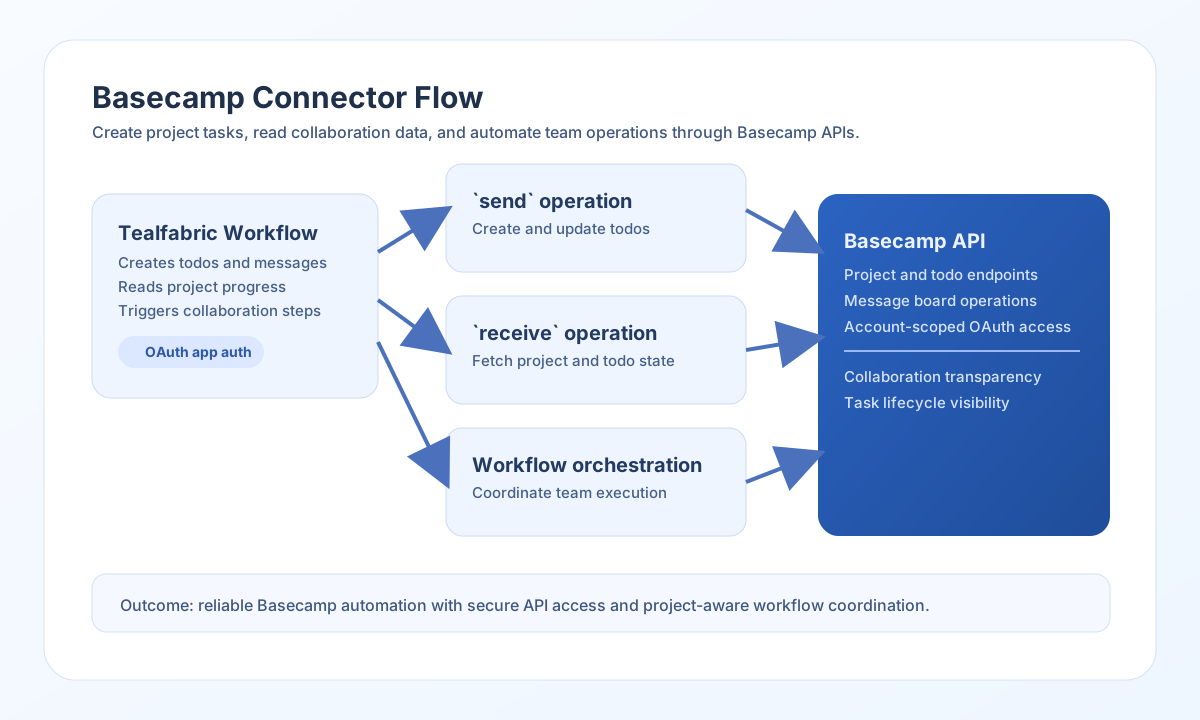
The Basecamp connector lets Tealfabric workflows interact with Basecamp projects, todos, and message boards. It is useful for project operations automation such as task creation, status synchronization, and notification posting.
Document information
| Field | Value |
|---|---|
| Canonical URL | /docs/04_connecting-systems/connectors/b/basecamp |
| Version (published date) | 2026-05-08 |
| Tags | connectors, reference, basecamp |
| Connector ID | basecamp-1.0.0 |
Configure OAuth access
Set client_id, client_secret, and redirect_uri from your Basecamp integration settings, then complete OAuth authorization to obtain access credentials. If tokens are already available, provide access_token and refresh_token so the connector can begin API calls immediately.
Use scope to limit permissions and adjust timeout_seconds for larger responses. Set base_url to your account-specific API root (for example https://3.basecampapi.com/{account_id}) when required by your integration. Run test before production rollout to confirm OAuth app configuration and token validity; test validates client_id, client_secret, and redirect_uri, while send, receive, sync, and batch require only a valid access_token at runtime.
Create collaboration items with send
Use send to create or update Basecamp resources like todos and messages. Keep endpoint paths specific to your project and tool IDs so updates target the correct records.
const baseUrl = "https://api.example.com/api/v1";
const tenantId = "<TENANT_ID>";
const apiKey = "<API_KEY>";

async function createTodo(integrationId: string) {
  const response = await fetch(`${baseUrl}/integrations/${encodeURIComponent(integrationId)}/execute`, {
    method: "POST",
    headers: {
      "X-API-Key": apiKey,
      "X-Tenant-ID": tenantId,
      "Content-Type": "application/json",
    },
    body: JSON.stringify({
      operation: "send",
      endpoint: "projects/<ENTITY_ID>/todosets/<ENTITY_ID>/todos.json",
      method: "POST",
      data: {
        content: "Publish sprint release notes",
        notes: "Include API changes and migration steps",
        due_on: "2026-05-15"
      }
    }),
  });
  if (!response.ok) throw new Error(`Request failed: ${response.status}`);
  return response.json();
}
curl -X POST "https://api.example.com/api/v1/integrations/<ENTITY_ID>/execute" \
-H "X-API-Key: <API_KEY>" \
-H "X-Tenant-ID: <TENANT_ID>" \
-H "Content-Type: application/json" \
-d '{
"operation": "send",
"endpoint": "projects/<ENTITY_ID>/todosets/<ENTITY_ID>/todos.json",
"method": "POST",
"data": {
"content": "Publish sprint release notes",
"notes": "Include API changes and migration steps",
"due_on": "2026-05-15"
}
}'
{
  "success": true,
  "data": {
    "message_count": 1,
    "data": {
      "id": "<ENTITY_ID>",
      "content": "Publish sprint release notes",
      "completed": false
    },
    "response": {
      "id": "<ENTITY_ID>",
      "content": "Publish sprint release notes",
      "completed": false
    }
  }
}
Retrieve project data with receive
Use receive to list projects, retrieve todos, or fetch specific records for status dashboards and workflow branching. Query parameters help reduce payload size and focus on active items.
const baseUrl = "https://api.example.com/api/v1";
const tenantId = "<TENANT_ID>";
const apiKey = "<API_KEY>";

async function listOpenTodos(integrationId: string) {
  const response = await fetch(`${baseUrl}/integrations/${encodeURIComponent(integrationId)}/execute`, {
    method: "POST",
    headers: {
      "X-API-Key": apiKey,
      "X-Tenant-ID": tenantId,
      "Content-Type": "application/json",
    },
    body: JSON.stringify({
      operation: "receive",
      endpoint: "projects/<ENTITY_ID>/todosets/<ENTITY_ID>/todos.json",
      query: {
        status: "open"
      }
    }),
  });
  if (!response.ok) throw new Error(`Request failed: ${response.status}`);
  return response.json();
}
curl -X POST "https://api.example.com/api/v1/integrations/<ENTITY_ID>/execute" \
-H "X-API-Key: <API_KEY>" \
-H "X-Tenant-ID: <TENANT_ID>" \
-H "Content-Type: application/json" \
-d '{
"operation": "receive",
"endpoint": "projects/<ENTITY_ID>/todosets/<ENTITY_ID>/todos.json",
"query": {
"status": "open"
}
}'
{
  "success": true,
  "data": {
    "message_count": 1,
    "data": [
      {
        "id": "<ENTITY_ID>",
        "content": "Publish sprint release notes",
        "completed": false
      }
    ],
    "total_size": 1
  }
}
Validate OAuth with test
Use test to confirm OAuth app configuration and token access via GET projects.json. This operation validates client_id, client_secret, and redirect_uri before probing the API.
curl -X POST "https://api.example.com/api/v1/integrations/<ENTITY_ID>/execute" \
  -H "X-API-Key: <API_KEY>" \
  -H "X-Tenant-ID: <TENANT_ID>" \
  -H "Content-Type: application/json" \
  -d '{"operation": "test"}'
{
  "success": true,
  "data": {
    "message": "Basecamp connection test successful",
    "details": {
      "api_base_url": "https://3.basecampapi.com"
    }
  }
}
Reliability guidance
Most failures are caused by expired OAuth tokens, incorrect endpoint IDs, or Basecamp rate limits. Verify account/project IDs and token validity before investigating payload structure.
For stable production usage, paginate larger collections, apply status filters, and back off on 429 responses. This keeps collaboration automations consistent and minimizes API contention.