BambooHR Advanced Connector Guide
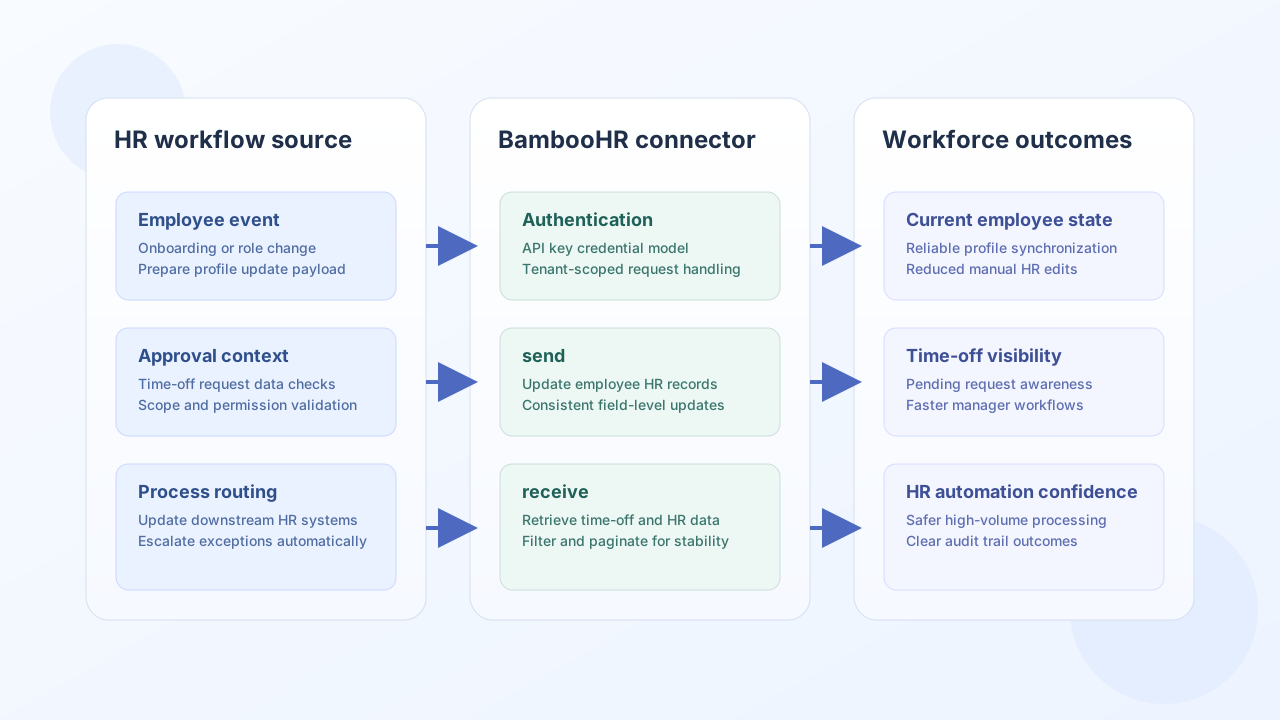
The BambooHR Advanced connector helps Tealfabric workflows synchronize HR records, time-off data, and reporting inputs with BambooHR. It is useful for onboarding, workforce updates, and payroll-adjacent automation where people data must stay current across systems.
Document information
| Field | Value |
|---|---|
| Canonical URL | /docs/04_connecting-systems/connectors/b/bamboohr-advanced |
| Version (published date) | 2026-05-08 |
| Tags | connectors, reference, bamboohr-advanced |
| Connector ID | bamboohr-advanced-1.0.0 |
Configuration and authentication
Configure your BambooHR subdomain and API key so the connector can execute requests in the correct tenant context. Requests are sent to https://{subdomain}.bamboohr.com/api/gateway.php/{endpoint} with Basic authentication (api_key:x).
base_url(required): BambooHR subdomain (for examplemycompanyformycompany.bamboohr.com). Full URLs and.bamboohr.comsuffixes are normalized automatically.api_key(required): BambooHR API key.timeout_seconds(optional): request timeout in seconds (default30).
Run test whenever credentials or endpoint settings change to confirm access before production runs.
Update HR records with send
Use send to create or update BambooHR resources via POST, PUT, or PATCH (default POST). Provide the gateway-relative endpoint path and a JSON data object per the BambooHR API reference.
const baseUrl = "https://api.example.com/api/v1";
const tenantId = "<TENANT_ID>";
const apiKey = "<API_KEY>";

async function updateEmployeeRecord(integrationId: string) {
  const response = await fetch(`${baseUrl}/integrations/${encodeURIComponent(integrationId)}/execute`, {
    method: "POST",
    headers: {
      "X-API-Key": apiKey,
      "X-Tenant-ID": tenantId,
      "Content-Type": "application/json",
    },
    body: JSON.stringify({
      operation: "send",
      endpoint: "employees/<EMPLOYEE_ID>",
      method: "POST",
      data: {
        jobTitle: "Senior Support Specialist",
        department: "Customer Success",
        location: "London",
      },
    }),
  });
  if (!response.ok) throw new Error(`Request failed: ${response.status}`);
  const payload = await response.json();
  return payload.data?.result;
}
curl -X POST "https://api.example.com/api/v1/integrations/<ENTITY_ID>/execute" \
-H "X-API-Key: <API_KEY>" \
-H "X-Tenant-ID: <TENANT_ID>" \
-H "Content-Type: application/json" \
-d '{
"operation": "send",
"endpoint": "employees/<EMPLOYEE_ID>",
"method": "POST",
"data": {
"jobTitle": "Senior Support Specialist",
"department": "Customer Success",
"location": "London"
}
}'
{
  "success": true,
  "data": {
    "message": "BambooHR Advanced operation completed successfully",
    "result": {
      "employeeId": "<EMPLOYEE_ID>",
      "jobTitle": "Senior Support Specialist",
      "department": "Customer Success"
    }
  }
}
Retrieve HR and time-off data with receive
Use receive to GET BambooHR resources. When the response contains employees or time_off_requests arrays, the connector unwraps them into data.items; otherwise the full response is returned as a single-item array.
const baseUrl = "https://api.example.com/api/v1";
const tenantId = "<TENANT_ID>";
const apiKey = "<API_KEY>";

async function listOpenTimeOff(integrationId: string) {
  const response = await fetch(`${baseUrl}/integrations/${encodeURIComponent(integrationId)}/execute`, {
    method: "POST",
    headers: {
      "X-API-Key": apiKey,
      "X-Tenant-ID": tenantId,
      "Content-Type": "application/json",
    },
    body: JSON.stringify({
      operation: "receive",
      endpoint: "time_off/requests",
      query: {
        status: "requested",
      },
    }),
  });
  if (!response.ok) throw new Error(`Request failed: ${response.status}`);
  const payload = await response.json();
  return payload.data?.items ?? [];
}
curl -X POST "https://api.example.com/api/v1/integrations/<ENTITY_ID>/execute" \
-H "X-API-Key: <API_KEY>" \
-H "X-Tenant-ID: <TENANT_ID>" \
-H "Content-Type: application/json" \
-d '{
"operation": "receive",
"endpoint": "time_off/requests",
"query": {
"status": "requested"
}
}'
{
  "success": true,
  "data": {
    "message": "BambooHR Advanced data retrieved successfully",
    "record_count": 2,
    "items": [
      {
        "requestId": "<REQUEST_ID>",
        "employeeId": "<EMPLOYEE_ID>",
        "status": "requested"
      }
    ]
  }
}
Call arbitrary gateway methods with execute
Use execute when you need an explicit HTTP method (default GET) and optional JSON body or data payload. This mirrors legacy BambooHR Advanced execute behavior for endpoints not covered by send/receive.
{
  "operation": "execute",
  "endpoint": "reports/custom",
  "method": "POST",
  "body": {
    "title": "Active Employees",
    "fields": ["firstName", "lastName", "department"]
  }
}
{
  "success": true,
  "data": {
    "message": "BambooHR Advanced method executed successfully",
    "result": {
      "title": "Active Employees"
    }
  }
}
Validate credentials with test
test calls GET employees/directory and returns the resolved BambooHR host plus employee count in data.details.
{
  "success": true,
  "data": {
    "message": "BambooHR Advanced connection test successful",
    "details": {
      "base_url": "https://mycompany.bamboohr.com",
      "employees_found": 42
    }
  }
}
Reliability guidance
Most BambooHR integration issues come from expired or rotated API keys, rate-limited polling, and unvalidated employee field mappings. Validate credentials with test, keep queries scoped and paginated, and apply retry with backoff for transient throttling responses (RATE_LIMIT errors are retriable).
These controls keep HR automations stable and easier to audit over time.