Zoom API Connector Guide
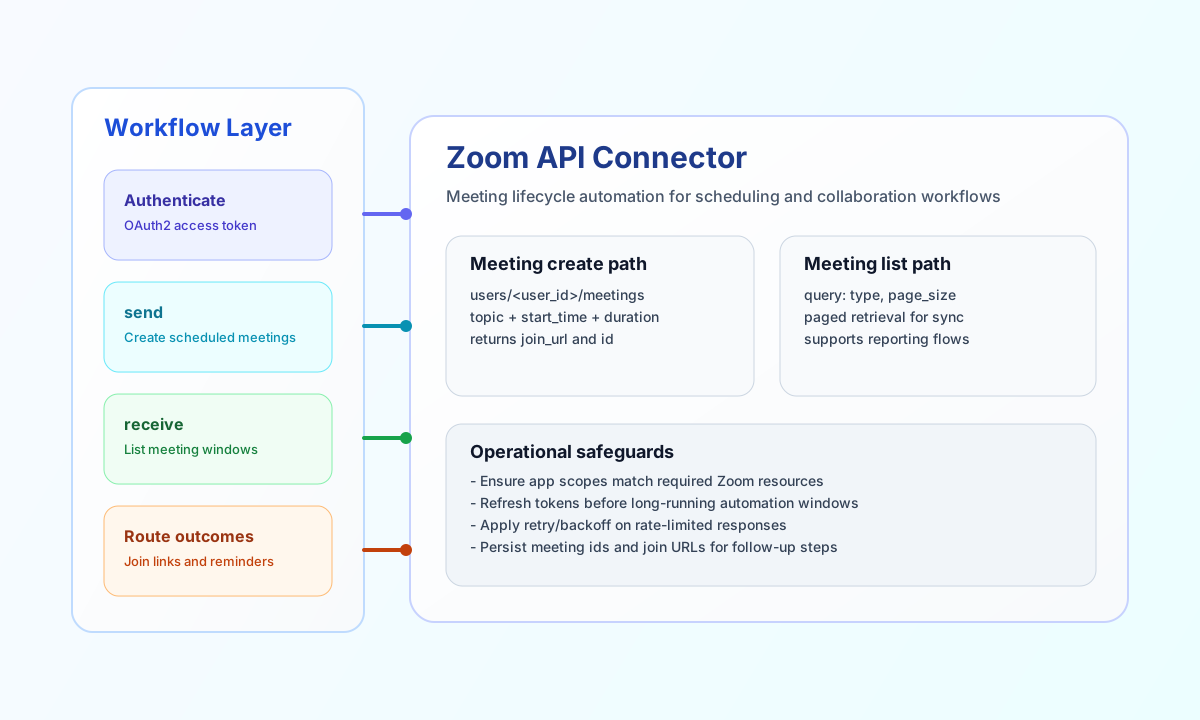
The Zoom API connector lets Tealfabric workflows create and retrieve Zoom resources such as meetings and users. It is useful for automating meeting scheduling, syncing meeting metadata, and routing collaboration workflows across systems.
Document information
| Field | Value |
|---|---|
| Canonical URL | /docs/04_connecting-systems/connectors/z/zoom-api |
| Version (published date) | 2026-05-08 |
| Tags | connectors, reference, zoom-api |
| Connector ID | zoom-api-1.0.0 |
Configure OAuth credentials
Configure client_id, client_secret, and redirect_uri from your Zoom Marketplace app. Add access_token and refresh_token for authenticated runtime calls so the connector can continue operating when short-lived access tokens expire.
Set optional scope and timeout_seconds values according to your Zoom app permissions and expected API latency. Before production use, confirm that app scopes include the meeting and user resources your workflow calls.
Create meetings with send
Use send for POST, PUT, or PATCH operations that create or update Zoom resources. The most common pattern is creating scheduled meetings under a specific user account.
const baseUrl = "https://api.example.com/api/v1";
const tenantId = "<TENANT_ID>";
const apiKey = "<API_KEY>";

async function createMeeting(integrationId: string) {
  const response = await fetch(`${baseUrl}/integrations/${encodeURIComponent(integrationId)}/execute`, {
    method: "POST",
    headers: {
      "X-API-Key": apiKey,
      "X-Tenant-ID": tenantId,
      "Content-Type": "application/json",
    },
    body: JSON.stringify({
      operation: "send",
      endpoint: "users/<ENTITY_ID>/meetings",
      method: "POST",
      data: {
        topic: "Quarterly Platform Review",
        type: 2,
        start_time: "2026-05-10T13:00:00Z",
        duration: 60,
        timezone: "UTC"
      }
    }),
  });
  if (!response.ok) throw new Error(`Request failed: ${response.status}`);
  return response.json();
}
curl -X POST "https://api.example.com/api/v1/integrations/<ENTITY_ID>/execute" \
-H "X-API-Key: <API_KEY>" \
-H "X-Tenant-ID: <TENANT_ID>" \
-H "Content-Type: application/json" \
-d '{
"operation": "send",
"endpoint": "users/<ENTITY_ID>/meetings",
"method": "POST",
"data": {
"topic": "Quarterly Platform Review",
"type": 2,
"start_time": "2026-05-10T13:00:00Z",
"duration": 60,
"timezone": "UTC"
}
}'
{
  "success": true,
  "data": {
    "id": "87234567891",
    "topic": "Quarterly Platform Review",
    "join_url": "https://zoom.us/j/87234567891"
  }
}
Retrieve meetings with receive
Use receive to list or fetch meetings for reporting, reminders, or post-processing flows. Include query paging controls such as page_size so large meeting datasets remain manageable.
const baseUrl = "https://api.example.com/api/v1";
const tenantId = "<TENANT_ID>";
const apiKey = "<API_KEY>";

async function listScheduledMeetings(integrationId: string) {
  const response = await fetch(`${baseUrl}/integrations/${encodeURIComponent(integrationId)}/execute`, {
    method: "POST",
    headers: {
      "X-API-Key": apiKey,
      "X-Tenant-ID": tenantId,
      "Content-Type": "application/json",
    },
    body: JSON.stringify({
      operation: "receive",
      endpoint: "users/<ENTITY_ID>/meetings",
      query: {
        type: "scheduled",
        page_size: 30,
        page_number: 1
      }
    }),
  });
  if (!response.ok) throw new Error(`Request failed: ${response.status}`);
  return response.json();
}
curl -X POST "https://api.example.com/api/v1/integrations/<ENTITY_ID>/execute" \
-H "X-API-Key: <API_KEY>" \
-H "X-Tenant-ID: <TENANT_ID>" \
-H "Content-Type: application/json" \
-d '{
"operation": "receive",
"endpoint": "users/<ENTITY_ID>/meetings",
"query": {
"type": "scheduled",
"page_size": 30,
"page_number": 1
}
}'
{
  "success": true,
  "total_size": 1,
  "data": [
    {
      "id": "87234567891",
      "topic": "Quarterly Platform Review",
      "start_time": "2026-05-10T13:00:00Z"
    }
  ]
}
Reliability guidance
Most failures come from expired tokens, insufficient app scopes, or malformed endpoint payloads. If calls fail, verify token freshness and scope permissions first, then compare request fields with the relevant Zoom API endpoint schema.
For production stability, use paging on large reads, apply retry/backoff when rate limits are reached, and store returned meeting URLs and IDs for downstream workflow steps.