Zapier Webhook Connector Guide
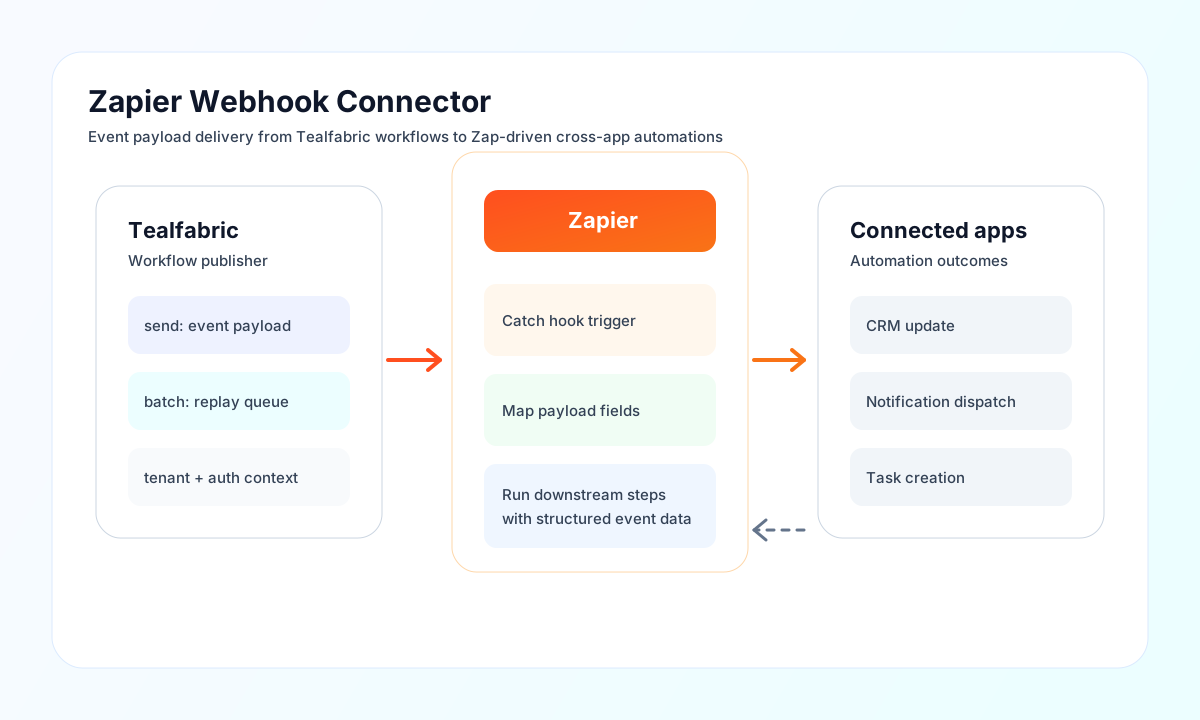
The Zapier Webhook connector lets Tealfabric workflows push event payloads into Zapier for downstream automation. It is useful for lead routing, notification fan-out, CRM enrichment, and other event-driven integrations where a single webhook trigger starts multi-step Zap actions.
Document information
| Field | Value |
|---|---|
| Canonical URL | /docs/04_connecting-systems/connectors/z/zapier-webhook |
| Version (published date) | 2026-05-08 |
| Tags | connectors, reference, zapier-webhook |
| Connector ID | zapier-webhook-1.0.0 |
Configuration reference
Connector settings are stored in integration configuration and reused during execution.
webhook_url(required): Zapier Catch Hook URL from your Zap trigger step.timeout_seconds(optional): HTTP request timeout in seconds (default30).
Run test after configuration to validate endpoint reachability before sending live business events.
Send events with send
Use send to POST JSON payloads that represent business events such as signups, orders, or status changes. Keep payload keys stable over time so mapped Zap fields do not break when workflows evolve.
Provide the webhook body via data or body, or pass fields directly in callData. The connector strips data and body metadata keys before POSTing.
const baseUrl = "https://api.example.com/api/v1";
const tenantId = "<TENANT_ID>";
const apiKey = "<API_KEY>";

async function sendSignupEvent(integrationId: string) {
  const response = await fetch(`${baseUrl}/integrations/${encodeURIComponent(integrationId)}/execute`, {
    method: "POST",
    headers: {
      "X-API-Key": apiKey,
      "X-Tenant-ID": tenantId,
      "Content-Type": "application/json",
    },
    body: JSON.stringify({
      operation: "send",
      data: {
        event: "user_signup",
        user_id: "user-123",
        email: "jane.doe@example.com",
        plan: "pro",
        occurred_at: "2026-05-08T19:06:00Z"
      }
    }),
  });
  if (!response.ok) throw new Error(`Request failed: ${response.status}`);
  return response.json();
}
curl -X POST "https://api.example.com/api/v1/integrations/<ENTITY_ID>/execute" \
-H "X-API-Key: <API_KEY>" \
-H "X-Tenant-ID: <TENANT_ID>" \
-H "Content-Type: application/json" \
-d '{
"operation": "send",
"data": {
"event": "user_signup",
"user_id": "user-123",
"email": "jane.doe@example.com",
"plan": "pro",
"occurred_at": "2026-05-08T19:06:00Z"
}
}'
{
  "success": true,
  "data": {
    "message_count": 1,
    "http_status": 200,
    "data": {
      "status_code": 200,
      "body": "success"
    }
  }
}
Send multiple payloads with batch
Use batch when you need to deliver multiple events in one workflow step, such as replaying queued events after downtime. Provide operations or items; each row may include a data field or pass the payload fields directly.
{
  "operation": "batch",
  "operations": [
    { "data": { "event": "order_created", "order_id": "ord-1" } },
    { "event": "order_created", "order_id": "ord-2" }
  ]
}
{
  "success": true,
  "data": {
    "message_count": 2,
    "total_operations": 2,
    "successful_operations": 2,
    "results": [
      { "index": 0, "success": true, "result": { "status_code": 200, "body": "success" } },
      { "index": 1, "success": true, "result": { "status_code": 200, "body": "success" } }
    ]
  }
}
Test webhook connectivity with test
The test operation POSTs { "test": true, "timestamp": "<ISO-8601>" } to the configured Catch Hook URL and requires an HTTP 2xx response.
{
  "success": true,
  "data": {
    "message": "Zapier Webhook connection test successful",
    "details": {
      "webhook_url": "https://hooks.zapier.com/hooks/catch/...",
      "http_status": 200
    }
  }
}
Unsupported operations
receive and sync are not supported for outbound webhooks and return VALIDATION errors.
Reliability and schema guidance
Common integration failures come from invalid webhook URLs, mismatched field names, and traffic bursts that exceed endpoint processing capacity. Validate the webhook path first, then confirm payload keys and field types match your Zap mappings.
The connector applies local throttling at 100 requests per minute per worker process. For robust automation, version your event schema, include timestamps and stable identifiers, and implement backoff when large volumes are sent.