Zendesk Connector Guide
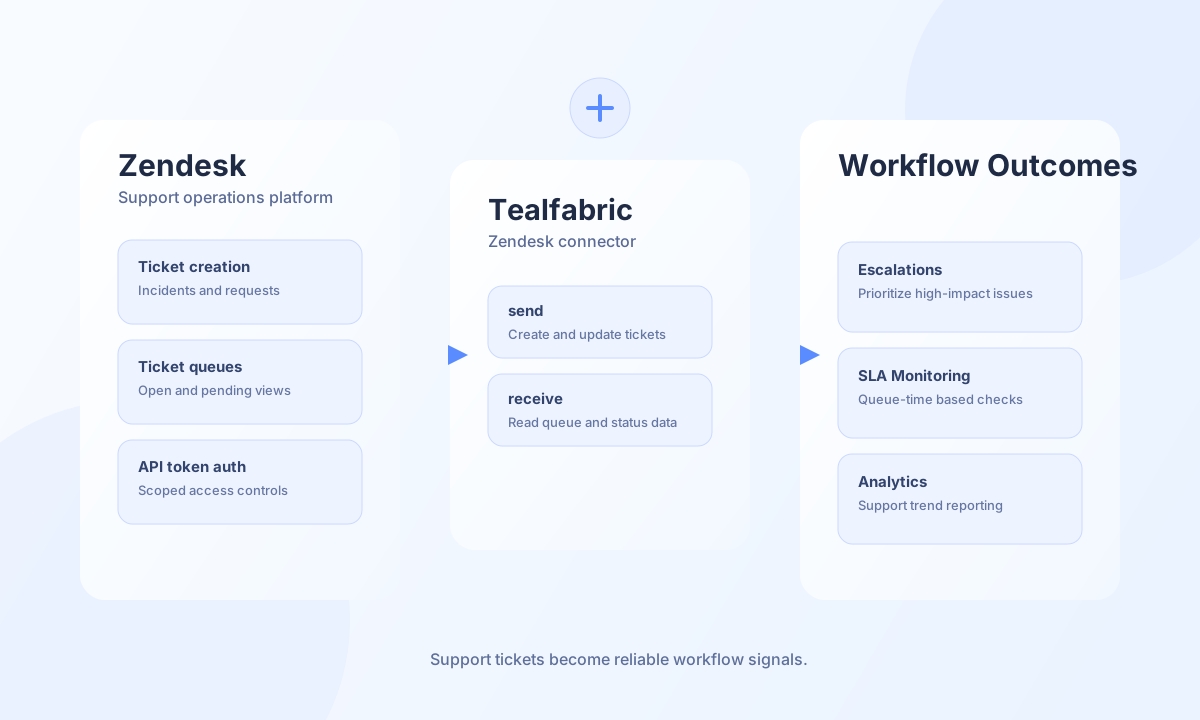
The Zendesk connector helps Tealfabric workflows create, update, and retrieve support data from Zendesk. It is useful for customer support automation, SLA monitoring, and cross-system incident orchestration where ticket state must drive downstream actions.
Document information
| Field | Value |
|---|---|
| Canonical URL | /docs/04_connecting-systems/connectors/z/zendesk |
| Version (published date) | 2026-05-08 |
| Tags | connectors, reference, zendesk |
| Connector ID | zendesk-1.0.0 |
Configuration and access
Before enabling this connector, confirm your Zendesk subdomain and create an API token for the integration user. API-token authentication is preferred over password authentication because it is easier to rotate and audit. Validate role permissions for tickets, users, and any other resources your workflow touches.
username(required): Zendesk account email.password(required): Zendesk password or API token credential string.host(required): Zendesk domain, for exampleyourdomain.zendesk.com.port(optional): Default443.timeout_seconds(optional): Default30.
Create tickets with send
Use send for write operations such as creating new tickets or updating status and comments. Include structured ticket fields so reporting and queue routing remain consistent across automations.
const baseUrl = "https://api.example.com/api/v1";
const tenantId = "<TENANT_ID>";
const apiKey = "<API_KEY>";

async function createSupportTicket(integrationId: string) {
  const response = await fetch(`${baseUrl}/integrations/${encodeURIComponent(integrationId)}/execute`, {
    method: "POST",
    headers: {
      "X-API-Key": apiKey,
      "X-Tenant-ID": tenantId,
      "Content-Type": "application/json",
    },
    body: JSON.stringify({
      operation: "send",
      endpoint: "tickets",
      method: "POST",
      data: {
        ticket: {
          subject: "Billing portal access issue",
          comment: { body: "Customer cannot access billing portal after password reset." },
          priority: "high",
          type: "incident",
        },
      },
    }),
  });
  if (!response.ok) throw new Error(`Request failed: ${response.status}`);
  const payload = await response.json();
  return payload.data;
}
curl -X POST "https://api.example.com/api/v1/integrations/<ENTITY_ID>/execute" \
-H "X-API-Key: <API_KEY>" \
-H "X-Tenant-ID: <TENANT_ID>" \
-H "Content-Type: application/json" \
-d '{
"operation": "send",
"endpoint": "tickets",
"method": "POST",
"data": {
"ticket": {
"subject": "Billing portal access issue",
"comment": {
"body": "Customer cannot access billing portal after password reset."
},
"priority": "high",
"type": "incident"
}
}
}'
{
  "success": true,
  "data": {
    "ticket": {
      "id": 12345,
      "status": "new",
      "subject": "Billing portal access issue"
    }
  }
}
Retrieve ticket queues with receive
Use receive to list open or pending tickets for assignment, escalation, and reporting workflows. Keep pagination explicit to maintain stable processing windows and avoid unnecessary API pressure.
const baseUrl = "https://api.example.com/api/v1";
const tenantId = "<TENANT_ID>";
const apiKey = "<API_KEY>";

async function listOpenTickets(integrationId: string) {
  const response = await fetch(`${baseUrl}/integrations/${encodeURIComponent(integrationId)}/execute`, {
    method: "POST",
    headers: {
      "X-API-Key": apiKey,
      "X-Tenant-ID": tenantId,
      "Content-Type": "application/json",
    },
    body: JSON.stringify({
      operation: "receive",
      endpoint: "tickets",
      query: {
        status: "open",
        per_page: 25,
        page: 1,
      },
    }),
  });
  if (!response.ok) throw new Error(`Request failed: ${response.status}`);
  const payload = await response.json();
  return payload.data ?? [];
}
curl -X POST "https://api.example.com/api/v1/integrations/<ENTITY_ID>/execute" \
-H "X-API-Key: <API_KEY>" \
-H "X-Tenant-ID: <TENANT_ID>" \
-H "Content-Type: application/json" \
-d '{
"operation": "receive",
"endpoint": "tickets",
"query": {
"status": "open",
"per_page": 25,
"page": 1
}
}'
{
  "success": true,
  "message_count": 1,
  "data": [
    {
      "id": 12345,
      "subject": "Billing portal access issue",
      "status": "open"
    }
  ]
}
Reliability guidance
Most Zendesk integration issues come from token misconfiguration, rate-limit throttling, or missing ticket permissions. Prefer API tokens, apply pagination and backoff for 429 responses, and validate core operations with test before rollout. These controls keep support automations stable and observable.