Vultr API Connector Guide
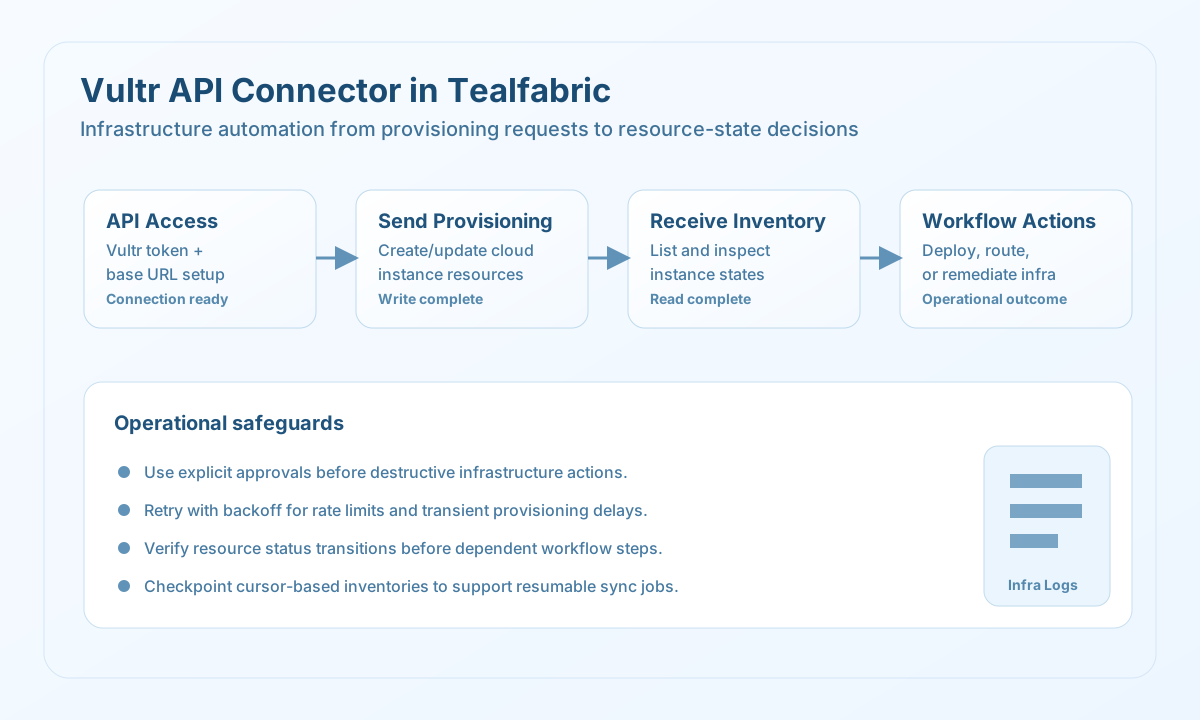
The Vultr API connector allows Tealfabric workflows to manage cloud infrastructure through Vultr v2 endpoints. It is useful for operations that create, inspect, or adjust compute resources as part of deployment and environment automation.
Document information
| Field | Value |
|---|---|
| Canonical URL | /docs/04_connecting-systems/connectors/v/vultr-api |
| Version (published date) | 2026-05-08 |
| Tags | connectors, reference, vultr-api |
| Connector ID | vultr-api-1.0.0 |
When to use this connector
Use this connector when workflows need to orchestrate Vultr infrastructure tasks such as provisioning instances, checking deployment state, or reconciling cloud inventory. It is a strong fit for release pipelines and environment lifecycle automation. The connector is most reliable when endpoint usage and retry behavior are standardized across teams.
Prerequisites
Before configuring the integration, generate a Vultr API token with permissions for the resources your workflow will access. Confirm the target account has quota for planned actions such as instance creation. Define operational safeguards, including approval rules for destructive operations in production environments.
Configuration
Store these values in the integration profile:
api_token(required): Vultr API token.base_url(optional): API base URL, defaulthttps://api.vultr.com/v2.timeout_seconds(optional): Request timeout in seconds, default30.
Create instances with send
Use send for write operations such as provisioning instances or updating cloud resources. Keep infrastructure payloads explicit so workflows are auditable and repeatable.
const baseUrl = "https://api.example.com/api/v1";
const tenantId = "<TENANT_ID>";
const apiKey = "<API_KEY>";

type InstanceCreateResult = {
  instance?: {
    id?: string;
    status?: string;
  };
};

async function createInstance(integrationId: string): Promise<InstanceCreateResult> {
  const response = await fetch(
    `${baseUrl}/integrations/${encodeURIComponent(integrationId)}/execute`,
    {
      method: "POST",
      headers: {
        "X-API-Key": apiKey,
        "X-Tenant-ID": tenantId,
        "Content-Type": "application/json",
      },
      body: JSON.stringify({
        operation: "send",
        endpoint: "instances",
        method: "POST",
        data: {
          region: "ewr",
          plan: "vc2-1c-1gb",
          os_id: 1743,
          label: "tf-automation-node",
        },
      }),
    }
  );
  if (!response.ok) throw new Error(`Request failed: ${response.status}`);
  const payload = (await response.json()) as { data?: InstanceCreateResult };
  if (!payload.data) throw new Error("Missing Vultr create payload");
  return payload.data;
}
curl -X POST "https://api.example.com/api/v1/integrations/<ENTITY_ID>/execute" \
-H "X-API-Key: <API_KEY>" \
-H "X-Tenant-ID: <TENANT_ID>" \
-H "Content-Type: application/json" \
-d '{
"operation": "send",
"endpoint": "instances",
"method": "POST",
"data": {
"region": "ewr",
"plan": "vc2-1c-1gb",
"os_id": 1743,
"label": "tf-automation-node"
}
}'
{
  "success": true,
  "data": {
    "message_count": 1,
    "response": {
      "instance": {
        "id": "<ENTITY_ID>",
        "status": "pending"
      }
    },
    "http_status": 202
  }
}
Retrieve instances with receive
Use receive for inventory reads and state checks before follow-up actions such as DNS updates or deployment validation. Apply pagination controls to keep jobs predictable.
const baseUrl = "https://api.example.com/api/v1";
const tenantId = "<TENANT_ID>";
const apiKey = "<API_KEY>";

type VultrInstance = {
  id?: string;
  label?: string;
  status?: string;
};

async function listInstances(integrationId: string): Promise<VultrInstance[]> {
  const response = await fetch(
    `${baseUrl}/integrations/${encodeURIComponent(integrationId)}/execute`,
    {
      method: "POST",
      headers: {
        "X-API-Key": apiKey,
        "X-Tenant-ID": tenantId,
        "Content-Type": "application/json",
      },
      body: JSON.stringify({
        operation: "receive",
        endpoint: "instances",
        query: {
          per_page: 25,
          cursor: "",
        },
      }),
    }
  );
  if (!response.ok) throw new Error(`Request failed: ${response.status}`);
  const payload = (await response.json()) as { data?: VultrInstance[] };
  if (!payload.data) throw new Error("Missing Vultr instance list payload");
  return payload.data;
}
curl -X POST "https://api.example.com/api/v1/integrations/<ENTITY_ID>/execute" \
-H "X-API-Key: <API_KEY>" \
-H "X-Tenant-ID: <TENANT_ID>" \
-H "Content-Type: application/json" \
-d '{
"operation": "receive",
"endpoint": "instances",
"query": {
"per_page": 25,
"cursor": ""
}
}'
{
  "success": true,
  "data": {
    "message_count": 1,
    "data": [
      {
        "instances": [
          {
            "id": "<ENTITY_ID>",
            "label": "tf-automation-node",
            "status": "active"
          }
        ],
        "meta": {
          "total": 1,
          "links": {}
        }
      }
    ],
    "total_size": 1,
    "http_status": 200,
    "meta": {
      "total": 1,
      "links": {}
    }
  }
}
receive wraps the Vultr JSON object in a single-element data array when the API returns an object (for example { "instances": [...], "meta": {...} }). When the API returns a top-level JSON array, that array is returned as data directly.
Sync outbound and inbound legs with sync
Use sync when a workflow needs to write and read in one connector invocation. Provide outbound (send-shaped callData) and/or inbound (receive-shaped callData).
{
  "operation": "sync",
  "outbound": {
    "endpoint": "instances",
    "method": "POST",
    "data": {
      "region": "ewr",
      "plan": "vc2-1c-1gb",
      "os_id": 1743,
      "label": "tf-automation-node"
    }
  },
  "inbound": {
    "endpoint": "instances",
    "query": { "per_page": 25 }
  }
}
{
  "success": true,
  "data": {
    "message_count": 2,
    "results": {
      "outbound": {
        "message_count": 1,
        "response": { "instance": { "id": "<ENTITY_ID>", "status": "pending" } },
        "http_status": 202
      },
      "inbound": {
        "message_count": 1,
        "data": [{ "instances": [], "meta": { "total": 0 } }],
        "total_size": 1,
        "http_status": 200,
        "meta": { "total": 0 }
      }
    }
  }
}
Test connection with test
test validates api_token and base_url (HTTPS required) and probes GET {base_url}/account.
{
  "operation": "test"
}
{
  "success": true,
  "data": {
    "message": "Vultr API connection test successful",
    "details": {
      "base_url": "https://api.vultr.com/v2",
      "http_status": 200,
      "account_email": "ops@example.com",
      "api_version": "v2"
    }
  }
}
Reliability guidance
Infrastructure calls can be rate limited or eventually consistent, so apply retry with backoff and validate state transitions before dependent actions. Keep destructive operations gated behind explicit workflow checks and approvals. For long-running resource inventories, checkpoint pagination cursors to support safe resume behavior.