Voyage AI Connector Guide
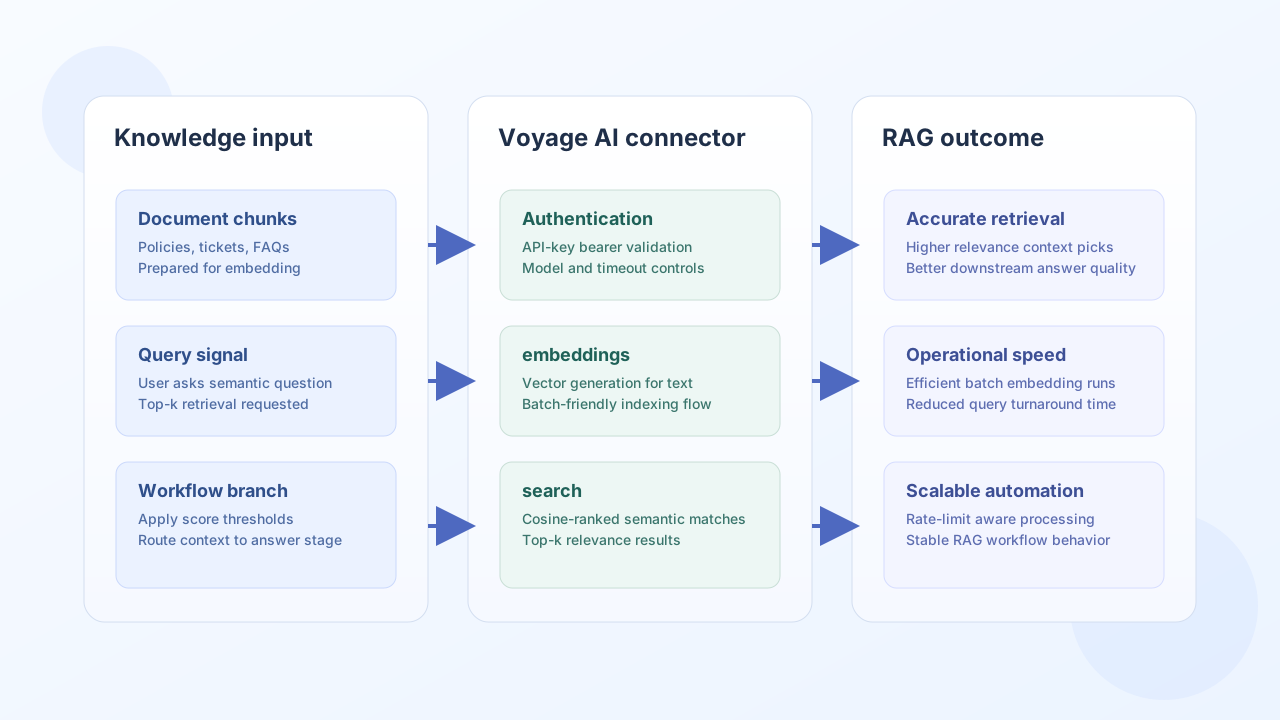
The Voyage AI connector helps Tealfabric workflows generate high-quality embeddings and run semantic matching for retrieval-driven use cases. Teams use it to power document search, RAG context selection, and intent-level text similarity workflows.
Document information
| Field | Value |
|---|---|
| Canonical URL | /docs/04_connecting-systems/connectors/v/voyage-ai |
| Version (published date) | 2026-05-08 |
| Tags | connectors, reference, voyage-ai |
| Connector ID | voyage-ai-1.0.0 |
Configuration and model setup
Configure the connector with your Voyage API key and choose a model that matches your quality, latency, and domain requirements. For most production RAG workflows, defaulting to a retrieval-optimized model is a practical starting point.
api_key(required): Voyage API key for bearer authentication.model(optional): embedding model name, such asvoyage-large-2.timeout_seconds(optional): request timeout value.
Voyage API uses API-key authentication only, so OAuth setup is not required.
Generate embeddings with embeddings
Use embeddings when a workflow needs vector representations for documents, tickets, or knowledge snippets. Batch text input improves throughput and helps keep indexing pipelines efficient.
const baseUrl = "https://api.example.com/api/v1";
const tenantId = "<TENANT_ID>";
const apiKey = "<API_KEY>";

async function embedKnowledgeChunk(integrationId: string) {
  const response = await fetch(`${baseUrl}/integrations/${encodeURIComponent(integrationId)}/execute`, {
    method: "POST",
    headers: {
      "X-API-Key": apiKey,
      "X-Tenant-ID": tenantId,
      "Content-Type": "application/json",
    },
    body: JSON.stringify({
      operation: "embeddings",
      input: "Reset two-factor authentication by opening Security Settings and selecting Reset Device.",
      model: "voyage-large-2"
    }),
  });
  if (!response.ok) throw new Error(`Request failed: ${response.status}`);
  return response.json();
}
curl -X POST "https://api.example.com/api/v1/integrations/<ENTITY_ID>/execute" \
-H "X-API-Key: <API_KEY>" \
-H "X-Tenant-ID: <TENANT_ID>" \
-H "Content-Type: application/json" \
-d '{
"operation": "embeddings",
"input": "Reset two-factor authentication by opening Security Settings and selecting Reset Device.",
"model": "voyage-large-2"
}'
{
  "success": true,
  "data": {
    "embedding_count": 1,
    "embeddings": [
      {
        "object": "embedding",
        "embedding": [0.013, -0.204, 0.557]
      }
    ],
    "model": "voyage-large-2",
    "data": {
      "object": "list",
      "data": [
        {
          "object": "embedding",
          "embedding": [0.013, -0.204, 0.557]
        }
      ],
      "model": "voyage-large-2",
      "usage": {
        "total_tokens": 16
      }
    }
  }
}
Run semantic retrieval with search
Use search when your workflow needs ranked semantic matches from a document set, such as selecting relevant knowledge snippets for answer generation. Keep candidate sets focused to improve search speed and result quality.
const baseUrl = "https://api.example.com/api/v1";
const tenantId = "<TENANT_ID>";
const apiKey = "<API_KEY>";

async function semanticLookup(integrationId: string) {
  const response = await fetch(`${baseUrl}/integrations/${encodeURIComponent(integrationId)}/execute`, {
    method: "POST",
    headers: {
      "X-API-Key": apiKey,
      "X-Tenant-ID": tenantId,
      "Content-Type": "application/json",
    },
    body: JSON.stringify({
      operation: "search",
      query: "How do I reset 2FA access?",
      documents: [
        "You can update billing contacts in account settings.",
        "Reset two-factor authentication in Security Settings by selecting Reset Device.",
        "Invoices are generated monthly on the first day of the month."
      ]
    }),
  });
  if (!response.ok) throw new Error(`Request failed: ${response.status}`);
  const payload = await response.json();
  return payload.data?.results ?? [];
}
curl -X POST "https://api.example.com/api/v1/integrations/<ENTITY_ID>/execute" \
-H "X-API-Key: <API_KEY>" \
-H "X-Tenant-ID: <TENANT_ID>" \
-H "Content-Type: application/json" \
-d '{
"operation": "search",
"query": "How do I reset 2FA access?",
"documents": [
"You can update billing contacts in account settings.",
"Reset two-factor authentication in Security Settings by selecting Reset Device.",
"Invoices are generated monthly on the first day of the month."
]
}'
{
  "success": true,
  "data": {
    "embedding_count": 3,
    "query": "How do I reset 2FA access?",
    "results": [
      {
        "document": "Reset two-factor authentication in Security Settings by selecting Reset Device.",
        "similarity": 0.92,
        "index": 1
      },
      {
        "document": "You can update billing contacts in account settings.",
        "similarity": 0.21,
        "index": 0
      }
    ]
  }
}
Validate credentials with test
Use test after configuring api_key to confirm bearer authentication against Voyage POST /embeddings with a minimal probe payload.
curl -X POST "https://api.example.com/api/v1/integrations/<ENTITY_ID>/execute" \
  -H "X-API-Key: <API_KEY>" \
  -H "X-Tenant-ID: <TENANT_ID>" \
  -H "Content-Type: application/json" \
  -d '{"operation": "test"}'
{
  "success": true,
  "data": {
    "message": "Voyage AI connection test successful",
    "details": {
      "endpoint": "https://api.voyageai.com/v1",
      "model": "voyage-large-2"
    }
  }
}
Reliability guidance
Most production issues come from rate limits, oversized batches, or retrieval sets that are too broad for accurate ranking. Use controlled batch sizes, add exponential backoff for transient failures, and pre-filter candidate documents before semantic search.
These practices keep embedding and retrieval workflows fast, stable, and easier to scale.