Vonage Connector Guide
The Vonage connector allows Tealfabric workflows to send SMS messages and retrieve delivery records using Vonage APIs. It is useful for alerts, one-time passcode notifications, and customer communication workflows where delivery status must be tracked.
Document information
| Field | Value |
|---|---|
| Canonical URL | /docs/04_connecting-systems/connectors/v/vonage |
| Version (published date) | 2026-05-08 |
| Tags | connectors, reference, vonage |
| Connector ID | vonage-1.0.0 |
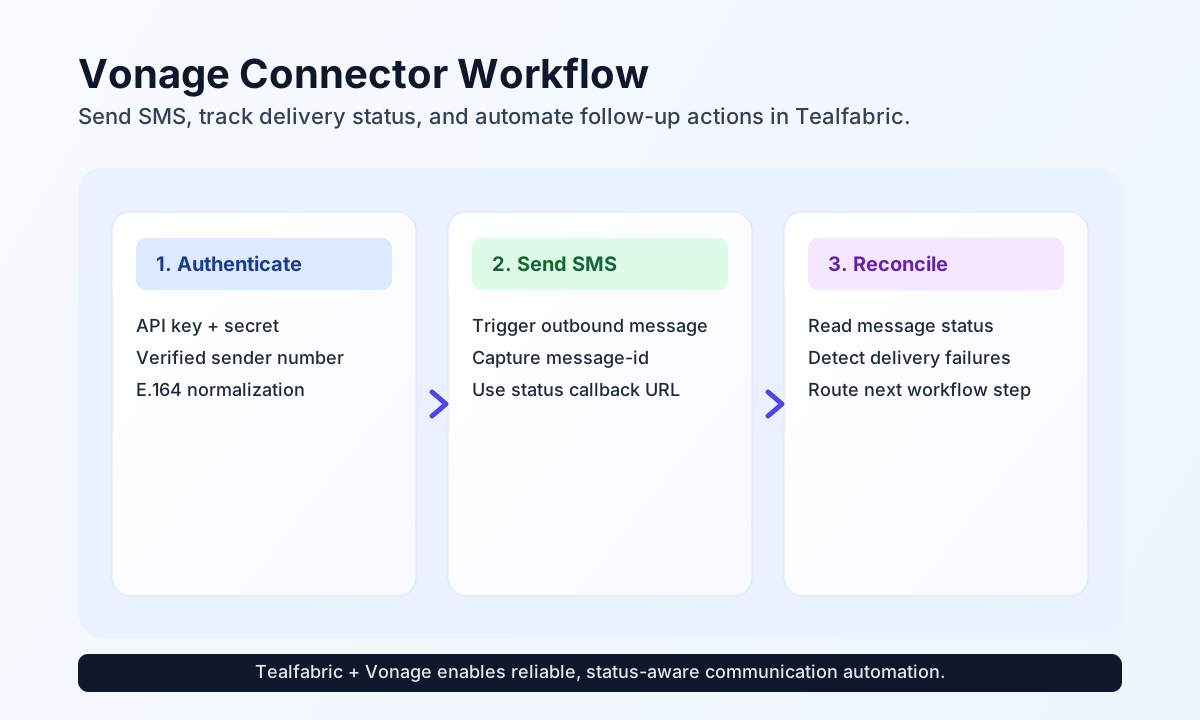
Configure credentials and sender details
Set up the connector with api_key, api_secret, and a verified from_number before building workflow steps. This ensures each send request is authenticated and consistently identifies your messaging source.
For production traffic, keep numbers in E.164 format and set timeout_seconds to match expected API responsiveness in your region. This reduces avoidable failures caused by formatting and network timing.
Send SMS with send
Use send to deliver one-time codes, incident alerts, or transactional updates. Include optional delivery callbacks when your process needs message lifecycle visibility after dispatch.
const baseUrl = "https://api.example.com/api/v1";
const tenantId = "<TENANT_ID>";
const apiKey = "<API_KEY>";

async function sendVerificationSms(integrationId: string) {
  const response = await fetch(`${baseUrl}/integrations/${encodeURIComponent(integrationId)}/execute`, {
    method: "POST",
    headers: {
      "X-API-Key": apiKey,
      "X-Tenant-ID": tenantId,
      "Content-Type": "application/json",
    },
    body: JSON.stringify({
      operation: "send",
      endpoint: "sms/json",
      method: "POST",
      data: {
        to: "+15551234567",
        from: "+15557654321",
        text: "Your verification code is 492118.",
        "status-report-req": 1,
        callback: "https://example.com/webhooks/vonage-status"
      }
    }),
  });
  if (!response.ok) throw new Error(`Request failed: ${response.status}`);
  return response.json();
}
curl -X POST "https://api.example.com/api/v1/integrations/<ENTITY_ID>/execute" \
-H "X-API-Key: <API_KEY>" \
-H "X-Tenant-ID: <TENANT_ID>" \
-H "Content-Type: application/json" \
-d '{
"operation": "send",
"endpoint": "sms/json",
"method": "POST",
"data": {
"to": "+15551234567",
"from": "+15557654321",
"text": "Your verification code is 492118.",
"status-report-req": 1,
"callback": "https://example.com/webhooks/vonage-status"
}
}'
{
  "success": true,
  "message_count": 1,
  "data": {
    "message-id": "0A0000000123ABCD1",
    "to": "+15551234567",
    "status": "0"
  }
}
Retrieve message records with receive
Use receive when a workflow needs to verify delivery outcomes or reconcile outbound communication attempts. Querying by message ID gives deterministic traceability for support and audit use cases.
const baseUrl = "https://api.example.com/api/v1";
const tenantId = "<TENANT_ID>";
const apiKey = "<API_KEY>";

async function getMessageStatus(integrationId: string) {
  const response = await fetch(`${baseUrl}/integrations/${encodeURIComponent(integrationId)}/execute`, {
    method: "POST",
    headers: {
      "X-API-Key": apiKey,
      "X-Tenant-ID": tenantId,
      "Content-Type": "application/json",
    },
    body: JSON.stringify({
      operation: "receive",
      endpoint: "search/messages",
      query: {
        ids: "0A0000000123ABCD1"
      }
    }),
  });
  if (!response.ok) throw new Error(`Request failed: ${response.status}`);
  return response.json();
}
curl -X POST "https://api.example.com/api/v1/integrations/<ENTITY_ID>/execute" \
-H "X-API-Key: <API_KEY>" \
-H "X-Tenant-ID: <TENANT_ID>" \
-H "Content-Type: application/json" \
-d '{
"operation": "receive",
"endpoint": "search/messages",
"query": {
"ids": "0A0000000123ABCD1"
}
}'
{
  "success": true,
  "total_size": 1,
  "data": {
    "message-id": "0A0000000123ABCD1",
    "status": "delivered",
    "to": "+15551234567"
  }
}
Reliability guidance
Most failures come from invalid credentials, rate limiting, or non-E.164 phone formats. When requests fail, validate credentials first, confirm phone number formatting, and then apply controlled retry behavior for throttled responses.
For reliable operations at scale, monitor delivery callbacks, track message-id values, and reconcile final statuses before triggering downstream actions. This improves workflow observability and reduces false positives in communication-heavy processes.