VictoriaMetrics Connector Guide
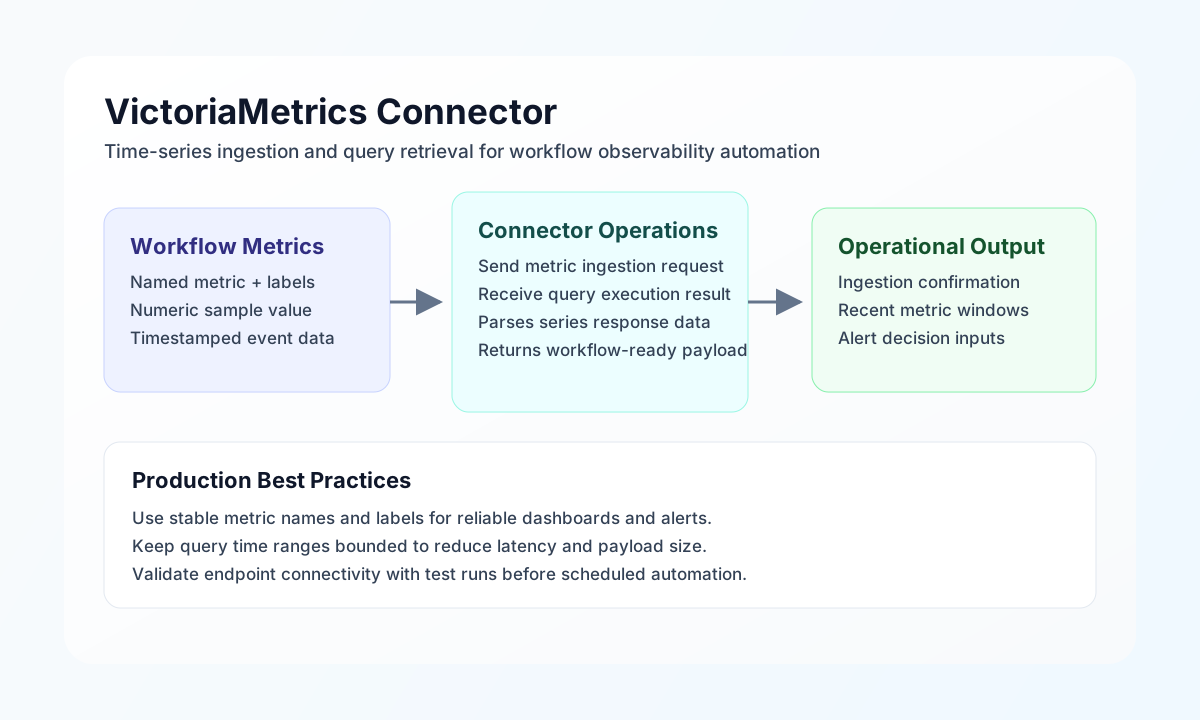
The VictoriaMetrics connector lets Tealfabric workflows write and query time-series data for monitoring and automation use cases. It is useful when you need to push custom metrics from business workflows or retrieve recent metric values to drive alerts, routing, and operational decisions.
Document information
| Field | Value |
|---|---|
| Canonical URL | /docs/04_connecting-systems/connectors/v/victoriametrics |
| Version (published date) | 2026-05-08 |
| Tags | connectors, reference, victoriametrics |
| Connector ID | victoriametrics-1.0.0 |
Configuration and connection
Configure the connector with your VictoriaMetrics base URL so requests can be sent to write and query endpoints reliably. In production, point this value to your reachable cluster or proxy endpoint and verify network access from the workflow runtime.
endpoint_url(required): VictoriaMetrics HTTP endpoint, for examplehttp://localhost:8428orhttps://metrics.example.com.timeout_seconds(optional): request timeout in seconds (default30).
After configuration, run test to validate connectivity (GET /health) before enabling recurring jobs.
Ingest metrics with write
Use write to import Prometheus exposition text into VictoriaMetrics (POST /api/v1/import/prometheus). Provide metrics in the metrics field, or use data as a legacy alias.
const baseUrl = "https://api.example.com/api/v1";
const tenantId = "<TENANT_ID>";
const apiKey = "<API_KEY>";

async function writeWorkflowMetric(integrationId: string) {
  const response = await fetch(`${baseUrl}/integrations/${encodeURIComponent(integrationId)}/execute`, {
    method: "POST",
    headers: {
      "X-API-Key": apiKey,
      "X-Tenant-ID": tenantId,
      "Content-Type": "application/json",
    },
    body: JSON.stringify({
      operation: "write",
      metrics: 'workflow_runs_total{workflow="invoice-reconcile",status="success",environment="prod"} 1\n'
    }),
  });
  if (!response.ok) throw new Error(`Request failed: ${response.status}`);
  return response.json();
}
curl -X POST "https://api.example.com/api/v1/integrations/<ENTITY_ID>/execute" \
-H "X-API-Key: <API_KEY>" \
-H "X-Tenant-ID: <TENANT_ID>" \
-H "Content-Type: application/json" \
-d '{
"operation": "write",
"metrics": "workflow_runs_total{workflow=\"invoice-reconcile\",status=\"success\",environment=\"prod\"} 1\n"
}'
{
  "success": true,
  "data": {
    "result_count": 1,
    "data": {
      "response": ""
    }
  }
}
Run instant PromQL queries with query
Use query for instant PromQL evaluation (GET /api/v1/query). Optionally pass time to evaluate at a specific timestamp.
const baseUrl = "https://api.example.com/api/v1";
const tenantId = "<TENANT_ID>";
const apiKey = "<API_KEY>";

async function queryWorkflowRuns(integrationId: string) {
  const response = await fetch(`${baseUrl}/integrations/${encodeURIComponent(integrationId)}/execute`, {
    method: "POST",
    headers: {
      "X-API-Key": apiKey,
      "X-Tenant-ID": tenantId,
      "Content-Type": "application/json",
    },
    body: JSON.stringify({
      operation: "query",
      query: 'sum(workflow_runs_total{workflow="invoice-reconcile",status="success"})'
    }),
  });
  if (!response.ok) throw new Error(`Request failed: ${response.status}`);
  return response.json();
}
curl -X POST "https://api.example.com/api/v1/integrations/<ENTITY_ID>/execute" \
-H "X-API-Key: <API_KEY>" \
-H "X-Tenant-ID: <TENANT_ID>" \
-H "Content-Type: application/json" \
-d '{
"operation": "query",
"query": "sum(workflow_runs_total{workflow=\"invoice-reconcile\",status=\"success\"})"
}'
{
  "success": true,
  "data": {
    "result_count": 1,
    "data": {
      "status": "success",
      "data": {
        "resultType": "vector",
        "result": [
          {
            "metric": {},
            "value": [1746716400, "42"]
          }
        ]
      }
    }
  }
}
Run range queries with query_range
Use query_range for time-window PromQL evaluation (GET /api/v1/query_range). Provide query, start, end, and step.
const baseUrl = "https://api.example.com/api/v1";
const tenantId = "<TENANT_ID>";
const apiKey = "<API_KEY>";

async function queryFailureRate(integrationId: string) {
  const response = await fetch(`${baseUrl}/integrations/${encodeURIComponent(integrationId)}/execute`, {
    method: "POST",
    headers: {
      "X-API-Key": apiKey,
      "X-Tenant-ID": tenantId,
      "Content-Type": "application/json",
    },
    body: JSON.stringify({
      operation: "query_range",
      query: 'sum(rate(workflow_runs_total{workflow="invoice-reconcile",status="failed"}[5m]))',
      start: "2026-05-08T15:00:00Z",
      end: "2026-05-08T15:20:00Z",
      step: "60s"
    }),
  });
  if (!response.ok) throw new Error(`Request failed: ${response.status}`);
  return response.json();
}
curl -X POST "https://api.example.com/api/v1/integrations/<ENTITY_ID>/execute" \
-H "X-API-Key: <API_KEY>" \
-H "X-Tenant-ID: <TENANT_ID>" \
-H "Content-Type: application/json" \
-d '{
"operation": "query_range",
"query": "sum(rate(workflow_runs_total{workflow=\"invoice-reconcile\",status=\"failed\"}[5m]))",
"start": "2026-05-08T15:00:00Z",
"end": "2026-05-08T15:20:00Z",
"step": "60s"
}'
{
  "success": true,
  "data": {
    "result_count": 1,
    "data": {
      "status": "success",
      "data": {
        "resultType": "matrix",
        "result": [
          {
            "metric": {},
            "values": [
              [1746716400, "0"],
              [1746716460, "0.2"]
            ]
          }
        ]
      }
    }
  }
}
Reliability guidance
Most failures come from unreachable endpoints, malformed metric payloads, or invalid query expressions. Start with the test operation, keep labels stable, and validate query strings in your monitoring environment before wiring them into workflow logic.
For production reliability, use bounded query windows, tune timeout values to your environment, and retry transient network failures with exponential backoff. These practices keep observability automations accurate and responsive.