RSS Feed Connector Guide
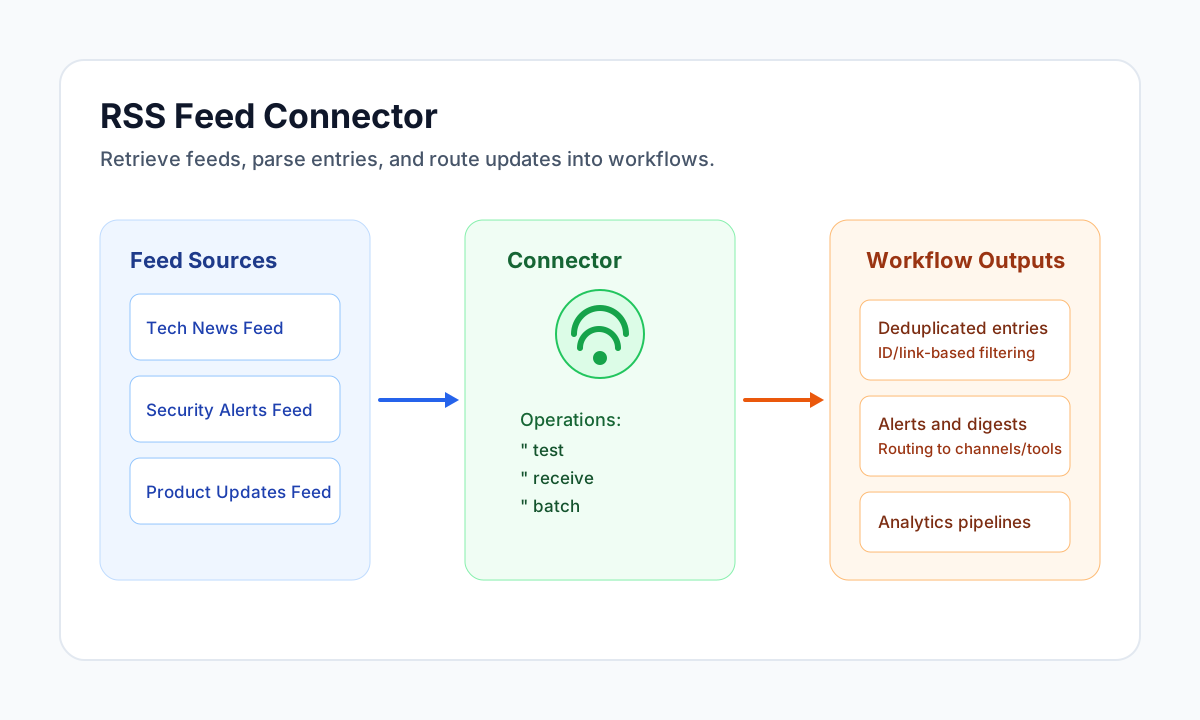
The RSS Feed connector lets Tealfabric workflows fetch and parse RSS 2.0 and Atom 1.0 feeds for automation use cases such as news monitoring, alert routing, and content aggregation. It is designed for lightweight retrieval of feed metadata and entries.
Document information
| Field | Value |
|---|---|
| Canonical URL | /docs/04_connecting-systems/connectors/r/rss-feed |
| Version (published date) | 2026-05-08 |
| Tags | connectors, reference, rss-feed |
| Connector ID | rss-feed-1.0.0 |
Configuration reference
base_url(required fortest): Default RSS or Atom feed URL.receivemay override withurlorfeed_url;batchuses per-callfeedsorurls.timeout_seconds(optional): HTTP request timeout in seconds (default30).
Run test after configuration to verify the configured base_url is reachable and returns valid RSS 2.0 or Atom 1.0 XML.
send and sync are not supported (read-only connector).
Fetch entries with receive
Use receive to load parsed feed metadata and entries. When url or feed_url is omitted, the connector fetches base_url from integration configuration.
Payload aliases: feed_url for url.
const baseUrl = "https://api.example.com/api/v1";
const tenantId = "<TENANT_ID>";
const apiKey = "<API_KEY>";

async function fetchLatestFeedItems(integrationId: string) {
  const response = await fetch(`${baseUrl}/integrations/${encodeURIComponent(integrationId)}/execute`, {
    method: "POST",
    headers: {
      "X-API-Key": apiKey,
      "X-Tenant-ID": tenantId,
      "Content-Type": "application/json",
    },
    body: JSON.stringify({
      operation: "receive",
      feed_url: "https://example.com/feed.xml",
    }),
  });
  if (!response.ok) throw new Error(`Request failed: ${response.status}`);
  const payload = await response.json();
  return payload.data;
}
curl -X POST "https://api.example.com/api/v1/integrations/<ENTITY_ID>/execute" \
-H "X-API-Key: <API_KEY>" \
-H "X-Tenant-ID: <TENANT_ID>" \
-H "Content-Type: application/json" \
-d '{
"operation": "receive",
"feed_url": "https://example.com/feed.xml"
}'
{
  "success": true,
  "data": {
    "message_count": 1,
    "data": [
      {
        "title": "Latest Update",
        "description": "Post summary text",
        "link": "https://example.com/posts/latest",
        "pubDate": "2026-05-08T20:14:00Z",
        "guid": "https://example.com/posts/latest"
      }
    ],
    "feed_info": {
      "title": "Example Feed",
      "description": "Example site updates",
      "link": "https://example.com/"
    },
    "total_size": 1
  }
}
Test connectivity with test
test validates integration configuration (base_url required) and fetches the feed once to confirm parseability.
{
  "success": true,
  "data": {
    "message": "RSS Feed connection test successful",
    "details": {
      "feed_url": "https://example.com/feed.xml",
      "feed_title": "Example Feed",
      "item_count": 42
    }
  }
}
Fetch multiple feeds with batch
Use batch when a workflow needs entries from several feed URLs in one run. Pass an array of feed URL strings in feeds (alias urls). Each feed is fetched sequentially; per-feed failures are recorded in results without aborting the whole batch.
Payload aliases: urls for feeds.
const baseUrl = "https://api.example.com/api/v1";
const tenantId = "<TENANT_ID>";
const apiKey = "<API_KEY>";

async function fetchMultipleFeeds(integrationId: string) {
  const response = await fetch(`${baseUrl}/integrations/${encodeURIComponent(integrationId)}/execute`, {
    method: "POST",
    headers: {
      "X-API-Key": apiKey,
      "X-Tenant-ID": tenantId,
      "Content-Type": "application/json",
    },
    body: JSON.stringify({
      operation: "batch",
      feeds: [
        "https://example.com/security-feed.xml",
        "https://example.com/product-feed.xml"
      ],
    }),
  });
  if (!response.ok) throw new Error(`Request failed: ${response.status}`);
  const payload = await response.json();
  return payload.data;
}
curl -X POST "https://api.example.com/api/v1/integrations/<ENTITY_ID>/execute" \
-H "X-API-Key: <API_KEY>" \
-H "X-Tenant-ID: <TENANT_ID>" \
-H "Content-Type: application/json" \
-d '{
"operation": "batch",
"feeds": [
"https://example.com/security-feed.xml",
"https://example.com/product-feed.xml"
]
}'
{
  "success": true,
  "data": {
    "message_count": 10,
    "total_feeds": 2,
    "successful_feeds": 2,
    "results": [
      {
        "index": 0,
        "success": true,
        "url": "https://example.com/security-feed.xml",
        "item_count": 5,
        "items": []
      },
      {
        "index": 1,
        "success": true,
        "url": "https://example.com/product-feed.xml",
        "item_count": 5,
        "items": []
      }
    ]
  }
}
Production guidance
Feed quality and availability vary by publisher, so production workflows should tolerate temporary parsing failures and network timeouts. Use retries with backoff and monitor failing feed URLs to keep ingestion pipelines stable.
When processing high-volume feeds, deduplicate by entry guid or link to avoid repeated processing. This keeps polling predictable and reduces downstream noise.
Related resources
Use RSS 2.0 specification, Atom RFC 4287, and the W3C Feed Validator when troubleshooting feed format issues.