Qdrant Connector Guide
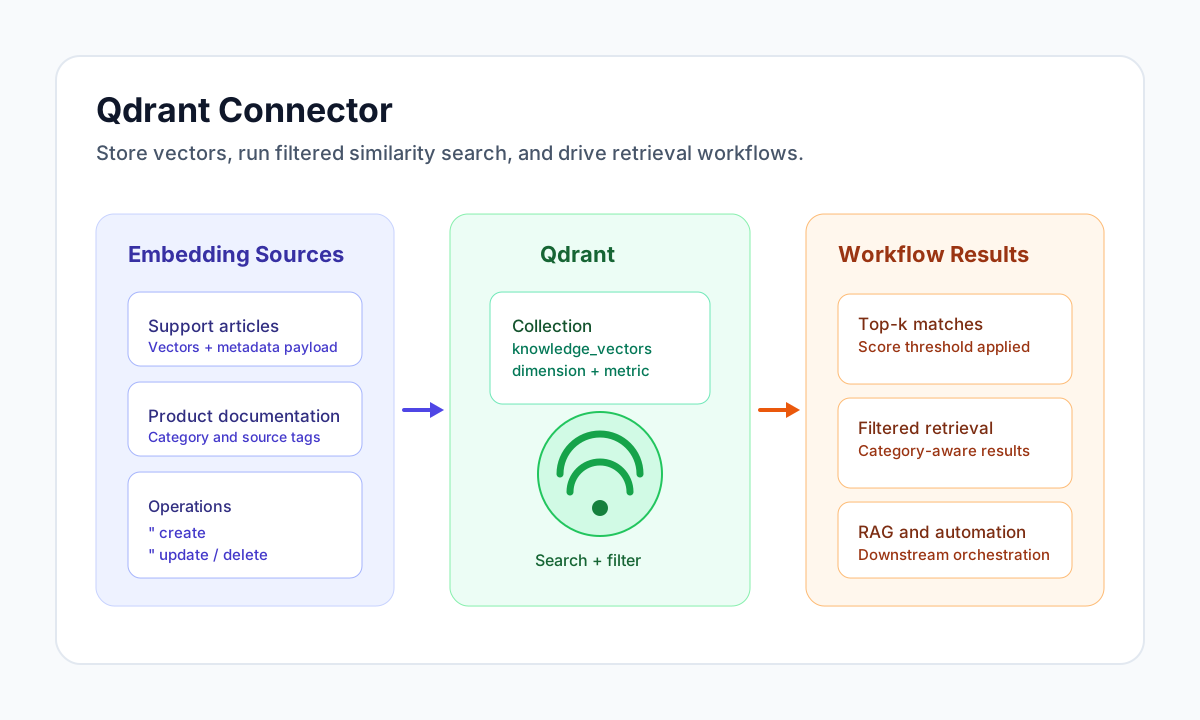
The Qdrant connector helps you store vectors, run similarity search, and manage point payloads from Tealfabric workflows. It is suited to retrieval-augmented generation, semantic recommendation, and classification pipelines where fast nearest-neighbor lookup and metadata filtering are both required.
Document information
| Field | Value |
|---|---|
| Canonical URL | /docs/04_connecting-systems/connectors/q/qdrant |
| Version (published date) | 2026-05-08 |
| Tags | connectors, reference, qdrant |
| Connector ID | qdrant-1.0.0 |
Configuration and authentication
Configure the connector with your Qdrant HTTP endpoint and optional API key. Run test after setup to verify connectivity via GET /collections before production schedules.
| Parameter | Required | Description |
|---|---|---|
endpoint_url | Yes | Qdrant cluster URL, for example http://localhost:6333. Trailing slashes are stripped. |
api_key | No | When set, sent as the api-key request header. |
timeout_seconds | No | Request timeout in seconds (default 30). |
test is the only operation that validates required configuration up front and returns Configuration validation failed when endpoint_url is missing. Other operations rely on the Qdrant API for runtime errors.
Create vectors with create
Use create to upsert one or more points (PUT /collections/{collection}/points). Pass a single point or a points array.
const baseUrl = "https://api.example.com/api/v1";
const tenantId = "<TENANT_ID>";
const apiKey = "<API_KEY>";

async function createKnowledgePoint(integrationId: string) {
  const response = await fetch(`${baseUrl}/integrations/${encodeURIComponent(integrationId)}/execute`, {
    method: "POST",
    headers: {
      "X-API-Key": apiKey,
      "X-Tenant-ID": tenantId,
      "Content-Type": "application/json",
    },
    body: JSON.stringify({
      operation: "create",
      collection: "knowledge_vectors",
      point: {
        id: "<ENTITY_ID>",
        vector: [0.11, 0.29, 0.48, 0.72],
        payload: {
          title: "How to rotate API keys",
          category: "security"
        }
      }
    }),
  });
  if (!response.ok) throw new Error(`Request failed: ${response.status}`);
  const payload = await response.json();
  return payload.data;
}
curl -X POST "https://api.example.com/api/v1/integrations/<ENTITY_ID>/execute" \
-H "X-API-Key: <API_KEY>" \
-H "X-Tenant-ID: <TENANT_ID>" \
-H "Content-Type: application/json" \
-d '{
"operation": "create",
"collection": "knowledge_vectors",
"point": {
"id": "<ENTITY_ID>",
"vector": [0.11, 0.29, 0.48, 0.72],
"payload": {
"title": "How to rotate API keys",
"category": "security"
}
}
}'
{
  "success": true,
  "data": {
    "point_count": 1,
    "data": {
      "status": "ok",
      "result": { "operation_id": 0, "status": "acknowledged" }
    }
  }
}
Search similar points with search
Use search for vector similarity (POST /collections/{collection}/points/search). The optional filter property is included in the request body only when the key is present and the value is not null (matching legacy PHP behavior). limit defaults to 10 when omitted.
const baseUrl = "https://api.example.com/api/v1";
const tenantId = "<TENANT_ID>";
const apiKey = "<API_KEY>";

async function searchKnowledgeBase(integrationId: string) {
  const response = await fetch(`${baseUrl}/integrations/${encodeURIComponent(integrationId)}/execute`, {
    method: "POST",
    headers: {
      "X-API-Key": apiKey,
      "X-Tenant-ID": tenantId,
      "Content-Type": "application/json",
    },
    body: JSON.stringify({
      operation: "search",
      collection: "knowledge_vectors",
      vector: [0.09, 0.31, 0.52, 0.69],
      limit: 5,
      filter: {
        must: [{ key: "category", match: { value: "security" } }]
      }
    }),
  });
  if (!response.ok) throw new Error(`Request failed: ${response.status}`);
  const payload = await response.json();
  return payload.data;
}
curl -X POST "https://api.example.com/api/v1/integrations/<ENTITY_ID>/execute" \
-H "X-API-Key: <API_KEY>" \
-H "X-Tenant-ID: <TENANT_ID>" \
-H "Content-Type: application/json" \
-d '{
"operation": "search",
"collection": "knowledge_vectors",
"vector": [0.09, 0.31, 0.52, 0.69],
"limit": 5,
"filter": {
"must": [{"key": "category", "match": {"value": "security"}}]
}
}'
{
  "success": true,
  "data": {
    "point_count": 1,
    "points": [
      {
        "id": "<ENTITY_ID>",
        "score": 0.93,
        "payload": {
          "title": "API key rotation policy",
          "category": "security"
        }
      }
    ],
    "data": {
      "status": "ok",
      "result": [
        {
          "id": "<ENTITY_ID>",
          "score": 0.93,
          "payload": {
            "title": "API key rotation policy",
            "category": "security"
          }
        }
      ]
    }
  }
}
Manage point lifecycle
Use get to retrieve a point by id (POST /collections/{collection}/points with ids), update to upsert a single point, and delete with ids or a single id (POST /collections/{collection}/points/delete).
Collection creation and schema tuning are handled in Qdrant itself, so create collections with correct dimensions and distance metrics before running connector operations.
Test connectivity with test
test calls GET /collections and returns data.details.collections_count plus the configured endpoint.
{
  "success": true,
  "data": {
    "message": "Qdrant connection test successful",
    "details": {
      "endpoint": "http://localhost:6333",
      "collections_count": 2
    }
  }
}
Reliability and troubleshooting
Most production failures come from invalid credentials, missing collections, filter syntax errors, or vector dimension mismatches. Add explicit checks around connector responses, and apply retries with backoff for transient network failures.
If search quality is inconsistent, validate embedding model consistency and index frequently filtered payload fields. These adjustments typically improve both relevance and response time.
Related resources
Use the Qdrant documentation, Qdrant API reference, and Qdrant Cloud for deeper platform configuration and scaling guidance.