QAD ERP Connector Guide
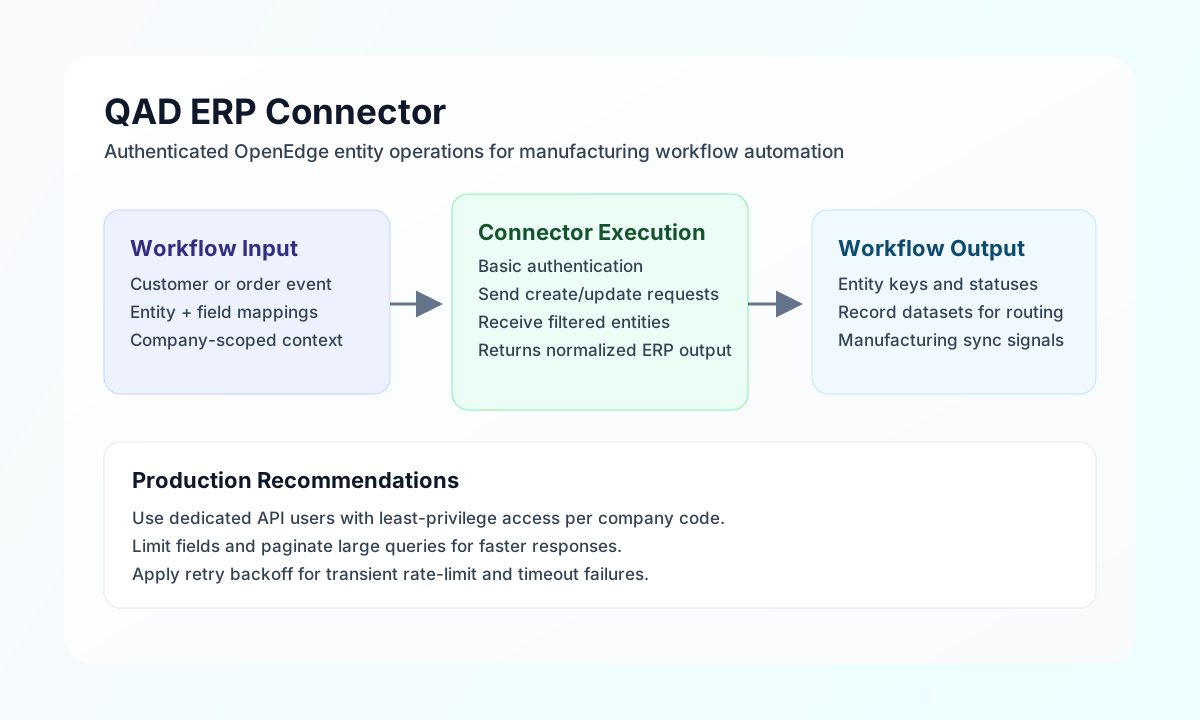
The QAD ERP connector lets Tealfabric workflows read and update QAD entities used in manufacturing and supply-chain operations. It is commonly used for customer master synchronization, order lifecycle automation, and operational data retrieval in company-scoped ERP environments.
Document information
| Field | Value |
|---|---|
| Canonical URL | /docs/04_connecting-systems/connectors/q/qad-erp |
| Version (published date) | 2026-05-08 |
| Tags | connectors, reference, qad-erp |
| Connector ID | qad-erp-1.0.0 |
Configuration and authentication
Configure the connector with your QAD API endpoint, company context, and integration credentials so workflow requests can authenticate consistently. Using a dedicated API user with scoped permissions improves operational safety and traceability.
Required values are base_url, username, password, and company_code. You can optionally tune timeout_seconds for longer-running ERP calls. After setup, run test to confirm connectivity and credentials before production use. The test operation validates required configuration and probes GET api/v1 with Basic auth and the X-QAD-Company header.
Create or update entities with send
Use send to POST, PUT, or PATCH JSON to QAD REST/OpenEdge paths relative to base_url. Provide the API path in endpoint and the JSON body in data; when data is omitted, remaining callData fields (excluding integration config and routing keys) are sent as the body, matching legacy connector behavior. POST bodies are omitted when PHP-empty() (for example {} or []).
const baseUrl = "https://api.example.com/api/v1";
const tenantId = "<TENANT_ID>";
const apiKey = "<API_KEY>";

async function createCustomer(integrationId: string) {
  const response = await fetch(`${baseUrl}/integrations/${encodeURIComponent(integrationId)}/execute`, {
    method: "POST",
    headers: {
      "X-API-Key": apiKey,
      "X-Tenant-ID": tenantId,
      "Content-Type": "application/json",
    },
    body: JSON.stringify({
      operation: "send",
      endpoint: "api/v1/customers",
      method: "POST",
      data: {
        cm_cust_no: "CUST-9001",
        cm_name: "Tealfabric Components Ltd",
        cm_city: "Chicago",
        cm_state: "IL",
        cm_country: "US",
        cm_email: "procurement@tealfabric-components.example"
      }
    }),
  });
  if (!response.ok) throw new Error(`Request failed: ${response.status}`);
  return response.json();
}
curl -X POST "https://api.example.com/api/v1/integrations/<ENTITY_ID>/execute" \
-H "X-API-Key: <API_KEY>" \
-H "X-Tenant-ID: <TENANT_ID>" \
-H "Content-Type: application/json" \
-d '{
"operation": "send",
"endpoint": "api/v1/customers",
"method": "POST",
"data": {
"cm_cust_no": "CUST-9001",
"cm_name": "Tealfabric Components Ltd",
"cm_city": "Chicago",
"cm_state": "IL",
"cm_country": "US",
"cm_email": "procurement@tealfabric-components.example"
}
}'
{
  "success": true,
  "data": {
    "message": "QAD ERP operation completed successfully",
    "result": {
      "cm_cust_no": "CUST-9001"
    }
  }
}
Retrieve records with receive
Use receive to GET QAD REST paths relative to base_url. Provide the API path in endpoint and optional filter parameters in query. List responses use items[] when present; otherwise the full response is wrapped as a single-item array.
const baseUrl = "https://api.example.com/api/v1";
const tenantId = "<TENANT_ID>";
const apiKey = "<API_KEY>";

async function listUsCustomers(integrationId: string) {
  const response = await fetch(`${baseUrl}/integrations/${encodeURIComponent(integrationId)}/execute`, {
    method: "POST",
    headers: {
      "X-API-Key": apiKey,
      "X-Tenant-ID": tenantId,
      "Content-Type": "application/json",
    },
    body: JSON.stringify({
      operation: "receive",
      endpoint: "api/v1/customers",
      query: {
        cm_country: "US",
        limit: 25,
        offset: 0
      }
    }),
  });
  if (!response.ok) throw new Error(`Request failed: ${response.status}`);
  return response.json();
}
curl -X POST "https://api.example.com/api/v1/integrations/<ENTITY_ID>/execute" \
-H "X-API-Key: <API_KEY>" \
-H "X-Tenant-ID: <TENANT_ID>" \
-H "Content-Type: application/json" \
-d '{
"operation": "receive",
"endpoint": "api/v1/customers",
"query": {
"cm_country": "US",
"limit": 25,
"offset": 0
}
}'
{
  "success": true,
  "data": {
    "message": "QAD ERP data retrieved successfully",
    "record_count": 1,
    "items": [
      {
        "cm_cust_no": "CUST-9001",
        "cm_name": "Tealfabric Components Ltd",
        "cm_city": "Chicago",
        "cm_state": "IL"
      }
    ]
  }
}
Reliability guidance
Most production issues come from permission gaps, incorrect company context, or invalid entity field mappings. Validate with test, confirm user access for the configured company_code, and verify entity schemas before large updates.
For reliable operations, paginate large reads, handle transient 429 responses with backoff, and monitor response errors for field-level validation failures. These controls keep QAD-driven workflows stable and supportable.