Looker Connector Guide
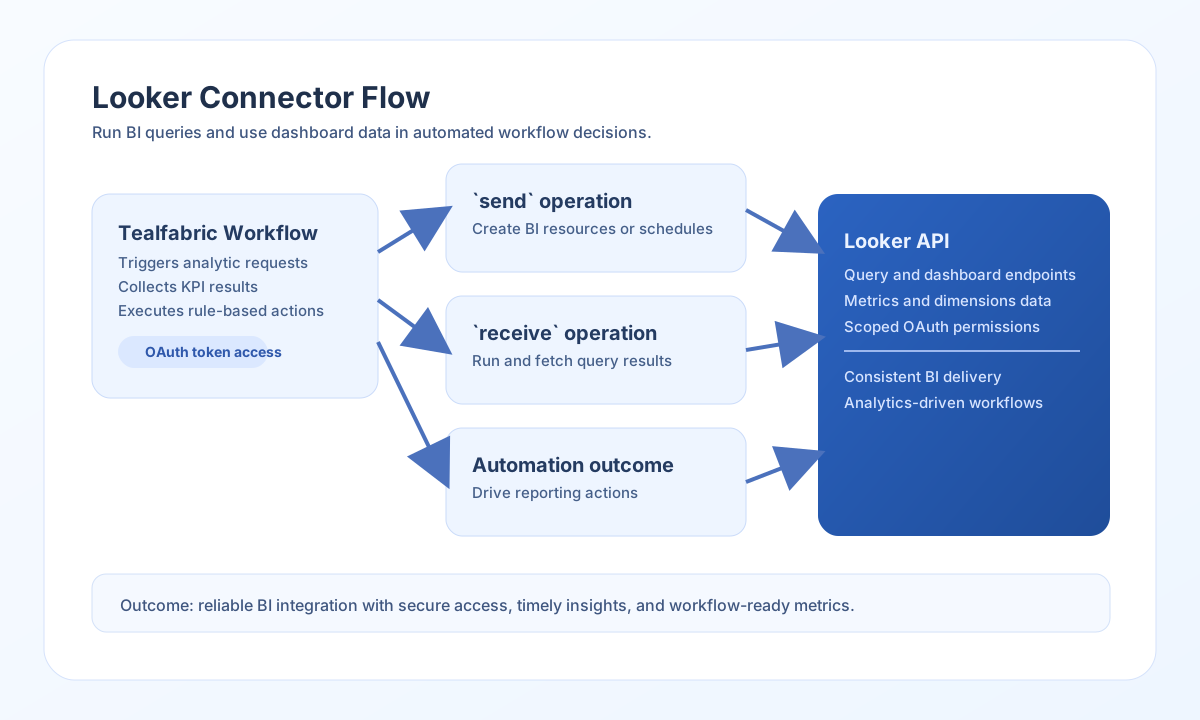
The Looker connector enables Tealfabric workflows to run BI operations such as querying dashboards, retrieving analytic results, and triggering data-driven actions. It is designed for Looker API v3.1 integrations that require OAuth-secured access.
Document information
| Field | Value |
|---|---|
| Canonical URL | /docs/04_connecting-systems/connectors/l/looker |
| Version (published date) | 2026-05-08 |
| Tags | connectors, reference, looker |
| Connector ID | looker-1.0.0 |
Configure OAuth credentials
Set base_url to your Looker instance URL, and configure client_id and client_secret for your OAuth application. If tokens are already provisioned, set access_token (and optionally refresh_token to trigger client-credentials login when access_token is absent).
Use timeout_seconds for larger query workloads. Run test before production use to confirm connectivity and authorization. The test operation validates required configuration (base_url, client_id, client_secret) and probes GET api/3.1/user.
Trigger analytics actions with send
Use send to call arbitrary Looker API paths under {base_url}/{endpoint}. Provide the JSON body in data; when data is omitted, remaining callData fields (excluding integration config and connector configuration keys) are used as the body, matching legacy connector behavior. POST/PUT/PATCH bodies are omitted when PHP-empty() would treat them as empty.
const baseUrl = "https://api.example.com/api/v1";
const tenantId = "<TENANT_ID>";
const apiKey = "<API_KEY>";

async function createScheduledPlan(integrationId: string) {
  const response = await fetch(`${baseUrl}/integrations/${encodeURIComponent(integrationId)}/execute`, {
    method: "POST",
    headers: {
      "X-API-Key": apiKey,
      "X-Tenant-ID": tenantId,
      "Content-Type": "application/json",
    },
    body: JSON.stringify({
      operation: "send",
      endpoint: "api/3.1/scheduled_plans",
      method: "POST",
      data: {
        name: "Daily Revenue Snapshot",
        look_id: "<ENTITY_ID>",
        enabled: true
      }
    }),
  });
  if (!response.ok) throw new Error(`Request failed: ${response.status}`);
  return response.json();
}
curl -X POST "https://api.example.com/api/v1/integrations/<ENTITY_ID>/execute" \
-H "X-API-Key: <API_KEY>" \
-H "X-Tenant-ID: <TENANT_ID>" \
-H "Content-Type: application/json" \
-d '{
"operation": "send",
"endpoint": "api/3.1/scheduled_plans",
"method": "POST",
"data": {
"name": "Daily Revenue Snapshot",
"look_id": "<ENTITY_ID>",
"enabled": true
}
}'
{
  "success": true,
  "data": {
    "message": "Looker operation completed successfully",
    "result": {
      "id": "<ENTITY_ID>",
      "name": "Daily Revenue Snapshot",
      "enabled": true
    }
  }
}
Retrieve analytics data with receive
Use receive to GET {base_url}/{endpoint} with an optional query object for URL parameters. Typical paths include dashboards, looks, and folder listings.
const baseUrl = "https://api.example.com/api/v1";
const tenantId = "<TENANT_ID>";
const apiKey = "<API_KEY>";

async function listDashboards(integrationId: string) {
  const response = await fetch(`${baseUrl}/integrations/${encodeURIComponent(integrationId)}/execute`, {
    method: "POST",
    headers: {
      "X-API-Key": apiKey,
      "X-Tenant-ID": tenantId,
      "Content-Type": "application/json",
    },
    body: JSON.stringify({
      operation: "receive",
      endpoint: "api/3.1/dashboards",
      query: {
        fields: "id,title"
      }
    }),
  });
  if (!response.ok) throw new Error(`Request failed: ${response.status}`);
  return response.json();
}
curl -X POST "https://api.example.com/api/v1/integrations/<ENTITY_ID>/execute" \
-H "X-API-Key: <API_KEY>" \
-H "X-Tenant-ID: <TENANT_ID>" \
-H "Content-Type: application/json" \
-d '{
"operation": "receive",
"endpoint": "api/3.1/dashboards",
"query": {
"fields": "id,title"
}
}'
{
  "success": true,
  "data": {
    "message": "Looker data retrieved successfully",
    "result": [
      {
        "id": "<ENTITY_ID>",
        "title": "Revenue Overview"
      }
    ]
  }
}
Run inline queries with execute
Use execute to POST api/3.1/queries/run/json with an inline query payload. Provide the query in query; when query is omitted, remaining callData fields (excluding integration config and connector configuration keys) are sent as the POST body.
{
  "operation": "execute",
  "query": {
    "model": "thelook",
    "view": "orders",
    "fields": ["orders.count", "orders.total_revenue"],
    "limit": 50
  }
}
{
  "success": true,
  "data": {
    "message": "Looker query executed successfully",
    "record_count": 2,
    "result": [
      {
        "orders.count": 142,
        "orders.total_revenue": 89342.55
      }
    ]
  }
}
Reliability guidance
Most failures come from expired OAuth credentials, insufficient API permissions, or malformed endpoint payloads. Validate OAuth scopes and endpoint contracts before troubleshooting query logic.
For stable BI automation, limit result sets, monitor connector timeouts, and implement retries for transient API failures. This keeps reporting workflows responsive and predictable.