JSON File Connector Guide
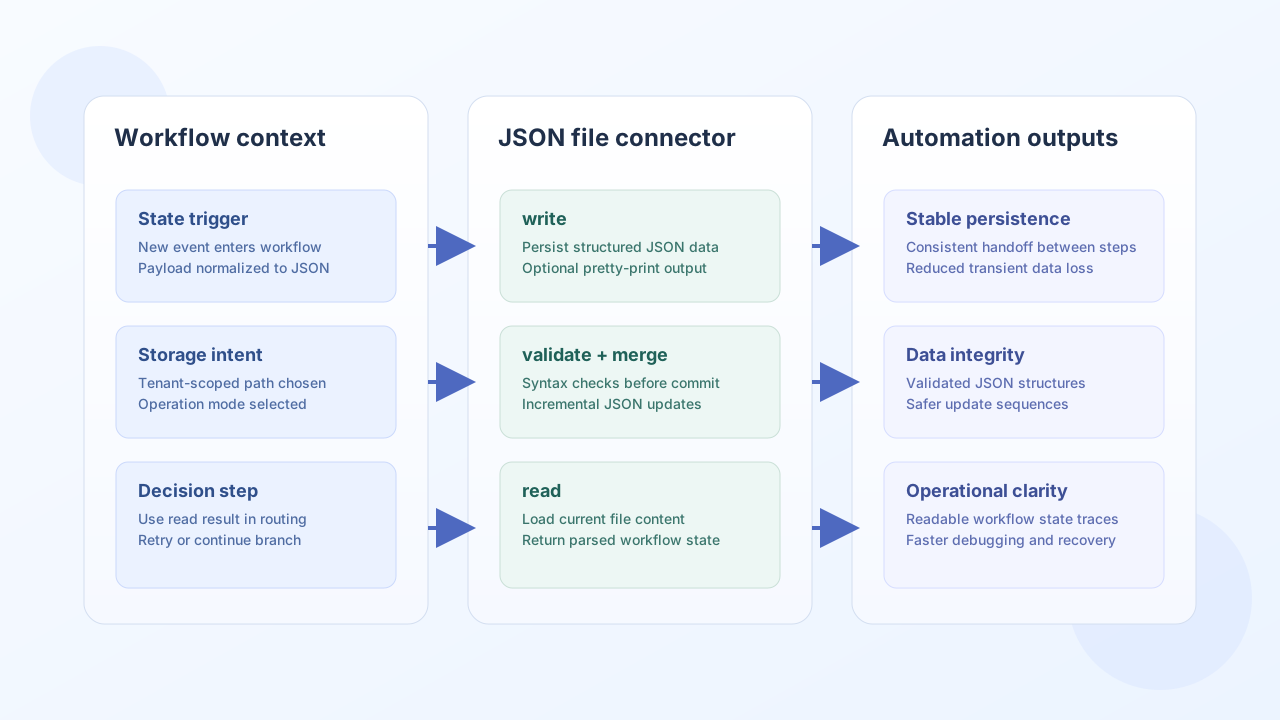
The JSON File connector helps Tealfabric workflows persist structured data in tenant-scoped storage and retrieve it later for automation decisions. It is useful for lightweight configuration, state handoff between workflow steps, and local cache-style data exchange.
Document information
| Field | Value |
|---|---|
| Canonical URL | /docs/04_connecting-systems/connectors/j/json-file |
| Version (published date) | 2026-05-08 |
| Tags | connectors, reference, json-file |
| Connector ID | json-file-1.0.0 |
Configuration and storage scope
Start by defining which JSON file the connector should manage, and optionally where it should live under tenant storage. This keeps file operations predictable and prevents cross-tenant or unsafe path access.
filename(required): target file name including.json(for exampleworkflow-state.json).path(optional): relative folder understorage/<tenant_id>/(for exampleconfig/app).pretty_print(optional): default formatting behavior for writes.
Paths that attempt directory traversal (such as ..) are blocked. This ensures the connector stays inside the expected tenant data boundary.
Write JSON content with write
Use write when a workflow needs to persist structured data for later use, such as storing normalized payloads, preferences, or checkpoint state. Keep objects concise and predictable so subsequent reads and merges remain stable.
const baseUrl = "https://api.example.com/api/v1";
const tenantId = "<TENANT_ID>";
const apiKey = "<API_KEY>";

async function writeWorkflowState(integrationId: string) {
  const response = await fetch(`${baseUrl}/integrations/${encodeURIComponent(integrationId)}/execute`, {
    method: "POST",
    headers: {
      "X-API-Key": apiKey,
      "X-Tenant-ID": tenantId,
      "Content-Type": "application/json",
    },
    body: JSON.stringify({
      operation: "write",
      data: {
        job_id: "JOB-1024",
        status: "queued",
        retries: 0,
        updated_at: "2026-05-08T14:00:00Z"
      },
      pretty_print: true
    }),
  });
  if (!response.ok) throw new Error(`Request failed: ${response.status}`);
  return response.json();
}
curl -X POST "https://api.example.com/api/v1/integrations/<ENTITY_ID>/execute" \
-H "X-API-Key: <API_KEY>" \
-H "X-Tenant-ID: <TENANT_ID>" \
-H "Content-Type: application/json" \
-d '{
"operation": "write",
"data": {
"job_id": "JOB-1024",
"status": "queued",
"retries": 0,
"updated_at": "2026-05-08T14:00:00Z"
},
"pretty_print": true
}'
{
  "success": true,
  "data": {
    "message": "JSON file written successfully",
    "file_path": "storage/<tenant_id>/workflow-state.json",
    "file_size": 168
  }
}
Read JSON content with read
Use read when downstream steps need the latest persisted state from the configured file. This is common for decision branches, resumable process checkpoints, and state reconciliation.
const baseUrl = "https://api.example.com/api/v1";
const tenantId = "<TENANT_ID>";
const apiKey = "<API_KEY>";

type WorkflowState = {
  job_id: string;
  status: string;
  retries: number;
  updated_at: string;
};

async function readWorkflowState(integrationId: string): Promise<WorkflowState> {
  const response = await fetch(`${baseUrl}/integrations/${encodeURIComponent(integrationId)}/execute`, {
    method: "POST",
    headers: {
      "X-API-Key": apiKey,
      "X-Tenant-ID": tenantId,
      "Content-Type": "application/json",
    },
    body: JSON.stringify({
      operation: "read"
    }),
  });
  if (!response.ok) throw new Error(`Request failed: ${response.status}`);
  const payload = (await response.json()) as { data?: { data?: WorkflowState } };
  if (!payload.data?.data) throw new Error("Missing workflow state payload");
  return payload.data.data;
}
curl -X POST "https://api.example.com/api/v1/integrations/<ENTITY_ID>/execute" \
-H "X-API-Key: <API_KEY>" \
-H "X-Tenant-ID: <TENANT_ID>" \
-H "Content-Type: application/json" \
-d '{
"operation": "read"
}'
{
  "success": true,
  "data": {
    "message": "JSON file read successfully",
    "data": {
      "job_id": "JOB-1024",
      "status": "queued",
      "retries": 0,
      "updated_at": "2026-05-08T14:00:00Z"
    }
  }
}
Validate JSON with validate
Use validate to check inline JSON text (json_string or data) or, when those are empty per PHP empty() semantics, the configured file contents. Invalid JSON returns success: false with error.code REMOTE_PAYLOAD_INVALID.
{
  "operation": "validate",
  "json_string": "{\"status\":\"ok\"}"
}
{
  "success": true,
  "data": {
    "valid": true,
    "message": "JSON is valid"
  }
}
Merge JSON with merge
Use merge to combine structures using PHP array_merge_recursive semantics (nested objects recurse; duplicate scalar keys become arrays). When base is empty and the configured file exists, file contents supply the base. Set write: true to persist the merged result.
{
  "operation": "merge",
  "base": { "status": "queued", "retries": 0 },
  "merge": { "retries": 1, "updated_at": "2026-05-08T15:00:00Z" },
  "write": true
}
{
  "success": true,
  "data": {
    "message": "JSON file written successfully",
    "file_path": "storage/<tenant_id>/workflow-state.json",
    "file_size": 96
  }
}
Test file access with test
Use test to verify the configured file is readable valid JSON, or that the parent directory is writable when the file does not yet exist.
{
  "operation": "test"
}
{
  "success": true,
  "data": {
    "message": "JSON file connector test successful",
    "details": {
      "file_path": "storage/<tenant_id>/workflow-state.json",
      "file_exists": true
    }
  }
}
Reliability guidance
For production stability, validate JSON before critical writes, check success on every operation, and keep file payloads bounded so large objects do not degrade runtime performance. If multiple workflows can write the same file, add sequencing logic at the workflow layer to avoid concurrent update collisions.
These practices keep JSON-based state predictable and easier to troubleshoot.