Jira API Connector Guide
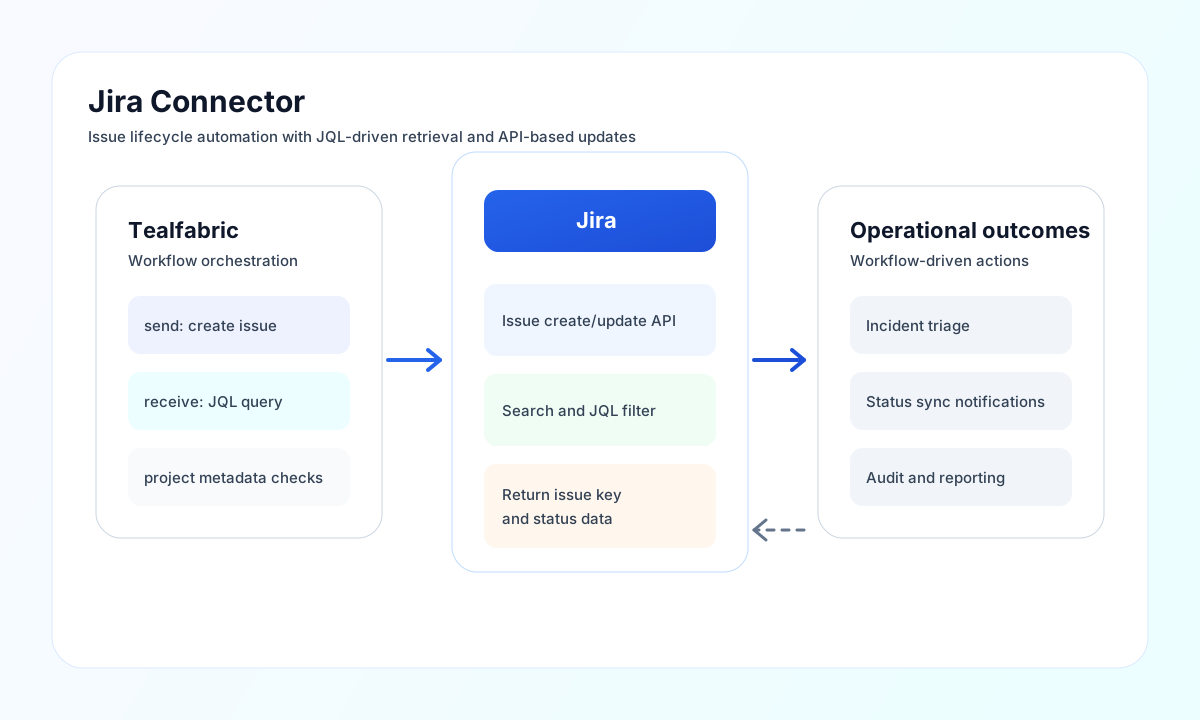
The Jira connector helps Tealfabric workflows create, update, and query Jira issues using Jira Cloud APIs. It is well suited for incident intake, ticket synchronization, and workflow-driven project automation.
Document information
| Field | Value |
|---|---|
| Canonical URL | /docs/04_connecting-systems/connectors/j/jira |
| Version (published date) | 2026-05-08 |
| Tags | connectors, reference, jira |
| Connector ID | jira-1.0.0 |
Configure Jira credentials
Set host to your Jira Cloud domain, then configure username with your Atlassian account email and password with an API token. API tokens are the recommended authentication method for automation and should be rotated on a regular security schedule.
Use port only when needed for non-default deployments, and tune timeout_seconds based on query complexity. Run test after setup to validate authentication and account access before enabling production workflows.
Create issues with send
Use send for write operations such as creating issues, updating fields, or adding comments. Keep issue type, project key, and field payloads aligned with project metadata so automations remain stable as Jira configuration evolves.
const baseUrl = "https://api.example.com/api/v1";
const tenantId = "<TENANT_ID>";
const apiKey = "<API_KEY>";

async function createJiraIssue(integrationId: string) {
  const response = await fetch(`${baseUrl}/integrations/${encodeURIComponent(integrationId)}/execute`, {
    method: "POST",
    headers: {
      "X-API-Key": apiKey,
      "X-Tenant-ID": tenantId,
      "Content-Type": "application/json",
    },
    body: JSON.stringify({
      operation: "send",
      endpoint: "rest/api/3/issue",
      method: "POST",
      data: {
        fields: {
          project: { key: "PROJ" },
          summary: "Investigate payment timeout spike",
          issuetype: { name: "Task" },
          description: {
            type: "doc",
            version: 1,
            content: [
              {
                type: "paragraph",
                content: [
                  { type: "text", text: "Automated alert detected elevated payment timeout rates." }
                }
              }
            ]
          }
        }
      }
    }),
  });
  if (!response.ok) throw new Error(`Request failed: ${response.status}`);
  return response.json();
}
curl -X POST "https://api.example.com/api/v1/integrations/<ENTITY_ID>/execute" \
-H "X-API-Key: <API_KEY>" \
-H "X-Tenant-ID: <TENANT_ID>" \
-H "Content-Type: application/json" \
-d '{
"operation": "send",
"endpoint": "rest/api/3/issue",
"method": "POST",
"data": {
"fields": {
"project": { "key": "PROJ" },
"summary": "Investigate payment timeout spike",
"issuetype": { "name": "Task" },
"description": {
"type": "doc",
"version": 1,
"content": [
{
"type": "paragraph",
"content": [
{ "type": "text", "text": "Automated alert detected elevated payment timeout rates." }
]
}
]
}
}
}
}'
{
  "success": true,
  "message_count": 1,
  "data": {
    "id": "10001",
    "key": "PROJ-123",
    "self": "https://yourdomain.atlassian.net/rest/api/3/issue/10001"
  },
  "response": {
    "id": "10001",
    "key": "PROJ-123",
    "self": "https://yourdomain.atlassian.net/rest/api/3/issue/10001"
  }
}
Retrieve issues with receive
Use receive to fetch individual issues or run JQL searches across projects. Prefer focused JQL filters and pagination settings so workflows process predictable result sets.
receive normalizes Jira list payloads from issues, values, top-level JSON arrays, or single-object responses into data records (legacy flat shape).
const baseUrl = "https://api.example.com/api/v1";
const tenantId = "<TENANT_ID>";
const apiKey = "<API_KEY>";

async function searchOpenBugs(integrationId: string) {
  const response = await fetch(`${baseUrl}/integrations/${encodeURIComponent(integrationId)}/execute`, {
    method: "POST",
    headers: {
      "X-API-Key": apiKey,
      "X-Tenant-ID": tenantId,
      "Content-Type": "application/json",
    },
    body: JSON.stringify({
      operation: "receive",
      endpoint: "rest/api/3/search",
      query: {
        jql: "project = PROJ AND status = Open ORDER BY created DESC",
        maxResults: 25,
      },
    }),
  });
  if (!response.ok) throw new Error(`Request failed: ${response.status}`);
  const payload = await response.json();
  return payload?.data ?? [];
}
curl -X POST "https://api.example.com/api/v1/integrations/<ENTITY_ID>/execute" \
-H "X-API-Key: <API_KEY>" \
-H "X-Tenant-ID: <TENANT_ID>" \
-H "Content-Type: application/json" \
-d '{
"operation": "receive",
"endpoint": "rest/api/3/search",
"query": {
"jql": "project = PROJ AND status = Open ORDER BY created DESC",
"maxResults": 25
}
}'
{
  "success": true,
  "message_count": 2,
  "data": [
    { "id": "10001", "key": "PROJ-101", "fields": { "summary": "Checkout timeout" } },
    { "id": "10002", "key": "PROJ-102", "fields": { "summary": "Retry queue backlog" } }
  ],
  "total_size": 2
}
Test credentials with test
Run test after configuring username, password, and host. The connector probes GET rest/api/3/myself and returns account metadata in details when authentication succeeds.
{
  "success": true,
  "message": "Jira connection test successful",
  "details": {
    "base_url": "https://yourdomain.atlassian.net",
    "user_account_id": "5b10a2844c20165700ede21g",
    "email": "automation@example.com"
  }
}
Reliability and Jira schema guidance
Common failures include invalid API tokens, missing project permissions, and field payloads that do not match issue configuration. Validate authentication and permissions first, then confirm issue type and required fields using Jira metadata endpoints.
For stable production behavior, version JQL queries, log issue keys for traceability, and apply retry-with-backoff for transient failures and rate limits. This keeps ticket automation dependable and easier to troubleshoot.