Jenkins API Connector Guide
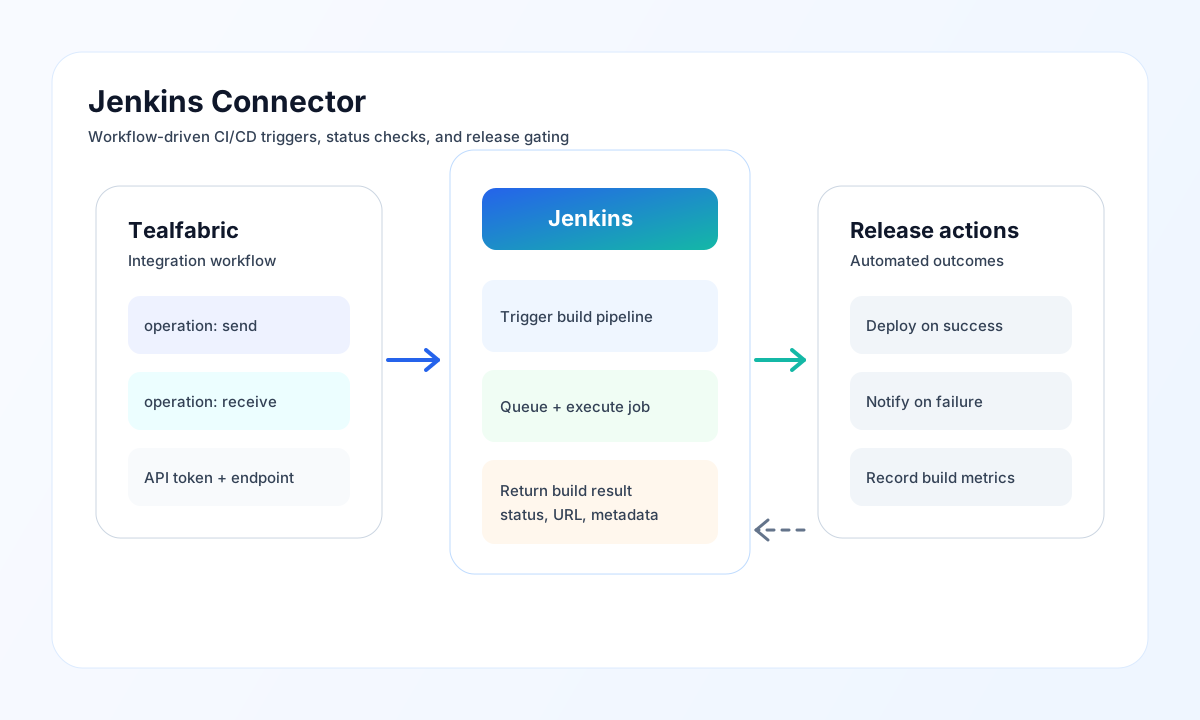
The Jenkins connector lets Tealfabric workflows trigger CI/CD jobs, read build state, and automate release decisions from pipeline output. It is useful for deployment approvals, build health monitoring, and post-build orchestration across delivery environments.
Document information
| Field | Value |
|---|---|
| Canonical URL | /docs/04_connecting-systems/connectors/j/jenkins |
| Version (published date) | 2026-05-08 |
| Tags | connectors, reference, jenkins |
| Connector ID | jenkins-1.0.0 |
Configure Jenkins access
Set host to your Jenkins hostname or full base URL (https://jenkins.example.com). When host omits a scheme, the connector composes http://{host}:{port} (default port 8080). Provide username and password using a Jenkins API token instead of a human password. API tokens are easier to rotate and reduce risk when credentials are used by automated workflows.
Use timeout_seconds (default 30) to match your network and job response profile. Run the connector test operation before enabling production steps — test is the only operation that validates required configuration up front (matching legacy testConnection behavior). Other operations defer missing-credential failures to the Jenkins API response.
HTTPS endpoints accept self-signed certificates (legacy PHP cURL disabled peer verification for on-prem Jenkins controllers).
Trigger a build with send
Use send for POST, PUT, or DELETE calls. Pass the Jenkins API path in endpoint (alias resource), optional resource_id / id path suffix, and JSON body in data (alias body). Control fields (endpoint, method, and aliases) are stripped from the body before the request is sent.
const baseUrl = "https://api.example.com/api/v1";
const tenantId = "<TENANT_ID>";
const apiKey = "<API_KEY>";

async function triggerBuild(integrationId: string) {
  const response = await fetch(`${baseUrl}/integrations/${encodeURIComponent(integrationId)}/execute`, {
    method: "POST",
    headers: {
      "X-API-Key": apiKey,
      "X-Tenant-ID": tenantId,
      "Content-Type": "application/json",
    },
    body: JSON.stringify({
      operation: "send",
      endpoint: "job/release-pipeline/buildWithParameters",
      method: "POST",
      data: {
        BRANCH: "main",
        ENVIRONMENT: "production"
      }
    }),
  });
  if (!response.ok) throw new Error(`Request failed: ${response.status}`);
  return response.json();
}
curl -X POST "https://api.example.com/api/v1/integrations/<ENTITY_ID>/execute" \
-H "X-API-Key: <API_KEY>" \
-H "X-Tenant-ID: <TENANT_ID>" \
-H "Content-Type: application/json" \
-d '{
"operation": "send",
"endpoint": "job/release-pipeline/buildWithParameters",
"method": "POST",
"data": {
"BRANCH": "main",
"ENVIRONMENT": "production"
}
}'
{
  "success": true,
  "data": {
    "message_count": 1,
    "data": {
      "statusCode": 201,
      "data": { "success": true }
    },
    "response": {
      "statusCode": 201,
      "data": { "success": true }
    }
  }
}
Read job and build state with receive
Use receive for read-only GET calls such as listing jobs or checking the latest build. Pass endpoint, optional resource_id / id, and query (object or raw query string). When the Jenkins payload includes a top-level jobs array, that array is returned as records. Otherwise indexed JSON arrays ([0] present) are returned as-is; all other objects are wrapped as a single record (including empty objects and empty arrays).
{
  "success": true,
  "data": {
    "message_count": 2,
    "data": [
      { "name": "release-pipeline", "url": "https://jenkins.example.com/job/release-pipeline/" },
      { "name": "nightly", "url": "https://jenkins.example.com/job/nightly/" }
    ],
    "total_size": 2
  }
}
Bidirectional sync and batch
sync runs optional outbound (send) and/or inbound (receive) legs when the leg object is non-empty (PHP empty() semantics). Nested leg results use the legacy flat shape (success, message_count, and operation fields at the top level of each leg result).
batch accepts operations or items with send or receive sub-operations. Each entry returns { index, success, result } where result uses the same flat legacy envelope on success.
Test connection
test probes GET api/json, validates required configuration, and returns Jenkins version metadata:
{
  "success": true,
  "data": {
    "message": "Jenkins connection test successful",
    "details": {
      "base_url": "https://jenkins.example.com",
      "jenkins_version": "2.426.3"
    }
  }
}
Reliability and operational guidance
Most connector failures come from invalid tokens, missing job permissions, incorrect endpoint paths, or request timeouts that are too aggressive for busy Jenkins controllers. Validate credentials and endpoint paths first, then tune timeout and retry behavior for your CI load profile.
The connector applies local throttling at 100 requests per minute per worker process (matching legacy behavior). For stable automations, prefer HTTPS with trusted certificates where possible, rotate API tokens regularly, and make downstream workflow steps idempotent in case build status checks are retried.