Xero API Connector Guide
The Xero connector lets Tealfabric workflows automate accounting tasks such as creating invoices, maintaining contacts, and retrieving financial records. It is designed for teams that need reliable OAuth-based access to Xero data within operational workflows.
Document information
| Field | Value |
|---|---|
| Canonical URL | /docs/04_connecting-systems/connectors/x/xero |
| Version (published date) | 2026-05-08 |
| Tags | connectors, reference, xero |
| Connector ID | xero-1.0.0 |
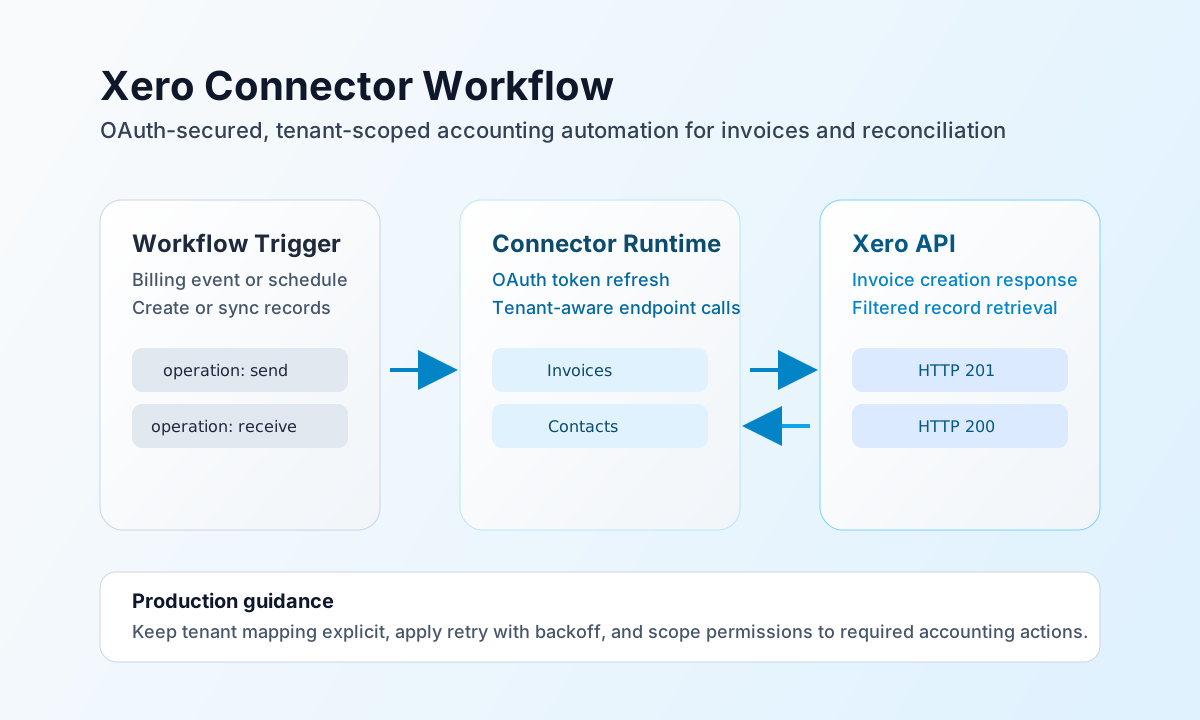
Configure OAuth and tenant access
Set client_id, client_secret, and redirect_uri from your Xero app configuration, then complete the OAuth flow to capture access_token and refresh_token. Because Xero APIs are organization scoped, you must also provide tenant_id so requests are routed to the correct organization.
test validates OAuth configuration (client_id, client_secret, and redirect_uri) before calling Xero. Other operations (send, receive, sync, batch) require a valid access_token and can run with existing tokens in legacy-compatible flows.
Set scope to the minimum permissions needed for your workflows and tune timeout_seconds based on expected response time. Run test after configuration to confirm token validity and tenant connectivity before enabling scheduled jobs.
Create accounting records with send
Use send to create or update records such as invoices, contacts, and payments. Keep Xero payloads wrapped in their resource arrays (for example Invoices and Contacts) to match API expectations.
const baseUrl = "https://api.example.com/api/v1";
const tenantId = "<TENANT_ID>";
const apiKey = "<API_KEY>";

async function createInvoice(integrationId: string) {
  const response = await fetch(`${baseUrl}/integrations/${encodeURIComponent(integrationId)}/execute`, {
    method: "POST",
    headers: {
      "X-API-Key": apiKey,
      "X-Tenant-ID": tenantId,
      "Content-Type": "application/json",
    },
    body: JSON.stringify({
      operation: "send",
      endpoint: "Invoices",
      method: "POST",
      data: {
        Invoices: [
          {
            Type: "ACCREC",
            Contact: { ContactID: "<ENTITY_ID>" },
            LineItems: [
              {
                Description: "Monthly support plan",
                Quantity: 1,
                UnitAmount: 120.0,
                AccountCode: "200"
              }
            },
            Date: "2026-05-08",
            DueDate: "2026-05-22"
          }
        ]
      }
    }),
  });
  if (!response.ok) throw new Error(`Request failed: ${response.status}`);
  return response.json();
}
curl -X POST "https://api.example.com/api/v1/integrations/<ENTITY_ID>/execute" \
-H "X-API-Key: <API_KEY>" \
-H "X-Tenant-ID: <TENANT_ID>" \
-H "Content-Type: application/json" \
-d '{
"operation": "send",
"endpoint": "Invoices",
"method": "POST",
"data": {
"Invoices": [
{
"Type": "ACCREC",
"Contact": { "ContactID": "<ENTITY_ID>" },
"LineItems": [
{
"Description": "Monthly support plan",
"Quantity": 1,
"UnitAmount": 120.0,
"AccountCode": "200"
}
],
"Date": "2026-05-08",
"DueDate": "2026-05-22"
}
]
}
}'
{
  "success": true,
  "data": {
    "message_count": 1,
    "data": {
      "Invoices": [
        {
          "InvoiceID": "<ENTITY_ID>",
          "Status": "DRAFT"
        }
      ]
    },
    "response": {
      "Invoices": [
        {
          "InvoiceID": "<ENTITY_ID>",
          "Status": "DRAFT"
        }
      ]
    }
  }
}
Retrieve records with receive
Use receive to read contacts, invoices, or payments for reconciliation and downstream processing. Add query filters such as where and order so workflows process only relevant records.
For list endpoints, the connector extracts records from the response collection key matching endpoint (for example Invoices). If an endpoint returns a top-level JSON array instead, the connector returns that array directly in data.
const baseUrl = "https://api.example.com/api/v1";
const tenantId = "<TENANT_ID>";
const apiKey = "<API_KEY>";

async function listAuthorisedInvoices(integrationId: string) {
  const response = await fetch(`${baseUrl}/integrations/${encodeURIComponent(integrationId)}/execute`, {
    method: "POST",
    headers: {
      "X-API-Key": apiKey,
      "X-Tenant-ID": tenantId,
      "Content-Type": "application/json",
    },
    body: JSON.stringify({
      operation: "receive",
      endpoint: "Invoices",
      query: {
        where: "Status=\"AUTHORISED\"",
        order: "Date DESC",
        page: 1
      }
    }),
  });
  if (!response.ok) throw new Error(`Request failed: ${response.status}`);
  return response.json();
}
curl -X POST "https://api.example.com/api/v1/integrations/<ENTITY_ID>/execute" \
-H "X-API-Key: <API_KEY>" \
-H "X-Tenant-ID: <TENANT_ID>" \
-H "Content-Type: application/json" \
-d '{
"operation": "receive",
"endpoint": "Invoices",
"query": {
"where": "Status=\"AUTHORISED\"",
"order": "Date DESC",
"page": 1
}
}'
{
  "success": true,
  "data": {
    "message_count": 1,
    "data": [
      {
        "InvoiceID": "<ENTITY_ID>",
        "InvoiceNumber": "INV-1001",
        "Status": "AUTHORISED"
      }
    ],
    "total_size": 1
  }
}
Operate reliably in production
Xero applies request limits and can return throttling responses during burst activity. Use retry with exponential backoff, batch work where practical, and schedule high-volume synchronization outside peak processing windows.
Authentication failures are usually caused by expired tokens, revoked consent, or mismatched tenant context. Keep secrets in secure storage, avoid logging token values, and revalidate authorization after permission or organization changes.
Related resources
For API details and accounting object behavior, see the Xero API documentation and the OAuth 2.0 guide.