Notion Connector Guide
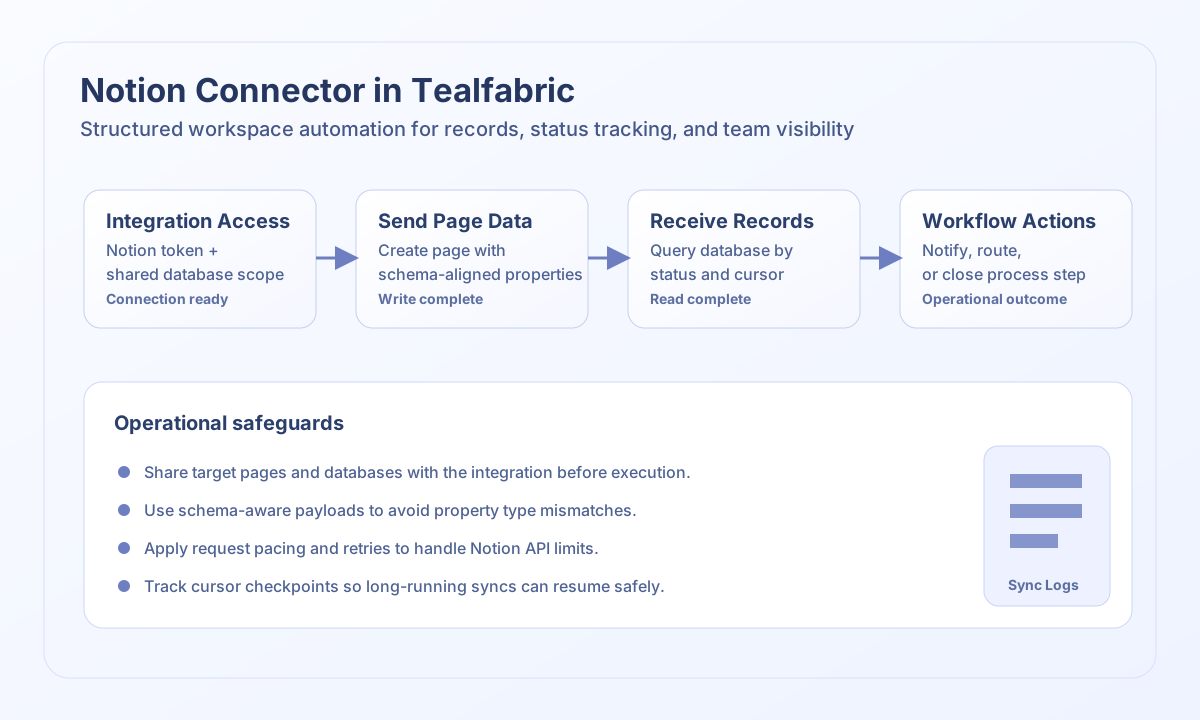
The Notion connector allows Tealfabric workflows to create and read structured workspace content such as database pages and block content. It is ideal for operational documentation, task tracking automations, and knowledge workflows where process state should be visible to teams in Notion.
Document information
| Field | Value |
|---|---|
| Canonical URL | /docs/04_connecting-systems/connectors/n/notion |
| Version (published date) | 2026-05-08 |
| Tags | connectors, reference, notion |
| Connector ID | notion-1.0.0 |
When to use this connector
Use this connector when workflows need to write structured records into Notion databases or read workspace state to trigger downstream actions. Common use cases include publishing operational runbooks, updating project tracking boards, and synchronizing status from external systems. This integration works best when each workflow maps to a clear database schema and property naming convention.
Prerequisites
Before configuring the integration, create a Notion integration token and share the target pages or databases with that integration. Confirm the database property schema required by your workflow, including title, select, date, and rich text fields. Validate permissions in a test workspace before enabling production write flows.
Configuration
Store these settings in the integration profile:
token(required): Notion integration bearer token.base_url(optional): API base URL; default ishttps://api.notion.com/v1.timeout_seconds(optional): Request timeout in seconds; default is30.
test validates that token is present and returns Configuration validation failed when it is missing. Other operations (send, receive, sync, batch) do not pre-validate configuration and rely on Notion API responses.
Create database pages with send
Use send to create or update pages in a Notion database. Keep property payloads aligned with the database schema so requests are predictable and easy to maintain.
const baseUrl = "https://api.example.com/api/v1";
const tenantId = "<TENANT_ID>";
const apiKey = "<API_KEY>";

type NotionPageResult = {
  id?: string;
  url?: string;
};

async function createTrackingPage(integrationId: string): Promise<NotionPageResult> {
  const response = await fetch(
    `${baseUrl}/integrations/${encodeURIComponent(integrationId)}/execute`,
    {
      method: "POST",
      headers: {
        "X-API-Key": apiKey,
        "X-Tenant-ID": tenantId,
        "Content-Type": "application/json",
      },
      body: JSON.stringify({
        operation: "send",
        endpoint: "pages",
        method: "POST",
        data: {
          parent: { database_id: "<ENTITY_ID>" },
          properties: {
            Name: {
              title: [{ text: { content: "Order A-100" } }],
            },
            Status: {
              select: { name: "In Progress" },
            },
            Source: {
              rich_text: [{ text: { content: "Tealfabric" } }],
            },
          },
        },
      }),
    }
  );
  if (!response.ok) throw new Error(`Request failed: ${response.status}`);
  const payload = (await response.json()) as {
    success?: boolean;
    data?: { data?: NotionPageResult; response?: NotionPageResult };
  };
  const page = payload.data?.data ?? payload.data?.response;
  if (!page) throw new Error("Missing Notion page payload");
  return page;
}
curl -X POST "https://api.example.com/api/v1/integrations/<ENTITY_ID>/execute" \
-H "X-API-Key: <API_KEY>" \
-H "X-Tenant-ID: <TENANT_ID>" \
-H "Content-Type: application/json" \
-d '{
"operation": "send",
"endpoint": "pages",
"method": "POST",
"data": {
"parent": { "database_id": "<ENTITY_ID>" },
"properties": {
"Name": {
"title": [{ "text": { "content": "Order A-100" } }]
},
"Status": {
"select": { "name": "In Progress" }
}
}
}
}'
{
  "success": true,
  "data": {
    "message_count": 1,
    "data": {
      "id": "<ENTITY_ID>",
      "url": "https://www.notion.so/<ENTITY_ID>"
    },
    "response": {
      "id": "<ENTITY_ID>",
      "url": "https://www.notion.so/<ENTITY_ID>"
    }
  }
}
Query databases with send
Notion database queries use POST databases/{database_id}/query. Use send (not receive) with a JSON body for filters and pagination.
const baseUrl = "https://api.example.com/api/v1";
const tenantId = "<TENANT_ID>";
const apiKey = "<API_KEY>";

type NotionRecord = {
  id?: string;
  properties?: Record<string, unknown>;
};

async function queryDoneRecords(integrationId: string): Promise<NotionRecord[]> {
  const response = await fetch(
    `${baseUrl}/integrations/${encodeURIComponent(integrationId)}/execute`,
    {
      method: "POST",
      headers: {
        "X-API-Key": apiKey,
        "X-Tenant-ID": tenantId,
        "Content-Type": "application/json",
      },
      body: JSON.stringify({
        operation: "send",
        endpoint: "databases",
        resource_id: "<ENTITY_ID>/query",
        method: "POST",
        data: {
          filter: {
            property: "Status",
            select: { equals: "Done" },
          },
          page_size: 20,
        },
      }),
    }
  );
  if (!response.ok) throw new Error(`Request failed: ${response.status}`);
  const payload = (await response.json()) as {
    success?: boolean;
    data?: { data?: { results?: NotionRecord[] } };
  };
  const results = payload.data?.data?.results;
  if (!Array.isArray(results)) throw new Error("Missing Notion query payload");
  return results;
}
curl -X POST "https://api.example.com/api/v1/integrations/<ENTITY_ID>/execute" \
-H "X-API-Key: <API_KEY>" \
-H "X-Tenant-ID: <TENANT_ID>" \
-H "Content-Type: application/json" \
-d '{
"operation": "send",
"endpoint": "databases",
"resource_id": "<ENTITY_ID>/query",
"method": "POST",
"data": {
"filter": {
"property": "Status",
"select": { "equals": "Done" }
},
"page_size": 20
}
}'
{
  "success": true,
  "data": {
    "message_count": 1,
    "data": {
      "results": [
        {
          "id": "<ENTITY_ID>",
          "properties": {
            "Status": {
              "select": { "name": "Done" }
            }
          }
        }
      ]
    }
  }
}
Read resources with receive
Use receive for GET endpoints such as retrieving a page or listing users. List payloads expose records in data.data (from results or top-level arrays).
Reliability guidance
Notion enforces request limits, so apply queueing and retry logic when batch-processing large datasets. Keep payload generation schema-aware to avoid runtime errors caused by property type mismatches. For long-running sync jobs, use cursors and checkpoints so workflows can resume safely after interruptions.